
Startup data room — ready in 5 minutes
Peony puts your deck, model and cap table in one secure data room, shows you which investors actually read them, and keeps diligence files from traveling. Investors open it free in any browser, with no account; you pay per admin, never per investor.
No credit card · 7-day Data Room trial that never auto-charges · investors view free, no account · 24/7 support
Trusted by Shopify and 0G


8,000+ customers in 60+ countries · $44.7B in client assets
Peony staff can't open your documents, your documents aren't used to train AI, and Peony has had no data breach since launch.
What is Peony's startup data room, and what does it cost?
Peony is a virtual data room that founders use to share a pitch deck, financial model, cap table and diligence files with investors, and to see page by page who read them.
Free covers up to 50 documents as tracked single-file links with page-level analytics. Data rooms start on Business at $30 per admin per month billed yearly ($44 monthly); Data Room at $52 ($75 monthly) adds dynamic watermarks, granular folder permissions and unlimited rooms. Investors never pay and never need an account.
- Send each investor firm its own link and see which pages each partner read, for how long, and when they came back (page-level analytics on every plan, Free included).
- Keep the cap table and diligence files behind an NDA gate, email verification, and download and screenshot blocking (Business), with each viewer's email stamped on every page (Data Room).
- Swap in the updated deck or model with Upload new version: same place, same link, every earlier version kept.
Peony at a glance
- Built for
- Founders raising pre-seed to Series B, and the angels and VCs who review their rooms for free.
- Typical plan
- Business, $30 per admin per month billed yearly ($44 monthly): 3 data rooms per admin, an NDA gate, viewer email verification, download prevention, desktop screenshot protection, drop-off reports and AI document Q&A.
- Pricing
- Business $30, Data Room $52 and Deal Team $64 (minimum 4 admins) per admin per month billed yearly ($44, $75 and $89 monthly); Enterprise is custom. Free ($0) covers 50 documents and 500 MB as tracked single-file links; data rooms start on Business.
- Investors
- Investors are unlimited and free on every plan and don't need a Peony account. You pay per admin, not per viewer.
- Rooms and storage
- Unlimited data rooms, documents and storage on Data Room and above, and no per-file size cap on any plan. Business includes 3 data rooms per admin, 1,000 documents per admin and 100 GB of storage, with no per-file size cap.
- File management
- Upload new version keeps a file's place and link and keeps every earlier version; AI room generation drafts the folder structure, and Index documents numbers every file (Data Room plan).
- Live models
- Peony renders .html files live with JavaScript running, so a Claude or ChatGPT artifact (a model, dashboard or calculator) stays interactive for the viewer, behind your NDA gate, permissions and analytics.
- Security
- AES-256 at rest, TLS 1.2+ in transit. Peony staff can't open your documents, your documents aren't used to train AI, and Peony has had no data breach since launch. Peony's incident-response policy commits to telling affected customers within 72 hours of confirming an incident that affects customer data. SOC 2 Type II-ready and ISO 27001-ready, with both audits underway. Compliance and certifications
- Setup
- Median 4 min 19 s from sign-up to first uploaded document (State of M&A Data Rooms, Q2 2026 edition).
- Trial
- 7-day Data Room trial you start yourself: no credit card, and it never auto-charges. Rooms, files, links, analytics and NDA settings carry over when you upgrade. AI features switch on after you upgrade.
- Support
- 24/7 support, handled directly by the Peony team across Europe, US and Asia hours, with no outsourced tier. Everyone you speak to on Peony support has M&A experience at elite boutiques or bulge-bracket banks, VC experience, or has raised $1M+ themselves.
- Customers
- 8,000+ customers in 60+ countries, with $44.7B in client assets.
What do founders use a data room for?
Three jobs decide a raise: tightening the pitch, knowing which investors to call, and keeping the cap table where it belongs.
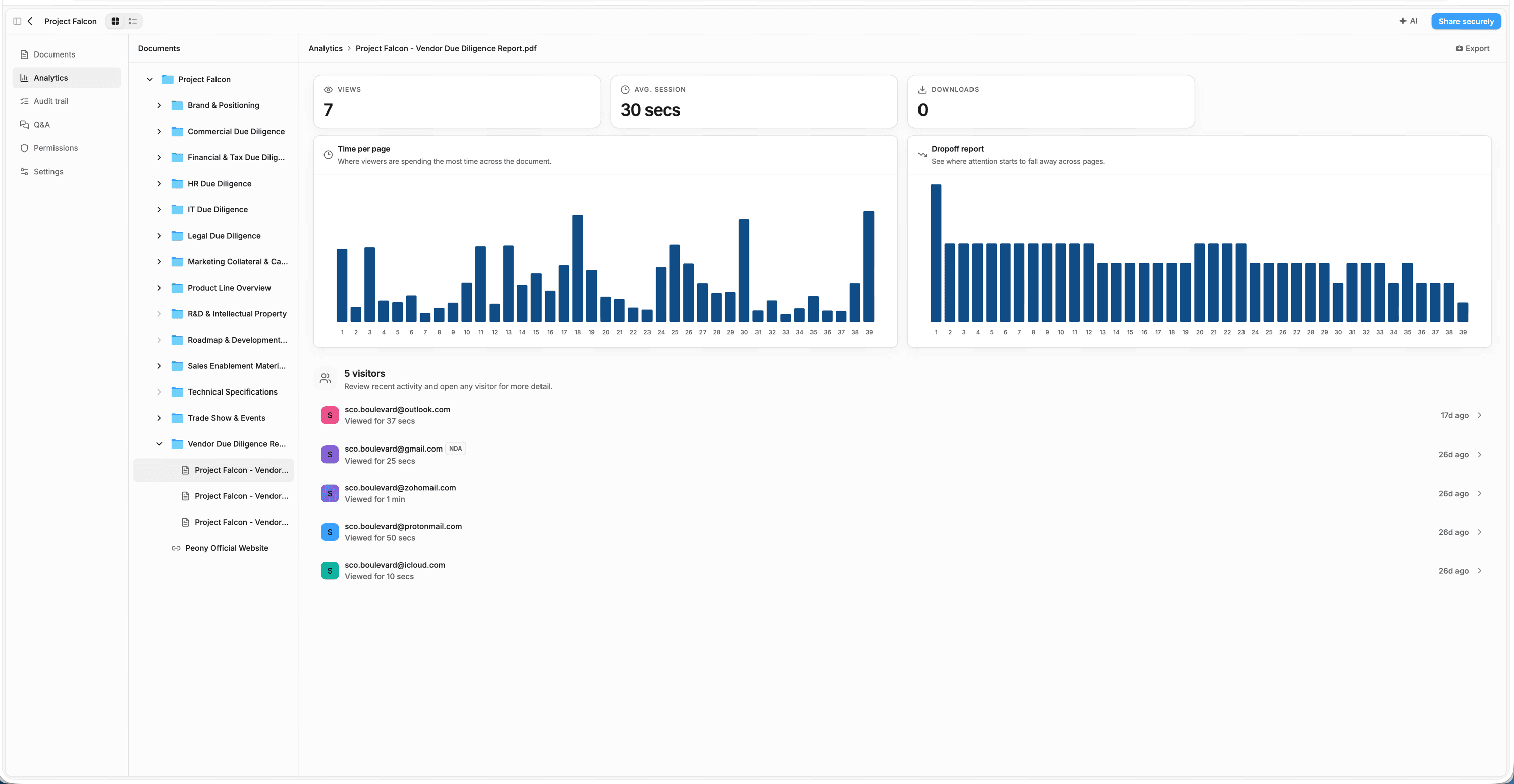
Find the slide that loses investors
Peony shows, page by page, how long each investor spent on every slide of your pitch deck, on every plan including Free, so you can see where attention drops before the next partner meeting. On Business, the drop-off report shows where attention falls away across the deck (“Page 3 — 50%” means half your viewers stopped engaging after page 3), and you can export every session to CSV.
Page-level analytics: every plan, Free included. Drop-off reports and CSV export: Business and up.
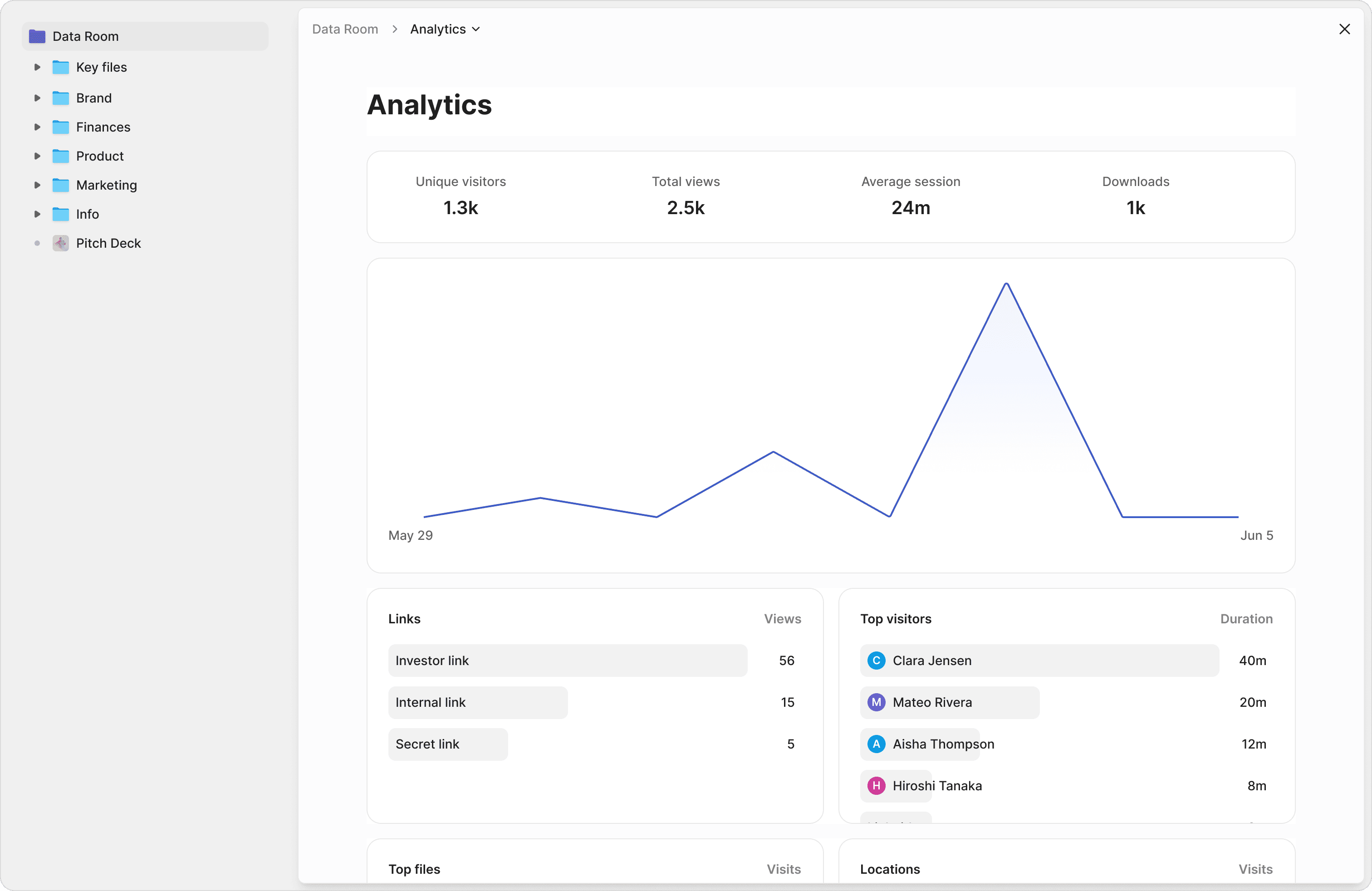
Call the investors who are actually reading
Peony gives each investor firm its own link and records who opened it, which pages they read, how long they stayed and when they came back, and visitor notifications email you about the activity. Compare each investor's total view time and visits, and the follow-up list writes itself: the partner who came back twice and spent twenty minutes in the model gets the first call.
One link per investor group in data rooms from Business; single tracked links on Free. Room-wide ranking of the most active investors: Data Room and up.
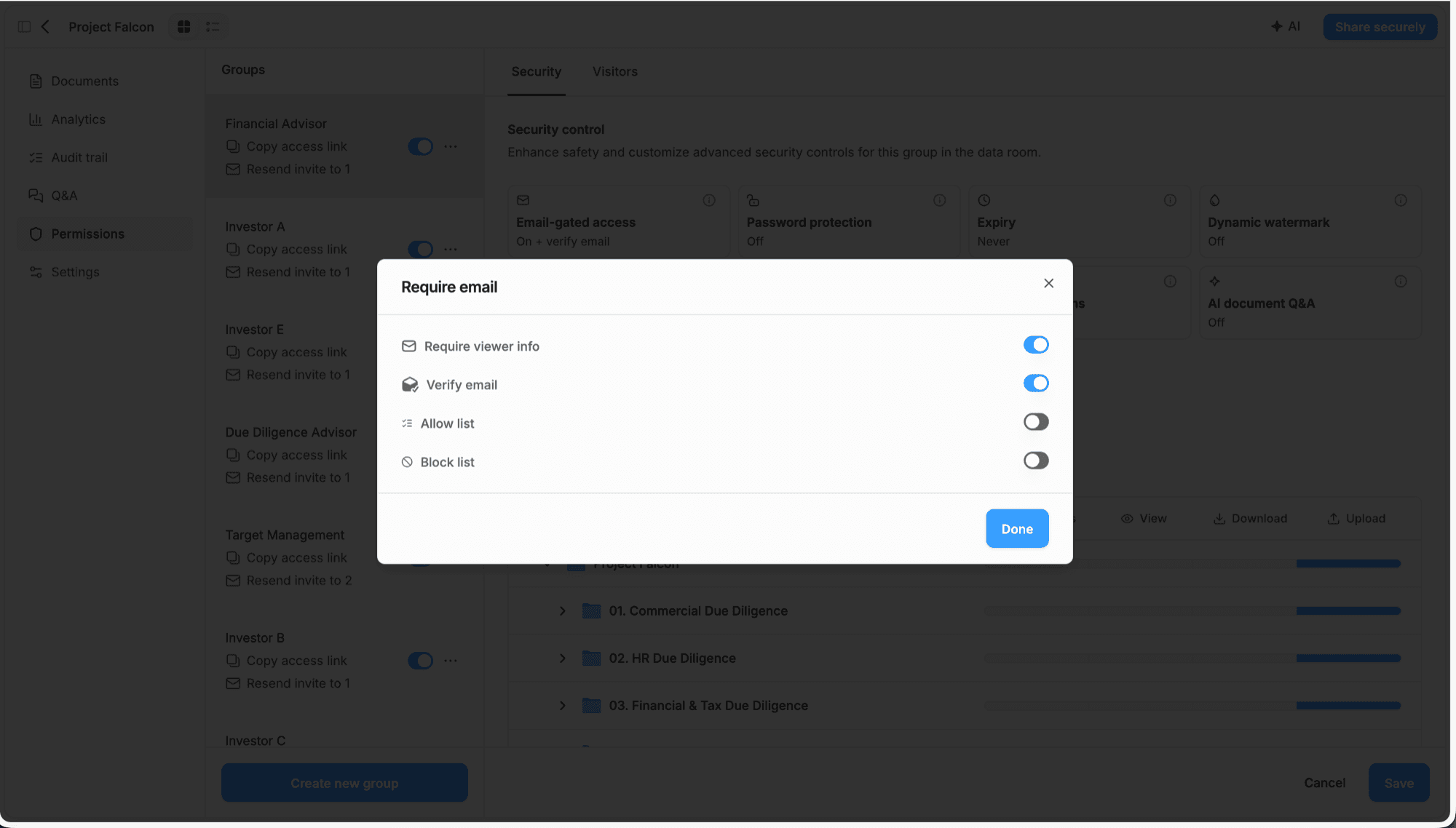
Keep your cap table from traveling
On Business ($30 per admin per month billed yearly), Peony puts the room behind an NDA, verifies every investor's email, and blocks downloads and desktop screenshots; Data Room ($52) stamps each viewer's email on every page. On Data Room, granular permissions keep the cap-table folder closed until a firm reaches diligence. With email verification on, anyone who opens a forwarded link shows up under their own verified email, and if the room is limited to an approved-email list, the link doesn't open for them at all.
NDA gate, email verification, allow lists, download and desktop screenshot blocking: Business and up. Dynamic watermarks, signed NDA and granular permissions: Data Room and up.
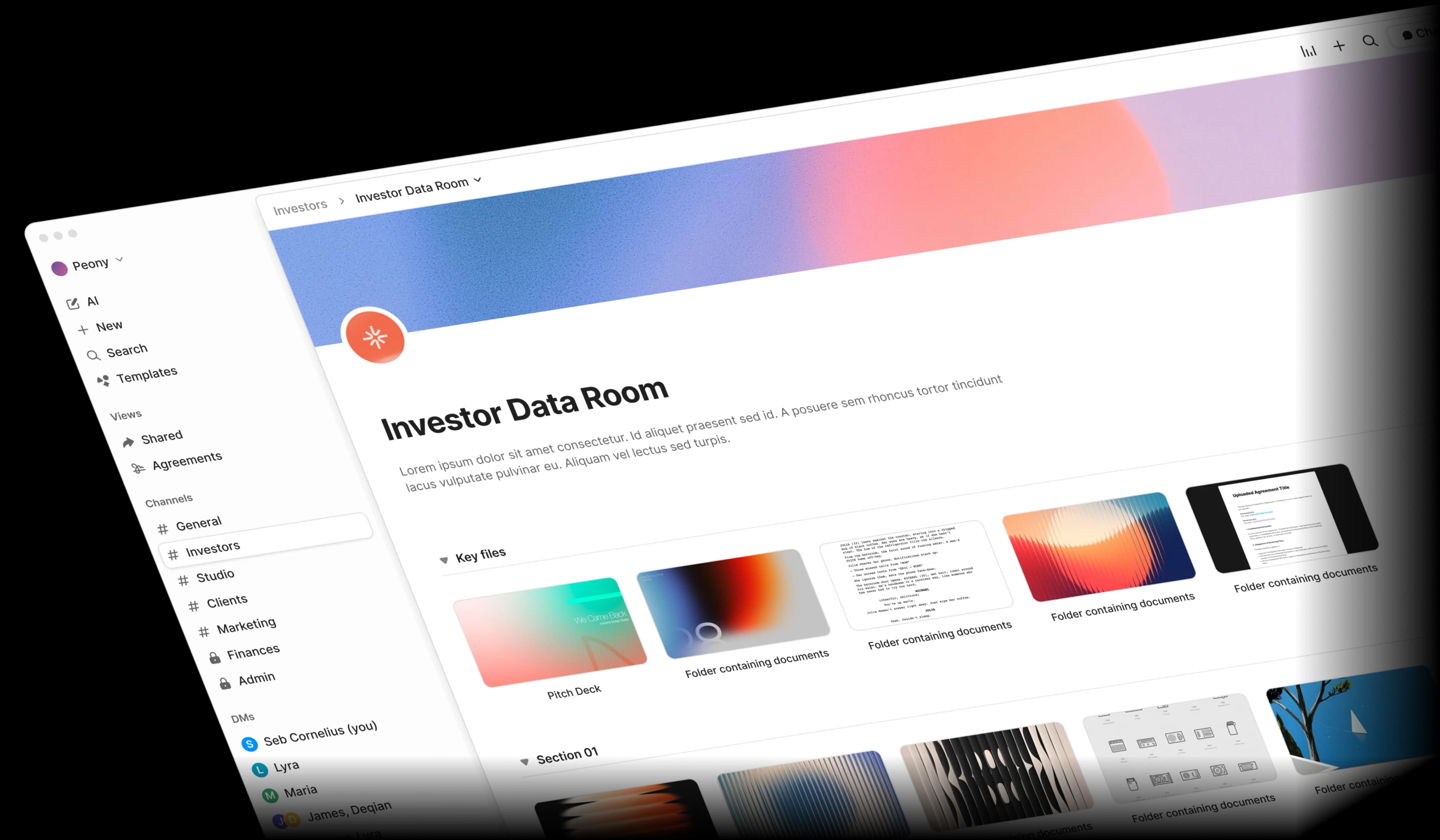
What your investors see
One link that opens in any browser, with no Peony account, no app and nothing to pay. Investors verify their email if you require it, accept your NDA first if you set one, and read. A model or calculator you built as a Claude or ChatGPT artifact runs live in their browser with JavaScript running, so they can move the inputs themselves.
Which Peony plan fits your round?
A seed raise fits Business; move to Data Room when your lead asks for a full diligence room. Investors are free on every plan.
| Stage | What you're sharing | Plan |
|---|---|---|
| Pre-seed, deck only | One tracked deck link with page-level analytics, up to 50 documents | Free, $0 |
| Seed, first diligence room | Folders, an NDA gate, email verification, download and desktop screenshot blocking, up to 3 rooms per admin | Business, $30/admin/mo |
| Series A, 200+ files, lead wants a “proper” room | Unlimited rooms and storage, dynamic watermarks, granular permissions, Index documents, signed NDA with audit record | Data Room, $52/admin/mo |
| Series B+, team of 4+ running several firms | Advanced redaction, Q&A routing, OAuth SSO, API access | Deal Team, $64/admin/mo (min. 4 admins) |
Prices are per admin per month billed yearly (monthly billing: $44, $75 and $89). Viewers are free on every plan. Full comparison on the pricing page.
“I need a data room”— now what?
Your advisor said you need one. Your accelerator mentor said you need one. But nobody told you what goes inside it or how to set it up.
“What even goes in a data room?”
Pitch deck, financials, cap table, incorporation docs — every investor expects something different, and there is no standard checklist.
Documents are everywhere
Your pitch deck is in Google Slides, financials in a spreadsheet, legal docs in email attachments. Pulling it all together is a full-day project.
Enterprise tools cost too much
Legacy data rooms charge hundreds per month. When you are pre-revenue, that is runway you cannot afford to burn on file sharing.
No time to figure it out
You have a product to build, customers to find, and a round to close. Learning complex VDR software is the last thing on your list.
From zero to investor-ready
Peony guides you through every step — what to include, how to organize it, and how to share it professionally.
The folder structure investors expect
Every startup data room needs the same core sections: Financials, Legal, Team, Product, and Cap Table. Peony gives you a ready-made template so you never have to guess what belongs where.
Pitch Deck
Executive summary, problem, solution, market, traction
Financials
Revenue model, projections, burn rate, bank statements
Legal
Certificate of incorporation, bylaws, IP assignments
Cap Table
Ownership breakdown, SAFEs, option pool, vesting schedules
Product
Product roadmap, technical architecture, key metrics
Describe your round — Peony drafts the folders
Drag and drop your documents from anywhere. Describe your round in one line and Peony drafts the folder structure investors expect; Index documents then numbers every file (1.1, 1.2...) so a partner can say “open 2.3” on a call. Both are on the Data Room plan, and Business rooms start from a built-in template. You stay in control of where every file lives.
Your brand, not a Google Drive link
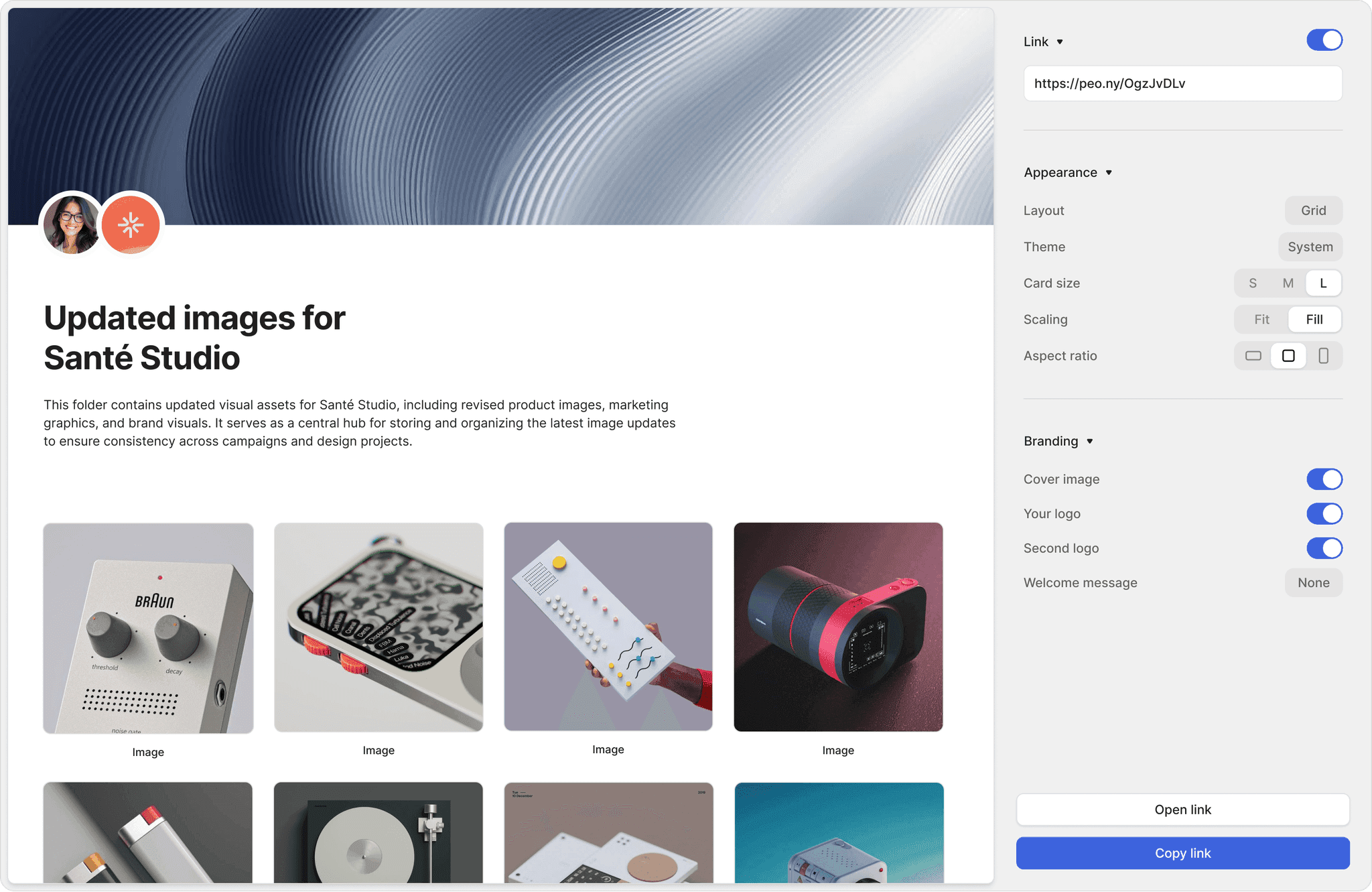
Add your logo, a custom cover image and a brand card, and set a light or dark theme. Investors open a polished link page — not a folder of files. First impressions close rounds.
Predictable pricing
Plans from $30/admin/month with no per-viewer, per-page, or per-link limits. Your costs stay flat as your investor list grows.
Drag-and-drop upload
PDF, DOCX, PPTX, spreadsheets — upload any file type. No conversion needed. No file size limit on any plan, and uploads are resumable; Business includes 100 GB of storage and Data Room and above are unlimited.
AI folder setup
Describe the round in one line and Peony drafts the folder structure; Index documents then numbers every file so investors can say “open 2.3” (Data Room plan).
Custom branding
Your logo, your cover image, your brand card. Share a link that looks like it was built by a design team, not a file hosting service.
Why do founders choose Peony for their raise?
Anish Bharadwaj
Founder & CEO, KiwiQ
“Peony is a great example of a customer-obsessed company with a fantastic sense of design and UX. We moved on from Docsend in the first week (that was an easy decision), but what we are really excited about is what all Peony does next - to make document sharing and consumption a lot more delightful.”
Robi Lin
Founder & CEO, Sepal AI (YC S24)
“Peony is easily the best form factor for sharing client facing material. It lets us stand out by embedding custom booking and website links into secure deck shares - DocSend and PDFs require 3 extra clicks to book a meeting. At this point, I love hearing "does Sepal AI have a sales deck?".”
Anthony Gale
Founder & CEO, PromoLens
“Not often I make recommendations, but I started using Peony to share presentations etc with external people. It works so well & makes us look really organized. We looked at DocSend etc. but the cost & clunkiness just put us off.”
Frequently asked questions
What is Peony, and is it a good fit for startup founders raising pre-seed to Series B?
Yes. Peony is a virtual data room that founders use to share the deck, model and cap table from one room, see which investors read each page and keep diligence files behind an NDA. Data rooms start on Business at $30 per admin per month billed yearly ($44 monthly); inviting investors is free and unlimited.
I'm raising a $1.5M pre-seed round — do I actually need a data room at this stage, or is Google Drive fine?
Google Drive is fine for storage, not for investor sharing: Peony Free ($0) shares your deck, model and incorporation docs as tracked links with page-level analytics, and data rooms start on Business ($30/admin/month). Google Drive has no page-level analytics, no link expiry, and no way to stop your cap table from being forwarded to anyone. Even at pre-seed, investors notice when your materials look disorganized. Peony's free plan gives you page analytics, 2FA, and link expiry, with access revocation on the Business plan ($30/admin/month) — enough for a pitch deck, financial model, and incorporation docs. You can set it up in under 5 minutes and share a secure link before your next angel meeting, so you look as buttoned-up as a Series A company without spending a dollar.
We're a seed-stage startup raising $5M and have partner meetings next week — how fast can I get a data room ready?
Today: Peony's median time from account creation to first uploaded document is 4 minutes 19 seconds (State of M&A Data Rooms, Q2 2026 edition), and each partner gets a separate tracked link. Upload your pitch deck, financials, cap table, and incorporation docs. On the Data Room plan, describe the round in one line and AI room generation drafts the folder structure seed investors expect, then Index documents numbers every file so a partner can say "open 2.3" on the call; on Business, start from a built-in template. You can share a personalized link with each partner before your meetings even start. Firmex and Ideals require onboarding calls and enterprise contracts that take weeks — by then your round window has closed.
I'm a Series A founder and our lead investor wants a 'proper' diligence room with 200+ documents — what plan do I need?
Pick Peony's Data Room plan ($52 per admin per month billed yearly, $75 monthly): unlimited rooms and storage, a signed NDA, dynamic watermarks, granular folder permissions and Visitor Q&A for your lead's questions. For a full Series A diligence process, your lead VC will expect organized folders, NDA gating, and the ability to ask questions about your documents without emailing you separately. Data Room covers all three, with Visitor Q&A so your lead's questions stay in the room, and AI document Q&A so investors can query your documents directly (if you turn it on), Index documents to number all 200+ files (1.1, 1.2...) so everyone cites the same document, and unlimited storage. That is a fraction of what Firmex or Ideals charge for equivalent enterprise features, and your investors access everything through a browser link — no app downloads or account creation required on their end.
We have 5 VCs sending us term sheets for our $50M Series B — how do I manage separate access for each firm without things leaking between them?
Give each firm its own Peony link and group, so Firm A never sees what Firm B is reviewing; on Data Room ($52/admin/month), folder-level permissions decide which files each firm can open. The Business plan ($30/admin/month) adds screenshot protection, and the Data Room plan ($52/admin/month) adds dynamic watermarks that stamp each viewer's email on every page, so if a document does leak, you know exactly who shared it. Page-level analytics show you which pages each firm spent time on, helping you gauge who is genuinely deep in diligence versus just kicking tires. On DocSend's published pricing (checked October 2026), data rooms, folder-level security and dynamic watermarking start on its Advanced tier, and legacy VDRs like Datasite would charge you thousands per month for the same setup.
I'm a YC founder about to hit Demo Day — I need to share my deck with 100+ investors at once. What's the best way to do that?
Share one Peony tracked link to the deck, with email capture on and expiry set 48 hours after Demo Day; Free ($0) covers it, with page-level analytics on every investor who opens it. Peony's free-plan analytics show you exactly which of those 100+ investors opened your deck, which pages they lingered on, and who came back for a second look — so you know who to prioritize for follow-up meetings. If you want to gate access behind an NDA, upgrade to the Business plan at $30/admin/month; for dynamic watermarks on the most sensitive materials, the Data Room plan is $52/admin/month. DocSend charges $45/user/month just for basic link tracking and caps you at limited security options.
I'm a deep-tech founder with patents and proprietary IP in my data room — how do I make sure nothing gets screenshotted or forwarded?
Use Peony's screenshot protection and download blocking (Business, $30/admin/month) plus per-viewer dynamic watermarks (Data Room, $52/admin/month): captures are blocked on desktop, and any leaked page traces back to one viewer. Data Room also adds Screenshield for mobile screenshots. You can require NDA signing before anyone accesses your IP filings, and link expiry automatically revokes access after a deadline. If a patent document does surface somewhere it should not, the watermark trace tells you exactly which viewer leaked it. Google Drive and Dropbox have zero equivalent protections — anyone with the link can screenshot, download, and forward freely.
I'm comparing Peony vs DocSend vs Google Drive for our fundraise — we're a 4-person team and can't afford enterprise pricing. What's the real difference?
Peony gives a 4-person team data rooms, NDA gates and page-level analytics from $30/admin/month with investors free; Google Drive has no page-level analytics, and DocSend puts data rooms on its Advanced tier. Google Drive is free but gives you no page-level analytics and no NDA gate, and no way to know if an investor even opened your deck. DocSend starts at $45/user/month for basic tracking and charges per seat, so a 4-person team pays $180/month minimum; on its published pricing (checked October 2026), data rooms, NDAs, visitor email authentication, folder-level security and dynamic watermarking start on the Advanced tier. Peony starts free with page analytics, 2FA, and link expiry, with access revocation on the Business plan ($30/admin/month). The Business plan at $30/admin/month adds e-signatures for SAFEs and term sheets, screenshot protection, NDA gating, and AI document Q&A, and the Data Room plan at $52/admin/month unlocks watermarks, Visitor Q&A, auto-indexing, and unlimited data rooms. No per-viewer or per-link charges, so your cost stays flat as your investor list grows.
My pitch deck got forwarded to a competitor — is there a way to prevent that from happening again?
Yes. Share the deck through a Peony room link limited to an approved-email list (Business, $30/admin/month): a forwarded link won't open for anyone else, and Data Room ($52) stamps each viewer's email on every page. Peony's Business plan ($30/admin/month) gives you two layers of leak protection. Screenshot protection blocks screen capture attempts. And you can set link expiry so the deck auto-disables after a set date, or revoke access to any specific viewer instantly from your dashboard. The Data Room plan ($52/admin/month) adds dynamic watermarks that stamp each viewer's email on every page so forwarded documents are immediately traceable. On the free plan you still get link expiry, and the Business plan ($30/admin/month) adds access revocation, so you can cut off a leaked link the moment you discover it. With Google Drive or Dropbox, once someone has your file, you have no way to trace or stop the spread.
Do investors need a Peony account, or pay, to open my data room?
No. Investors open your Peony link in any browser for free, with no account or app; you pay per admin, never per investor, on every plan. They verify their email if you require it, accept your NDA first if you set one, and read. Viewers are unlimited on every plan, so inviting 10 firms or 100 costs the same. If you turn it on, investors can also ask AI document Q&A questions against your documents without signing up (Business and up).
Can I update my pitch deck after I've sent investors the link?
Yes. Peony's Upload new version swaps in the new deck at the same place and link, so investors see the update the next time they open it, and earlier versions stay in the version menu. It works in any Peony data room (Business and up): nothing needs re-sending, and per-file permissions you set on the deck carry over, which deleting and re-uploading would reset. Use it for a refreshed model after month-end or a corrected cap table mid-diligence.
Can investors use an interactive model I built with Claude or ChatGPT?
Yes. Peony renders .html files live with JavaScript running, so a Claude or ChatGPT artifact such as a financial model or calculator stays interactive for investors, behind your NDA gate, permissions and analytics. Export the artifact as a single .html file, upload it to your data room (data rooms start on Business) and send each investor their link: sliders move and inputs recalculate in their browser, with no conversion to a screenshot or PDF. Screenshot protection, the NDA gate and page-level analytics all apply to the live view.
I'm raising my second company and last time I just used Google Drive — what should I do differently this time with my data room?
Get organized before investors ask: start on Peony Free the day you incorporate, then move to Business ($30/admin/month) when the round needs a real data room with an NDA gate. Upload your formation docs, cap table and early financials as you go. As your round heats up, Peony's page analytics show you exactly which investors are engaged, and you can upgrade to Business ($30/admin/month) for e-signatures on SAFEs plus screenshot protection and NDA gating, or the Data Room plan ($52/admin/month) for dynamic watermarks, unlimited data rooms, and full enterprise security. The setup takes under 5 minutes, so there is no reason to wait until a VC asks for a data room link.
Which data room should a startup actually pick at each stage — and when is Peony not the answer?
Pick by stage: Peony Free ($0) for a tracked pre-seed deck, Business ($30/admin/month) for a seed data room, and Data Room ($52/admin/month) for a Series A or B diligence room. At pre-seed, Peony Free ($0) covers up to 50 documents with page-by-page analytics and password protection, and it does not expire. For a seed raise that needs a real room with a Simple NDA gate, screenshot protection, and unlimited e-signatures, Peony Business is $30/admin/month. For sensitive IP that needs dynamic per-viewer watermarks and Advanced NDA countersigning, Peony Data Room is $52/admin/month. The honest exceptions: if you only track a deck and your investors already live in DocSend, its Standard tier works (though data rooms there start on $150-300/month three-seat plans); and if your lead investor mandates a specific platform, use theirs — the room exists to close the round. Our 13-platform startup data room ranking and the five-file seed round data room template walk the full decision.
Can I try Peony before I pay?
Yes. Peony's Data Room plan has a 7-day free trial you start yourself, with no credit card, and it never converts to paid on its own. Rooms, files, links, analytics and NDA settings carry over when you upgrade. AI features, such as AI document Q&A and AI room generation, switch on once you're on a paid plan. Free ($0) covers 50 documents and 500 MB as tracked single-file links; data rooms start on Business.
Comparing options first? Start with the 13-platform startup data room ranking, the five-file seed round data room template, and the 60-document startup data room checklist. The setup figure on this page comes from State of M&A Data Rooms (Q2 2026 edition), and every plan is compared on the pricing page.
Last updated October 2026
Your data room should not be the hard part
Sign up, upload your documents, and share a professional link — all in under 5 minutes. Simple, predictable pricing.
- Investors never need a seat, a Peony account or an app.
- Unlimited rooms on Data Room: your seed room, investor updates and Series A room cost the same as one.
- Live in minutes, and the 7-day Data Room trial never auto-charges.
No credit card · 7-day Data Room trial that never auto-charges · investors view free, no account · 24/7 support