
DocSend shares documents.Peony gives you the whole data room.
DocSend is great for sharing a single pitch deck. But when you need full data rooms with screenshot protection, dynamic watermarks, NDA gating, and AI-powered document chat, you need Peony.Set up in under 5 minutes.
No credit card required
Side-by-side comparison
DocSend is a document sharing tool owned by Dropbox. Peony is a complete virtual data room with analytics, security, and AI built in — designed for fundraising, M&A, and investor relations.
 Peony
PeonyWhy teams switch from DocSend to Peony
DocSend was built for sharing pitch decks one at a time. Modern fundraising and deal workflows demand full data rooms, granular security, and AI-powered document intelligence.
Full data rooms
DocSend shares single documents via links. Peony lets you organize hundreds of files into structured, branded data rooms with folder hierarchies and granular permissions — built for fundraising and M&A due diligence.
Screenshot protection
DocSend has no screenshot protection. Anyone who opens your pitch deck can capture and forward it. Peony blocks screen captures, adds dynamic watermarks, and gates access behind NDAs to keep your deal documents confidential.
AI document chat
Peony lets investors and partners ask questions about your documents and get instant AI-powered answers around the clock. DocSend offers no document intelligence — viewers are left to read everything on their own.
Start for free
DocSend has no free tier — you pay from day one. Peony lets you set up a data room, share documents, and track analytics at $0. When you scale, Pro ($20/admin/mo) gives you 200 GB and every premium feature.
Pricing comparison
Peony gives you data rooms, page-by-page analytics, screenshot protection, and AI document chat — all at a lower price than DocSend, which only shares single documents.

Peony
Free
$0
2 GB storage, unlimited data rooms
Pro
$20/admin/mo
200 GB storage
Business
$40/admin/mo
1 TB storage
Data rooms, analytics, screenshot protection, watermarks, NDA gating, AI chat, and e-signatures included on all plans.
DocSend
Personal
$10/mo
Single-doc sharing only
Standard
$25/user/mo
Single-doc sharing only
Advanced
$40/user/mo
Single-doc sharing, virtual data rooms add-on
No free tier. No screenshot protection. No AI features. No dynamic watermarks. No NDA gating.
When to use each platform
DocSend works for sharing individual pitch decks with basic tracking. Peony is the better choice when you need full data rooms, advanced security, and AI intelligence for deal workflows.
Choose DocSend when you need
Simple one-off pitch deck sharing with a single link
Basic document-level open and view tracking
Integration with the existing Dropbox ecosystem
Sharing individual sales proposals or one-pagers
Choose Peony when you need
A secure data room for fundraising, M&A, or due diligence
Page-by-page analytics to see exactly which slides investors care about
Screenshot protection, dynamic watermarks, and NDA gating to protect confidential deal documents
AI document chat so investors get instant answers without waiting for your team
Built-in e-signatures for NDAs, term sheets, and closing documents
A free tier to share your first data room without a credit card
What Peony gives you that DocSend does not
Stop unauthorized screenshots of your deal documents
DocSend has no screenshot protection. Anyone who opens your pitch deck can capture every slide and forward it. Peony blocks screen captures and stamps every page with the viewer's identity and timestamp — so if a document leaks, you know exactly who shared it.
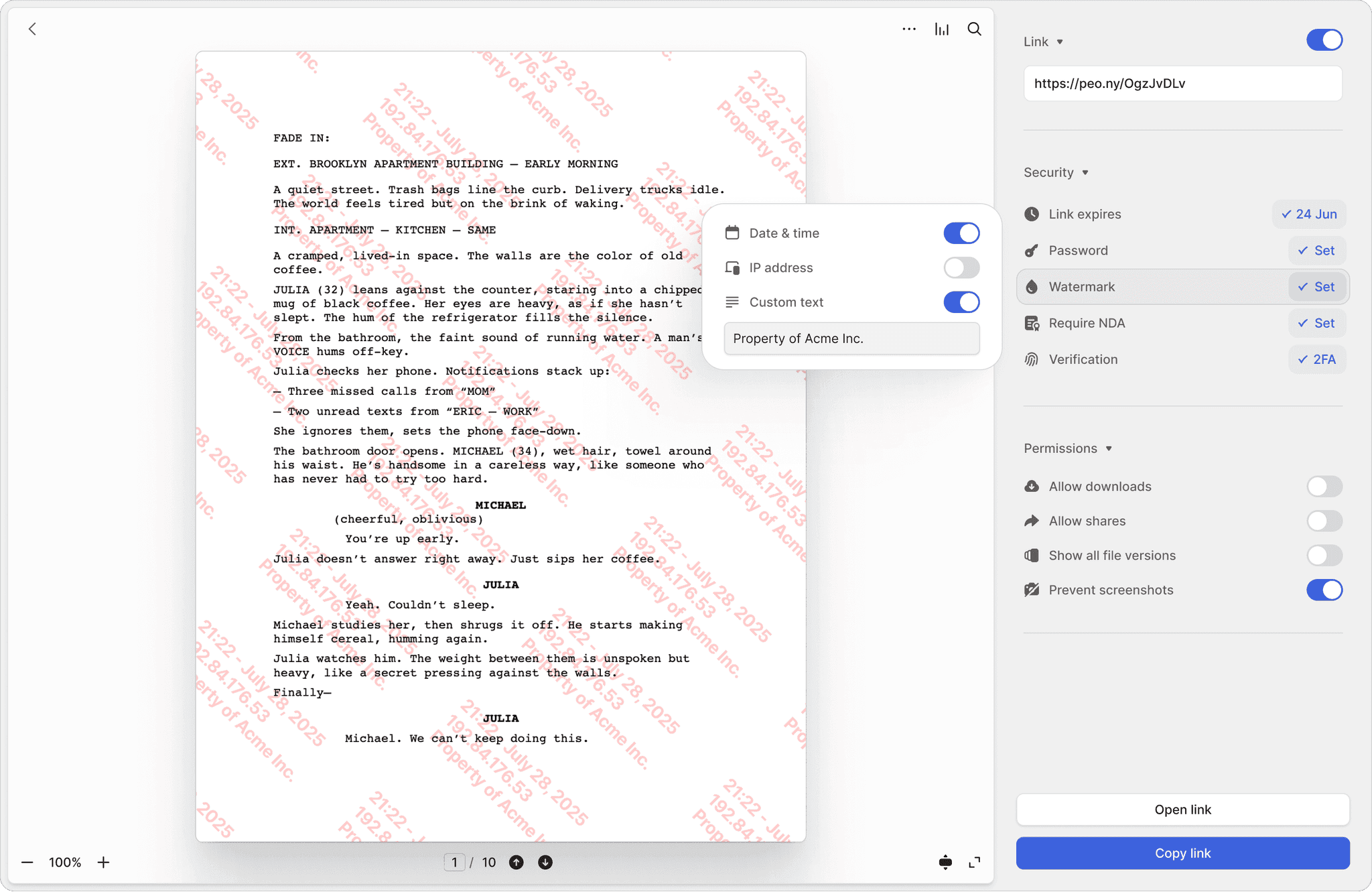
Screenshot protection
Block screen captures of sensitive documents. DocSend has no equivalent — once a document is viewed, it can be screenshotted freely.
Dynamic watermarks
Every page stamped with the viewer's email and timestamp. Trace the source of any leak instantly — something DocSend simply cannot do.
NDA-gated access
Require investors to sign an NDA before they see a single page. Built-in e-signatures make it seamless — no separate signing tool needed.
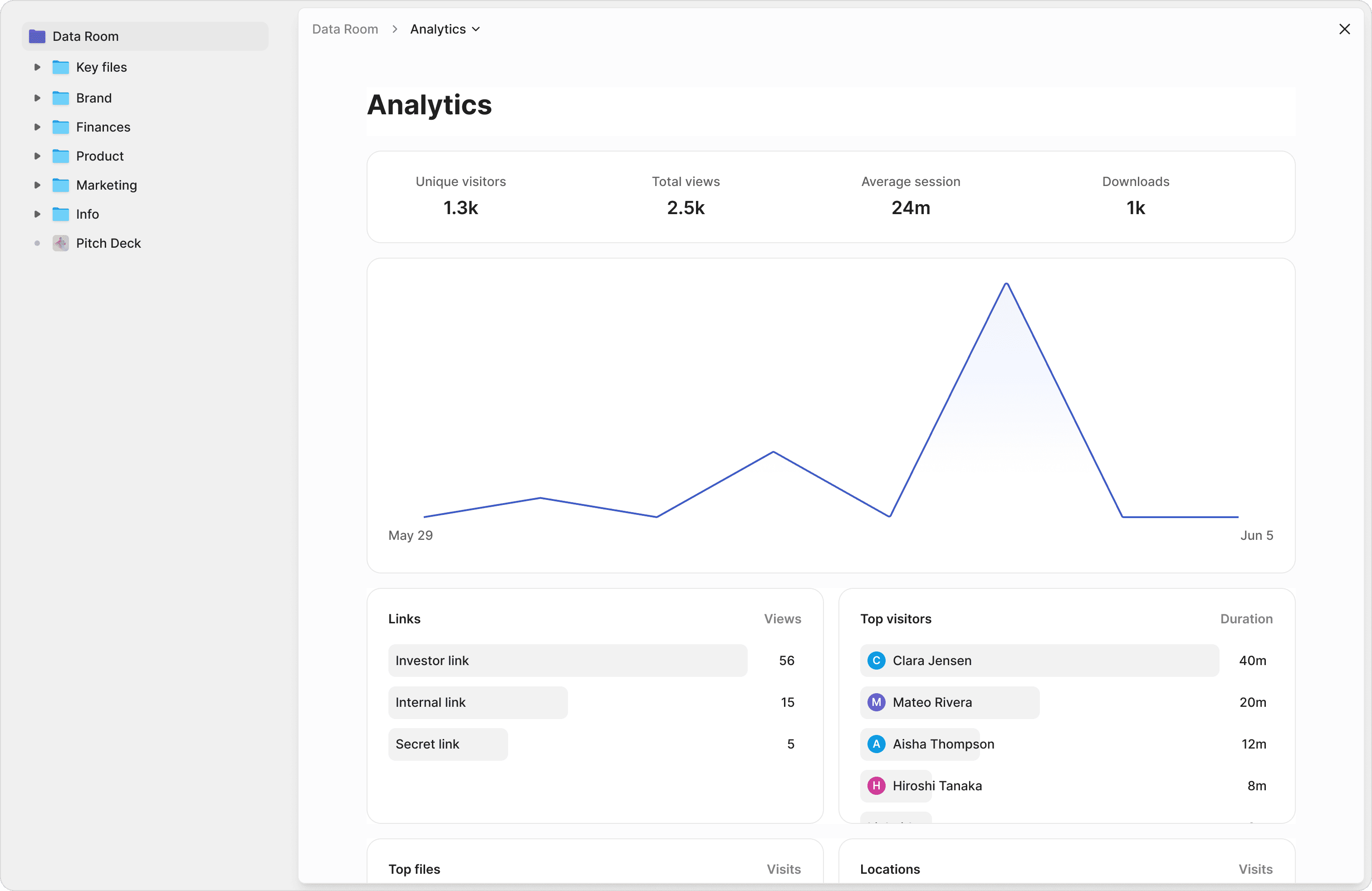
Know exactly which slides your investors care about
DocSend shows you that a document was opened. Peony shows you which pages were read, how long each investor spent per slide, and their total viewing time. Prioritize your follow-up calls based on real engagement data, not guesswork.
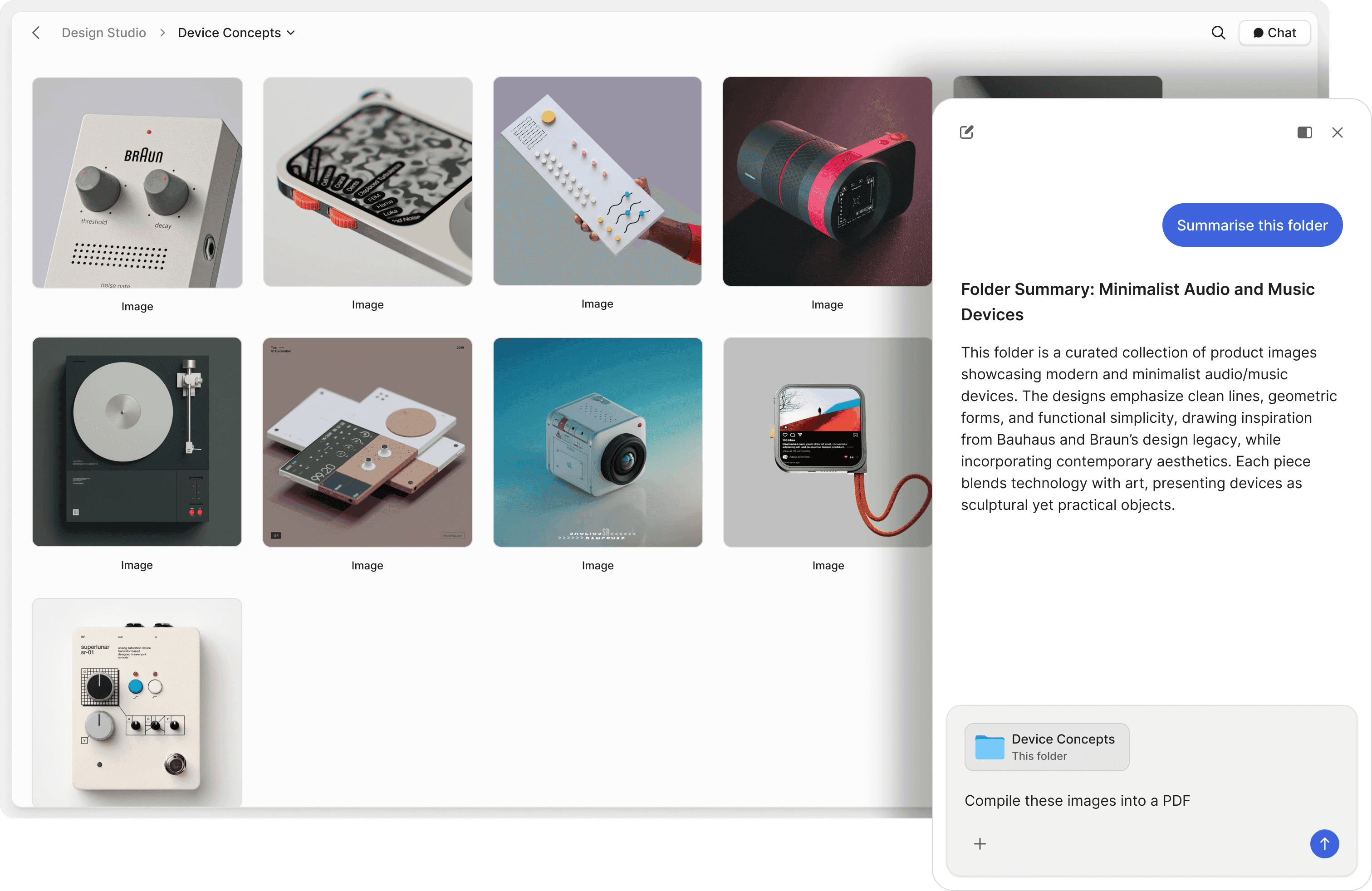
Let investors ask questions and get instant answers
DocSend has no AI capabilities. Peony's AI document chat lets investors and partners ask questions about your data room and receive instant, accurate answers pulled directly from your documents — 24 hours a day, 7 days a week. Close deals faster by removing information bottlenecks.
"Peony is a standout for data rooms and gated file sharing — intuitive, secure, and beautifully designed. The AI actually adds value, not just a checkbox feature. Highly recommend."

Michael Hui
Managing Director, Piton Partners
Frequently asked questions
Is Peony a good alternative to DocSend for startups?
Yes. Peony is the data room DocSend users graduate to when they need more than single-document sharing. Peony offers full data rooms, page-by-page analytics showing which slides investors spend the most time on, screenshot protection, dynamic watermarks, NDA gating with built-in e-signatures, and AI document chat — all starting free. DocSend has no data rooms, no screenshot protection, no watermarks, and no AI features at any tier. Startups raising from seed to Series D use Peony for its intuitive design and enterprise-grade security.
Can I use Peony as a data room for fundraising instead of DocSend?
Absolutely. DocSend is designed for sharing individual pitch decks, not organizing multi-document investor data rooms. Peony provides unlimited, fully structured data rooms with folder organization, granular per-investor permissions, branded viewer experiences, and auto-indexing that automatically classifies uploaded files, applies OCR, and enables full-text search across your entire data room. When investors ask follow-up questions, Peony's AI document chat gives them instant answers from your financials and projections — 24/7, without waiting for your team.
Does Peony have security features that DocSend lacks?
Yes — this is one of the biggest differences. Peony includes screenshot protection that blocks screen captures of your pitch deck and deal documents, dynamic watermarks stamped with each viewer's identity and timestamp, NDA gating with built-in e-signatures, controlled redaction for permanently blacking out sensitive information, two-factor authentication, password protection, link expiry, and revoke access — all backed by AES-256 encryption at rest, TLS 1.3 in transit, and SOC 2-ready, GDPR, CCPA, and HIPAA compliance. DocSend offers none of these security features — your pitch deck can be screenshotted and forwarded freely.
How does Peony pricing compare to DocSend?
Peony starts free ($0) with 2 GB of storage, unlimited data rooms, and unlimited links. Pro is $20 per admin per month (200 GB) and Business is $40 per admin per month (1 TB) — with every feature included and no per-viewer, per-page, or per-link limits. DocSend starts at $10 per month for Personal with very limited features, $25 per user per month for Standard, and $40 per user per month for Advanced — still with no screenshot protection, no AI, no watermarks, and no real data rooms.
Can I track which slides investors spend the most time on?
Yes. Peony provides page-by-page analytics showing exactly which slides each investor read, how long they spent on each page, their scroll depth, and total viewing time — with no per-viewer tracking limits. You also get real-time notifications the moment an investor opens your deck or data room. This is significantly more granular than DocSend's document-level tracking and helps founders prioritize which investors to follow up with first based on genuine engagement signals.
Does Peony support NDA gating for investor data rooms?
Yes. Peony lets you require investors to sign an NDA before they can access any documents in your data room — built into the platform with Peony's native e-signatures, no third-party tools needed. This is essential for Series A and beyond when you are sharing detailed financials, cap tables, and customer data with multiple investor groups simultaneously. DocSend does not offer NDA gating at any tier, leaving founders with no way to enforce confidentiality before sharing sensitive deal documents.
What makes Peony better than DocSend for Series A and beyond?
As fundraising rounds grow, investors expect a professional data room — not individual document links. Peony gives you unlimited branded data rooms with folder structures, granular per-investor permissions, NDA gating, screenshot protection, dynamic watermarks, full audit trails, controlled redaction, and AI document chat so investors get instant answers to diligence questions. Peony also includes Smart Q&A, a structured 4-step workflow where investors submit questions, AI drafts answers from your documents, your team reviews, and approved responses are published. Mark Petrov, Head of Financials at Loop, describes Peony as the simplest and most intuitive way to populate and share data rooms with investors.
Does Peony have AI features for investor Q&A?
Yes. Peony includes four AI capabilities purpose-built for fundraising workflows: AI document chat that lets investors ask questions about your financials and get instant, cited answers 24/7, Smart Q&A with a structured 4-step workflow where investors submit questions, AI drafts answers, your team reviews, and approved responses are published, AI Rooms that score your data room completeness and flag missing documents so you are fully prepared before sharing with investors, and auto-indexing with automatic document classification, OCR, and full-text search. All AI features are included on every plan — not sold as add-ons.
Can VCs and fund managers use Peony to manage deal flow?
Yes. VCs and fund managers use Peony to receive and review pitch decks, financial models, and diligence documents from portfolio companies and prospective investments. Peony's page-by-page analytics help investment teams quickly assess which deals have strong documentation, AI document chat lets analysts query across multiple documents instantly, and granular permissions ensure each deal stays confidential. Peony's free tier makes it easy for fund managers to start immediately without procurement approval.
Do startups actually switch from DocSend to Peony?
Yes. Startups switch from DocSend to Peony when they outgrow single-document sharing and need a professional data room with enterprise-grade security. Akash Ghavalkar, Co-founder and COO of Third Space, said Peony has completely transformed their workflows and saves them hours every week. Most teams complete their migration in under 5 minutes — upload your documents, configure security, and share a single branded link. No credit card required to start.
Compare other data room providers
Looking for the best DocSend alternative? Read our top 10 alternatives to DocSend.