
Traditional VDR pricing is broken.Get a modern data room at a fraction of the cost.
FirmRoom charges thousands per project for a traditional data room. Peony gives you page-by-page analytics on every plan, with AI document chat, screenshot protection, and full data rooms on Business ($40/admin/month).Set up in under 5 minutes. No sales calls required.
No credit card required

Side-by-side comparison
FirmRoom is a traditional virtual data room built for M&A transactions. Peony is a modern virtual data room with analytics, security, and AI features that FirmRoom does not offer.
 Peony
PeonyWhy teams switch from FirmRoom to Peony
FirmRoom is a capable VDR for traditional M&A. But modern teams need AI-powered document intelligence, real-time analytics, and transparent pricing — without waiting for a sales call.
Instant self-serve setup
Peony data rooms are live in under 5 minutes with self-serve onboarding. FirmRoom requires contacting sales and waiting for project setup, which can take days.
Page-level analytics
See exactly which pages investors read, how long they spent on each one, and what they focused on. FirmRoom offers only basic activity logs without page-level detail.
AI document chat
Peony lets recipients ask questions about your documents and get instant AI-powered answers 24/7. FirmRoom has no AI capabilities for document intelligence.
Transparent pricing
Peony starts free and scales with simple per-admin pricing. No per-project fees, no surprise invoices. FirmRoom charges thousands per project with opaque, quote-based pricing.
Pricing comparison
Peony gives you a full-featured data room with AI, analytics, and advanced security — at a fraction of what FirmRoom charges per project.

Peony
Free
$0
2 GB storage
Pro
$20/admin/mo
200 GB storage
Business
$40/admin/mo
Unlimited storage
Analytics on all plans. E-signatures on Pro+. Data rooms, AI chat, and advanced security on Business.
FirmRoom
Per-project pricing
~EUR 1,500/project
Starting price
Mid-market deals
~EUR 5,000/project
Typical range
Enterprise
EUR 10,000+/project
Custom pricing
No free tier. Per-project billing. No AI features, no screenshot protection, no page-level analytics.
When to use each platform
FirmRoom is built for traditional M&A advisory firms in Europe. Peony is the better choice when you need modern analytics, AI, and flexible pricing for any deal type.
Choose FirmRoom when you need
A traditional European VDR provider with local compliance expertise
White-glove onboarding with dedicated project managers
Per-project billing preferred by your finance team
Only basic document sharing — no analytics or AI needed
Choose Peony when you need
A secure data room for fundraising, M&A, or due diligence
Page-by-page analytics to see what investors actually read
AI document chat so recipients get answers instantly
Screenshot protection, dynamic watermarks, and NDA gating
Self-serve setup in under 5 minutes — no sales calls
A free tier to get started without a credit card
What Peony gives you that FirmRoom does not
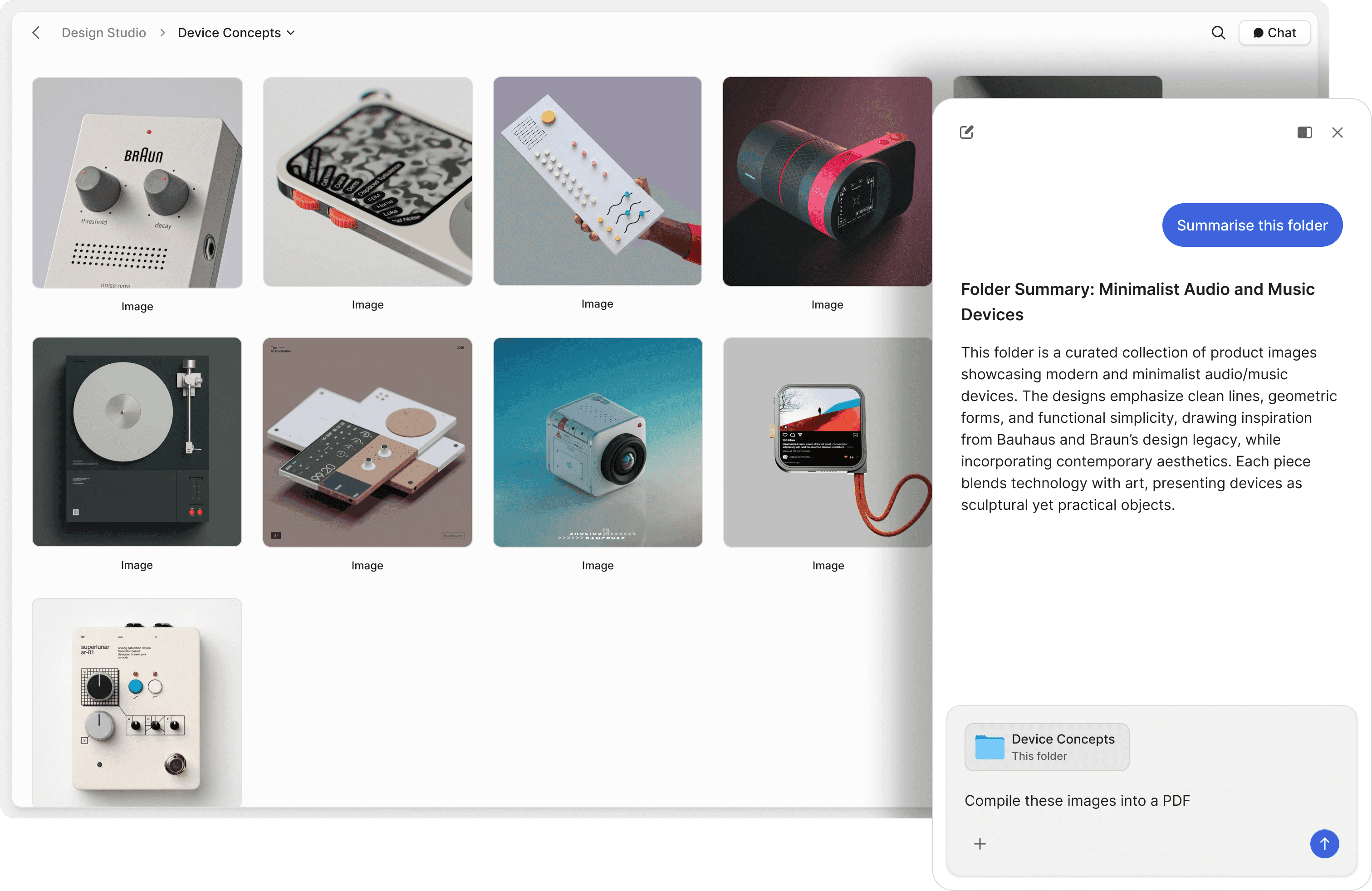
Let investors ask your documents questions directly
FirmRoom is a static file repository — investors download and read on their own. Peony includes AI document chat that lets recipients ask questions and get instant answers from your documents, 24/7. Deals move faster when investors can self-serve.
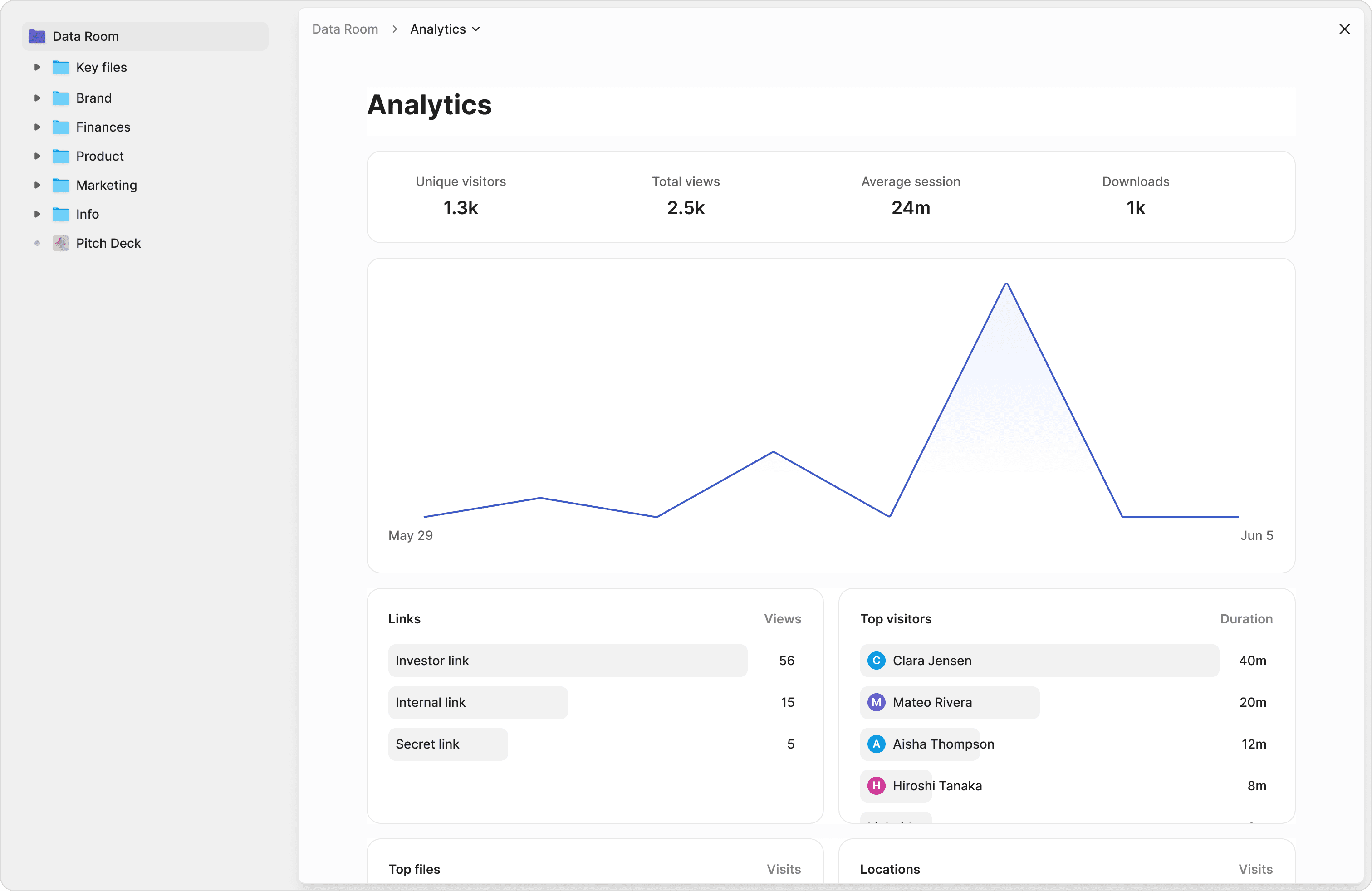
Know exactly what investors read and for how long
FirmRoom shows basic activity logs — who logged in, what they downloaded. Peony tracks every page view, time spent per page, scroll depth, and visitor detail. See which sections of your pitch deck or financials investors care about most.
Security that goes beyond basic access controls
FirmRoom offers standard VDR permissions and access controls. Peony adds screenshot protection, dynamic watermarks stamped with viewer identity, NDA-gated access, link expiry, 2FA, and password protection — ensuring your confidential documents stay confidential.
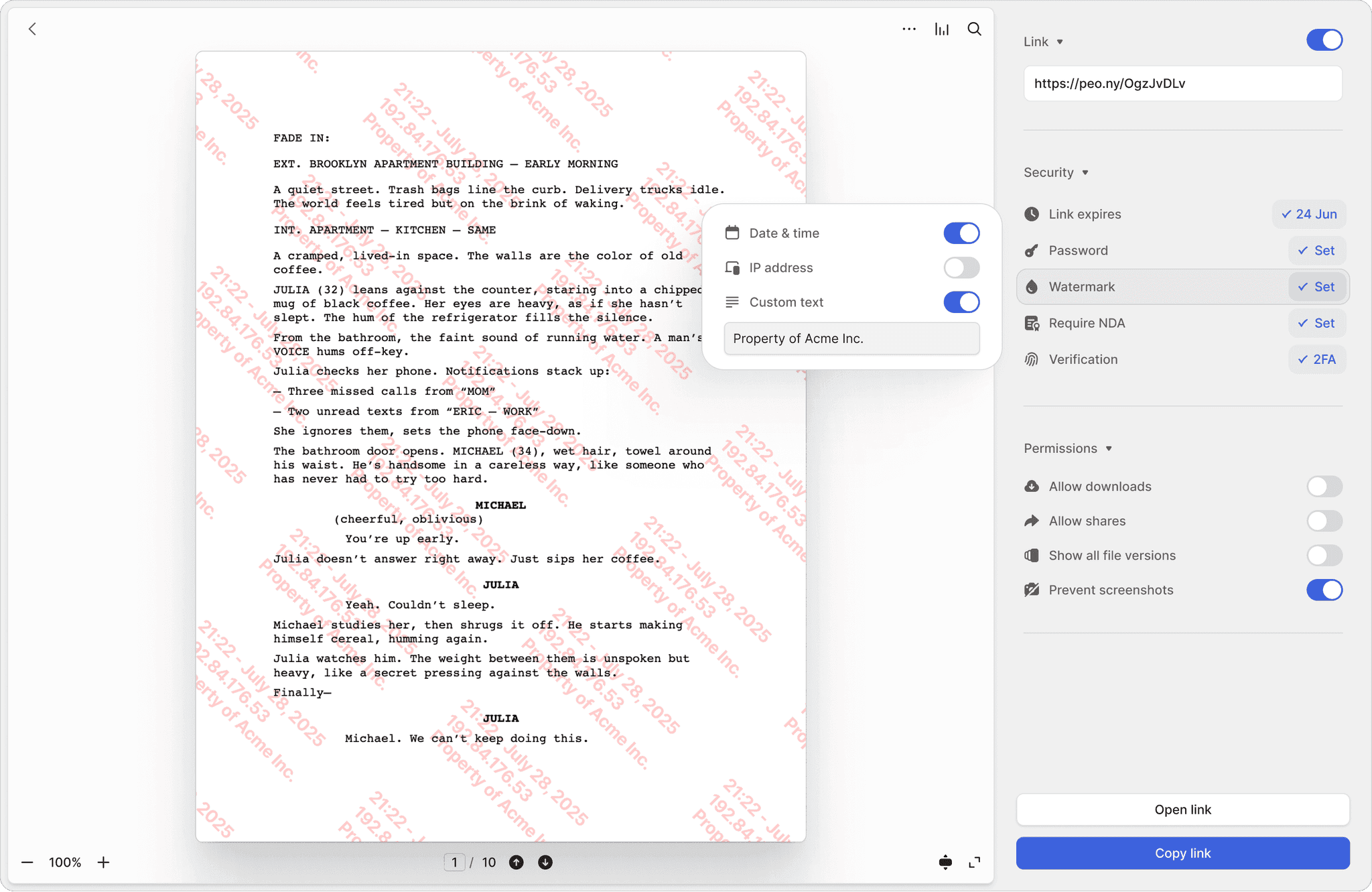
Screenshot protection
Block screen captures of sensitive deal documents. FirmRoom has no equivalent — once a document is viewed, it can be screenshotted freely.
Dynamic watermarks
Every page stamped with the viewer's identity and timestamp. If a document leaks, you know exactly who shared it. FirmRoom offers only static watermarks.
NDA-gated access
Require viewers to sign an NDA before accessing documents. Built-in e-signatures make it seamless — no separate tool needed. FirmRoom requires third-party e-signature tools.
"Not often I make recommendations, but I started using Peony to share presentations etc with external people. It works so well & makes us look really organized."

Anthony Gale
Founder & CEO, PromoLens
Frequently asked questions
Our boutique M&A shop runs 6 sell-side mandates a year — how does Peony compare to FirmRoom for due diligence and legal matters?
Peony offers the same core data room functionality as FirmRoom — secure document sharing, granular permissions, and organized folders — plus AI document chat, page-by-page analytics, and screenshot protection that FirmRoom lacks. For M&A advisors managing sell-side processes or law firms running due diligence, Peony delivers deeper security and AI-powered workflows at a lower cost. Peony also starts free, while FirmRoom charges per project.
I'm at a 4-partner law firm managing 10+ client matters at a time — is Peony cheaper than FirmRoom for a practice our size?
Yes. Peony offers a free plan ($0, 2 GB), then $20/admin/month for Pro and $40/admin/month for Business. FirmRoom typically charges EUR 1,500 to EUR 10,000 per project, making Peony significantly more affordable for boutique M&A advisors running multiple mandates or law firms managing several client matters simultaneously.
We handle 3 concurrent fundraises for PE clients — can Peony replace FirmRoom for those transaction data rooms?
Absolutely. Peony is built for fundraising, M&A, and due diligence — the same workflows that deal teams and transactional lawyers rely on daily. It includes everything FirmRoom offers plus AI document chat so bidders and counsel get instant answers, page-by-page analytics so you know which pages buyers and LPs actually read, and NDA gating for confidential deal materials.
My team shares privileged legal documents and CIMs with 15+ counterparties per deal — does Peony have the security we need versus FirmRoom?
Peony goes beyond FirmRoom on security — essential when handling confidential information memoranda, purchase agreements, and privileged legal documents. Every plan includes AES-256 encryption at rest, TLS 1.3 in transit, 2FA, and link expiry on SOC 2-ready, GDPR, CCPA, and HIPAA compliant infrastructure. Pro ($20/admin/month) adds password protection. Business ($40/admin/month) adds screenshot protection, dynamic watermarks stamped with viewer identity, and NDA-gated access.
I'm a junior associate and my partner needs a data room live by tomorrow for a $50M transaction — how fast can I set up Peony compared to FirmRoom?
Peony data rooms can be set up in under 5 minutes with self-serve onboarding — a junior banker or paralegal can drag and drop a CIM, legal exhibits, or financial models and share a branded link without any sales calls or demos. FirmRoom typically requires contacting sales for setup, which can take days to weeks depending on project scope.
Our deal teams field 40+ diligence questions per week from bidders and counsel — does Peony have AI features for M&A that FirmRoom lacks?
Yes. Peony includes AI document chat that lets bidders or opposing counsel ask questions about your data room documents and get instant answers 24/7. This is a feature FirmRoom does not offer. Peony also uses AI to organize and index uploaded documents automatically, and Smart Q&A provides a structured 4-step workflow for managing diligence questions at scale — so deal teams and lawyers spend less time fielding repetitive requests.