
File streaming is not document security.Get the data room you need.
LucidLink streams large creative files in real time. But when you need analytics, watermarks, NDA gating, and a complete data room for confidential deal sharing, you need Peony.Set up in under 5 minutes.
No credit card required

Side-by-side comparison
LucidLink is a cloud-native virtual file system for creative production. Peony is a secure virtual data room built for document sharing, tracking, and deal management.
 Peony
PeonyWhy teams choose Peony over LucidLink for document sharing
LucidLink excels at streaming large creative files. But for confidential document sharing with access controls, analytics, and security, Peony is the right tool.
Document analytics
LucidLink tells you nothing about how files are viewed. Peony tracks every page view, time spent per page, and scroll depth — so you know exactly what recipients focus on.
Document-level security
Peony includes 2FA and link expiry on every plan, with screenshot protection, dynamic watermarks, and NDA gating on the Business plan. LucidLink offers basic folder-level permissions with no document-level security.
AI document chat
Peony lets recipients chat with your documents and get instant answers 24/7. LucidLink has no document intelligence or AI features — it is purely a file delivery system.
Start for free
Peony has a free tier with analytics and unlimited links. AI chat and data rooms are on Business. LucidLink has no free plan — the cheapest option is $10 per user per month with no analytics or security features.
Pricing comparison
Peony gives you per-page analytics and enterprise-grade encryption on every plan. The Business plan ($40/admin/mo) adds data rooms, AI chat, and advanced security. LucidLink charges per user with no analytics or document security.

Peony
Free
$0
2 GB storage
Pro
$20/admin/mo
200 GB storage
Business
$40/admin/mo
Unlimited storage
Analytics on all plans. E-signatures on Pro+. Data rooms, AI chat, watermarks, NDA gating on Business.
LucidLink
Individual
$10/user/mo
File streaming only
Team
$25/user/mo
File streaming only
Enterprise
Custom
File streaming only
No data rooms, no page analytics, no watermarks, no NDA gating, no AI features.
When to use each platform
LucidLink excels at streaming large media files for creative production. Peony is the better choice when you need secure document sharing with analytics and access controls.
Choose LucidLink when you need
Real-time streaming of large video, 3D, or post-production files
A cloud-native file system that replaces on-premise NAS or SAN storage
Creative teams collaborating on raw media across locations
Only file delivery — no analytics, security controls, or data rooms needed
Choose Peony when you need
A secure data room for fundraising, M&A, or due diligence
Page-by-page analytics to see what investors and partners actually read
Document security: screenshot protection, watermarks, NDA gating, link expiry
AI document chat so recipients get answers instantly
Per-document access controls and granular permissions
A free tier to get started without a credit card
What Peony gives you that LucidLink does not
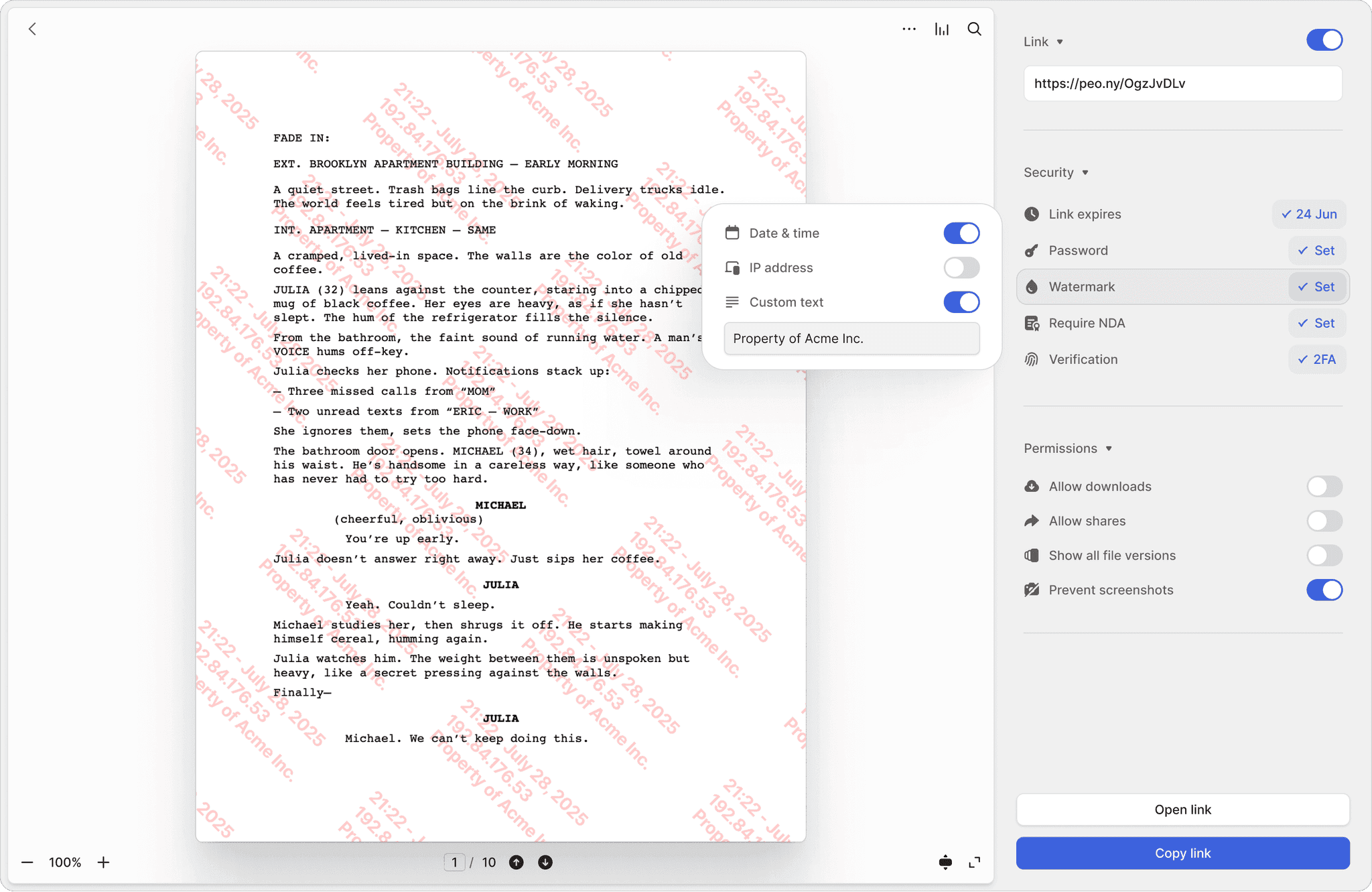
Know exactly who leaks a document
LucidLink has no watermarking or leak protection — once a file is streamed to a user, it can be freely copied. Peony stamps every page with the viewer's identity and timestamp, so if a document leaks, you trace it instantly.
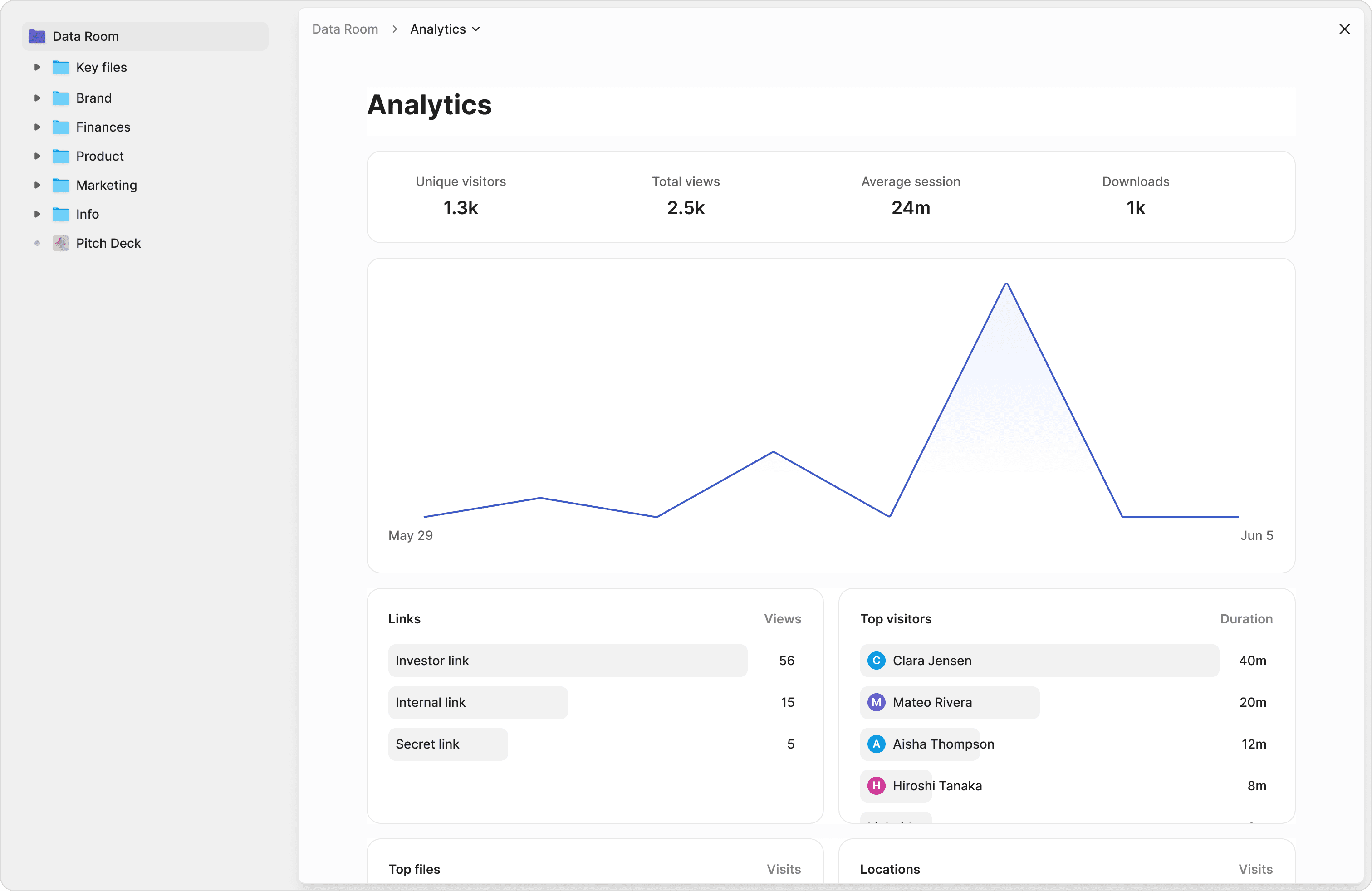
Know exactly what your recipients read
LucidLink offers no analytics on file access. Peony tracks every page view, time spent, scroll depth, and visitor detail. See which sections of your pitch deck or due diligence documents investors care about most.
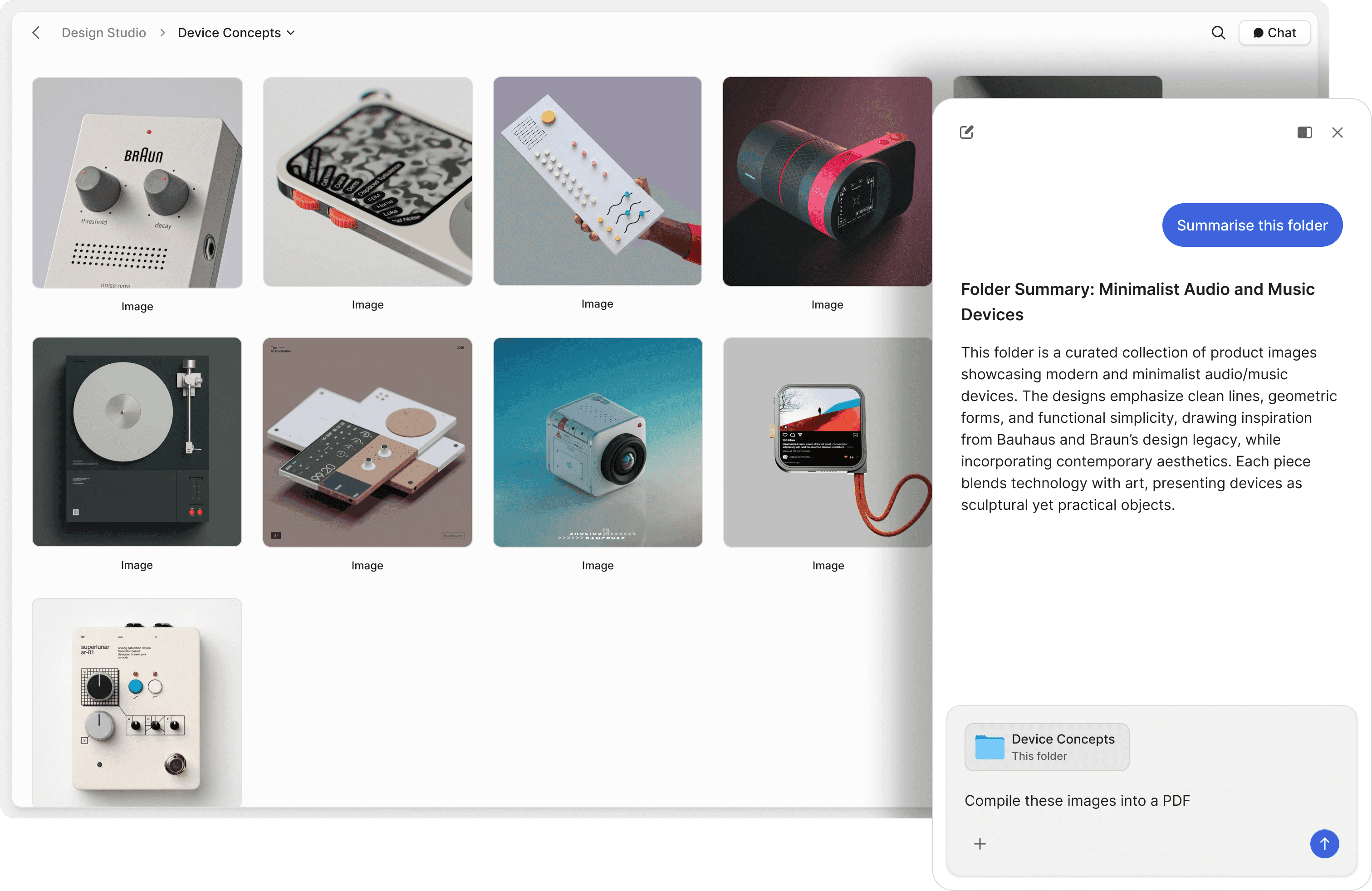
Let recipients get instant answers from your documents
LucidLink is a file system with no intelligence layer. Peony lets viewers chat with your documents and get AI-powered answers instantly — reducing back-and-forth questions and speeding up due diligence.
Screenshot protection
Block screen captures of sensitive documents. LucidLink has no equivalent — once a file is streamed, it can be captured freely.
Per-document access controls
Set granular permissions on every document — not just at the folder level. Control who sees what with precision that LucidLink cannot match.
NDA-gated access
Require viewers to sign an NDA before accessing documents. Built-in e-signatures make it seamless — no separate tool needed. LucidLink has no NDA or e-signature capability.
"Every now and then, you come across a product that has a massive positive impact on your business. Peony is one such product."
Panos Moutafis
Founder & CEO, Zenus
Frequently asked questions
Our 15-person post house uses LucidLink for internal editing but needs something secure for sharing screeners with 10+ distribution partners — how does Peony compare?
Peony is a modern data room built for securely sharing screeners, licensing agreements, and content catalogs with distributors, buyers, and reviewers. Every shared link includes page-by-page analytics, dynamic watermarks, NDA gating, screenshot protection, and controlled redaction for blacking out territory-specific pricing or talent deal terms. Peony enforces AES-256 encryption at rest, TLS 1.3 in transit, and SOC 2-ready, GDPR, CCPA, and HIPAA compliance on every plan. LucidLink is a cloud-native virtual file system designed to stream large creative files to post-production teams in real time. Peony is purpose-built for confidential content distribution to external parties; LucidLink is purpose-built for internal creative production workflows.
We're negotiating licensing terms with 5 international distributors simultaneously — can LucidLink handle NDA-gated document sharing, or do we need Peony?
No. LucidLink is a cloud file system that streams large media files to post-production teams. It does not offer per-document access controls, viewer analytics, NDA gating, or watermarks — all critical when sharing licensing agreements, territory rights packages, or pre-release screeners with distributors and buyers. Peony provides page-by-page analytics on every plan so studios can see exactly which sections a distributor reviewed. The Business plan ($40/admin/mo) adds data rooms, auto-indexing with OCR and full-text search, dynamic watermarks, NDA gating, and AI document chat for answering buyer questions directly from your content catalog.
Our studio sends 20GB+ screener packages to buyers at 3 major film markets a year — is Peony good for sharing those securely with analytics?
Yes. Peony supports files up to 5 GB per upload and provides 200 GB of storage on the Pro plan and unlimited storage on Business — enough for screeners, dailies, and full content packages. Unlike LucidLink, Peony adds page-by-page analytics and security controls to every shared file, so production companies and studios can track exactly which buyers or reviewers engaged with pre-release content and for how long.
We're a 20-person post house spending $1,200/month on LucidLink — how does Peony pricing compare if we add it for external document sharing?
Peony starts free ($0) with 2 GB of storage, unlimited links, and per-page analytics — with no per-viewer, per-page, or per-link limits on any plan. The Business plan ($40/admin/month) adds data rooms, AI document chat, screenshot protection, and dynamic watermarks — ideal for studios sharing screeners and licensing agreements at film markets. LucidLink does not offer a free tier — its cheapest plan starts at $10 per user per month but includes no document analytics, watermarks, or access controls.
I sent screener packages to 12 acquisition executives last week — can Peony show me exactly which pages each buyer reviewed and for how long?
Yes. Peony provides page-by-page analytics on every plan, showing exactly which distributors, buyers, or reviewers opened your screeners, how long they spent on each page, and which sections of your content catalog they focused on. Pro ($20/admin/month, 200 GB) adds password protection. Business ($40/admin/month, unlimited storage) adds data rooms, screenshot protection, dynamic watermarks, NDA gating, and Smart Q&A — a 4-step workflow where buyers submit questions about territory rights or licensing terms, AI drafts answers from your documents, your team reviews, and approved responses are published. LucidLink has no analytics, watermarks, or access controls.
Our editors need real-time collaboration on 8K footage and our business team needs secure document sharing with buyers — does Peony handle both like LucidLink?
Peony is optimized for document-centric workflows — screeners, licensing agreements, content catalogs, pitch decks, and contracts — with AI chat and page-by-page analytics. LucidLink is optimized for streaming large video, 3D, and post-production files to internal creative teams. If your priority is securely sharing pre-release content with external distributors and buyers while tracking their engagement, Peony is the better choice.