
File sharing is the baseline.Get AI, analytics, and real security.
OneHub handles basic file sharing and data rooms. But when you need AI document chat, screenshot protection, page-by-page analytics, and NDA gating, you need Peony.Set up in under 5 minutes. No credit card required.
No credit card required

Side-by-side comparison
OneHub is a traditional file-sharing and VDR platform. Peony is a full-featured data room with screenshot protection, dynamic watermarks, and page-by-page analytics built in.
 Peony
PeonyWhy teams switch from OneHub to Peony
OneHub is a solid file-sharing platform. But modern teams need AI intelligence, granular analytics, and advanced security that traditional VDRs cannot provide.
AI document chat
Peony lets recipients ask questions about shared documents and get instant AI-powered answers 24/7. OneHub has no AI features — recipients must read everything manually.
Page-level analytics
See which pages investors read, how long they spent, and what they focused on. OneHub only tracks file-level activity — Peony gives you page-by-page detail.
Modern security
Screenshot protection, dynamic watermarks, NDA gating, 2FA, and link expiry are built into Peony. OneHub relies on traditional permissions without these modern safeguards.
Free tier included
Peony starts free with 2 GB of storage. OneHub has no free plan — their data room tier starts at $375 per month. Try Peony risk-free with no credit card required.
Pricing comparison
Peony gives you AI document chat, screenshot protection, and page-by-page analytics — all at a fraction of OneHub's data room pricing.

Peony
Free
$0
2 GB storage
Pro
$20/admin/mo
200 GB storage
Business
$40/admin/mo
Unlimited storage
Analytics on all plans. E-signatures on Pro+. Data rooms, AI chat, screenshot protection, watermarks, and NDA gating on Business.
OneHub
Standard
$15/user/mo
Basic file sharing
Advanced
$25/user/mo
Enhanced sharing
Data Room
$375/mo
5 users included
No AI features, no screenshot protection, no page-by-page analytics, no dynamic watermarks.
When to use each platform
OneHub works for basic file sharing and traditional VDR needs. Peony is the better choice when you need AI intelligence, advanced security, and detailed analytics.
Choose OneHub when you need
Basic file sharing with workspace organization for internal teams
A traditional VDR with standard permission controls and audit trails
FTP replacement for teams already comfortable with legacy interfaces
Simple file storage without analytics or AI requirements
Choose Peony when you need
A secure data room for fundraising, M&A, or due diligence
Page-by-page analytics to see exactly what investors read and for how long
AI document chat so recipients get instant answers without waiting
Screenshot protection, dynamic watermarks, NDA gating, and link expiry
Built-in e-signatures alongside document sharing in one platform
A free tier to get started immediately — no credit card required
What Peony gives you that OneHub does not
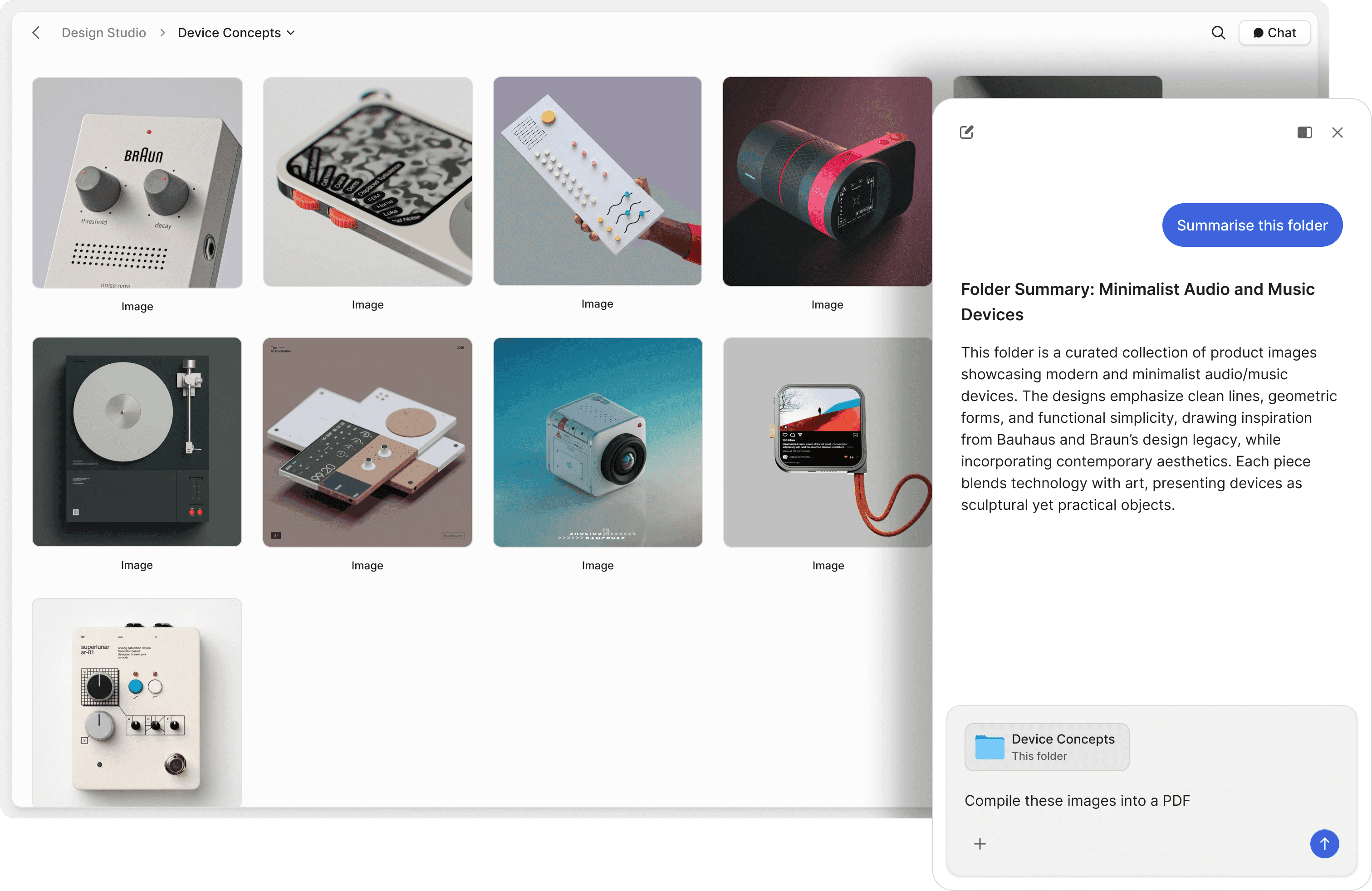
Let AI answer questions about your documents
OneHub stores files for download and viewing. Peony lets recipients chat with your documents and get instant AI-powered answers — reducing back-and-forth emails and speeding up due diligence.
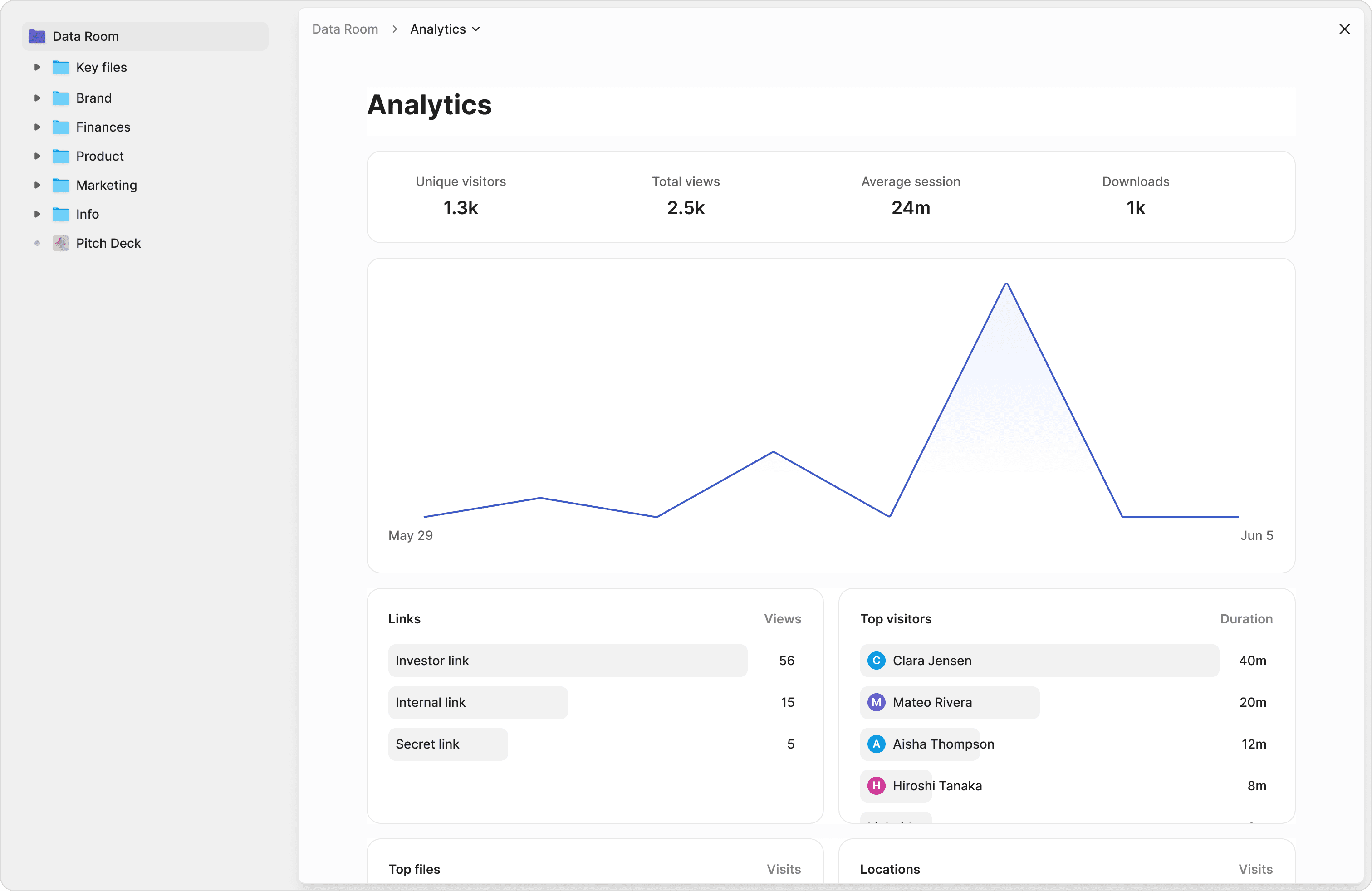
Know exactly what your recipients read
OneHub tracks file downloads and basic activity. Peony tracks every page view, time spent per page, scroll depth, and visitor details. See which sections of your pitch deck investors care about most.
Security that goes beyond permissions
OneHub relies on role-based permissions and watermarking. Peony adds screenshot protection, dynamic watermarks tied to viewer identity, NDA gating, 2FA, password protection, and automatic link expiry — securing the entire document lifecycle.
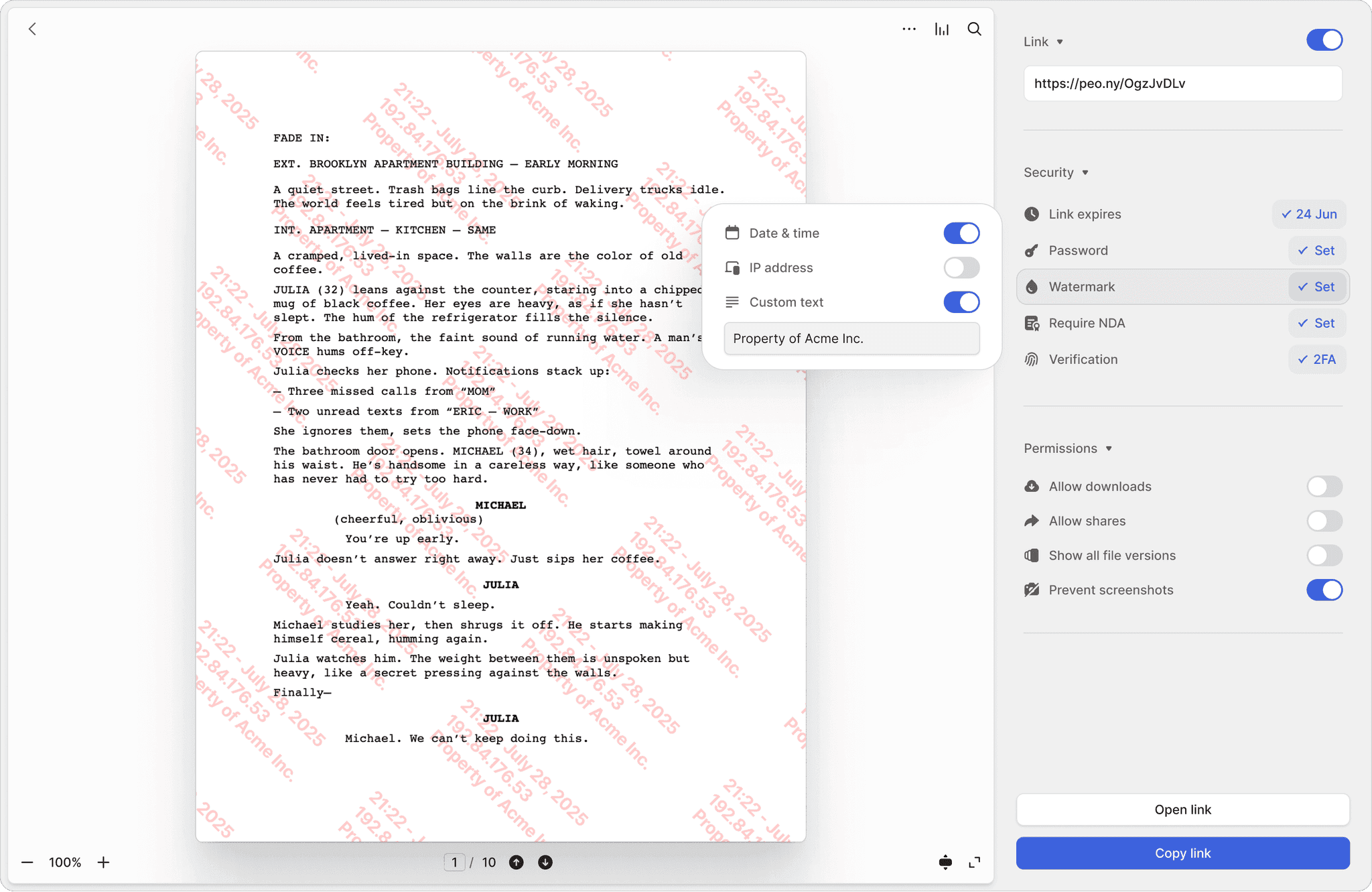
Screenshot protection
Block screen captures of sensitive documents. OneHub has no screenshot blocking — once a document is viewed, it can be captured freely.
Dynamic watermarks
Every page stamped with the viewer's identity and timestamp. If a document leaks, you know exactly who shared it.
NDA-gated access
Require viewers to sign an NDA before accessing documents. Built-in e-signatures make it seamless — no separate tool needed.
"The team at Peony put craft into everything they do; from the product to their support, they shine through how much they care."

Germain Brion
Founder, Veritai
Frequently asked questions
Our 8-person startup is juggling 3 investor conversations and needs a better way to manage deal documents — how does Peony compare to OneHub?
Small teams and founders juggling deal documents need more than a file locker. Peony is a modern data room with built-in AI document chat that answers counterparty questions from your uploaded files, screenshot protection to keep confidential deal materials contained, dynamic watermarks stamped with each viewer's identity, and page-by-page analytics on every plan. OneHub is a traditional file-sharing platform with basic VDR functionality — no AI features, no screenshot blocking, and no dynamic watermarks at any tier.
We're a 4-person advisory firm running our first M&A sell-side — is Peony more affordable than OneHub for a team our size?
Yes. A small deal team can start on Peony's free tier with 2 GB of storage, per-page analytics, and no credit card required — enough to share an information memorandum and track which counterparties engage. OneHub starts at $15 per user per month with no free plan. When the M&A process ramps up and you need a full data room, Peony Business at $40 per admin per month includes AI document chat for counterparty Q&A, screenshot protection for confidential financials, data rooms with folder organization, and analytics that OneHub does not offer at any price.
I'm an independent sponsor managing a $15M acquisition and need a proper diligence room — does Peony offer data rooms like OneHub?
Yes. Peony includes full-featured data rooms on the Business plan with folder organization, granular per-user permissions, and branded sharing — built for how deal teams actually run diligence. On top of OneHub's basic VDR, Peony adds AI document chat so counterparties can ask questions about deal documents and get instant answers, NDA gating that requires signing before viewing, and page-by-page analytics showing exactly which diligence materials each party reviewed and for how long.
We're raising a $3M seed round and sharing our deck with 25+ VCs — can our startup replace OneHub with Peony for fundraising?
Absolutely. Founders raising capital need to know which investors are seriously engaged. Peony provides per-page analytics on all plans showing exactly which pitch deck slides each investor reads and how long they spend on financials versus team bios. The Business plan ($40/admin/mo) adds data rooms for organizing cap tables, financials, and legal documents, plus AI document chat for investor questions and NDA gating to control access. OneHub lacks page-level analytics and AI features, leaving founders guessing about investor interest.
My team shares financial models and board decks with 5-6 potential acquirers per process — does Peony offer screenshot protection for those M&A documents?
Yes. When deal teams share financial models, board materials, or management presentations, Peony's screenshot protection on the Business plan blocks screen captures so confidential M&A documents cannot be leaked to competing bidders or unauthorized parties. OneHub does not offer screenshot protection on any plan. Peony's infrastructure is also SOC 2-ready, GDPR, CCPA, and HIPAA compliant — giving small teams enterprise-grade security without enterprise pricing.
We fielded over 200 diligence questions on our last deal — how does Peony's AI document chat help cut that workload during due diligence?
During M&A diligence, counterparties ask dozens of questions about your deal documents. Peony's AI document chat lets them ask questions and get instant, accurate answers pulled directly from your data room — around the clock, without your small team fielding every inquiry manually. Peony also offers Smart Q&A, a structured 4-step workflow where counterparties submit questions, AI drafts responses, your team reviews, and approved answers are published. OneHub has no AI capabilities for document interaction or Q&A, so every question lands on your team.
I'm a solo founder sharing a 40-page investor memo — does OneHub give me page-by-page analytics so I know which sections VCs actually read?
OneHub provides basic file-level activity tracking — you can see who downloaded a file, but not which pages they actually read. For small teams sharing deal documents or proposals, that level of detail is not enough. Peony tracks every page view, time spent per page, scroll depth, and visitor details on every plan, giving founders and deal teams the insight they need to identify engaged counterparties and prioritize follow-ups.
We just got a term sheet and need a data room live by tomorrow — how fast can our 5-person team set up Peony compared to OneHub?
Founders and small teams can set up Peony in under 5 minutes with no credit card and no sales call. The free plan includes per-page analytics, link expiry, and 2FA — enough to start sharing pitch decks or deal documents immediately. The Business plan ($40/admin/mo) adds data rooms, AI document chat, and screenshot protection when the M&A process or fundraise demands tighter security. OneHub requires a paid subscription before you can begin, adding friction when a deal is moving fast.