
Cloud storage is not a data room.Share documents with control.
Google Drive stores files. Peony is a purpose-built data room with page-by-page analytics, screenshot protection, dynamic watermarks, NDA gating, and AI document chat.Set up in under 5 minutes.
No credit card required

Side-by-side comparison
Google Drive is a general-purpose cloud storage service. Peony is a secure virtual data room built for document sharing, tracking, and deal management.
 Peony
PeonyWhy teams switch from Google Drive to Peony
Google Drive works for everyday file storage. But when you share confidential documents with investors, partners, or buyers, you need analytics, security, and control that Google Drive was never built for.
Document analytics
Google Drive shows if someone opened a file. Peony shows which pages they read, how long they spent on each page, and exactly when they visited — page by page.
Advanced security
Screenshot protection, dynamic watermarks, NDA gating, 2FA, and link expiry are all built into Peony. Google Drive relies on basic link permissions with no document-level security.
Purpose-built data rooms
Peony provides structured data rooms for fundraising, M&A, and due diligence. Google Drive is a flat file system — no deal structure, no granular access controls.
All-in-one platform
Peony replaces Google Drive, your data room, your document tracking tool, and your e-signature add-on — all in one platform starting free.
Pricing comparison
Peony gives you data rooms, analytics, e-signatures, and AI document chat. Google Drive gives you file storage. Both start free.

Peony
Free
$0
2 GB storage
Pro
$20/admin/mo
200 GB storage
Business
$40/admin/mo
Unlimited storage
Analytics on all plans. E-signatures on Pro+. Data rooms, AI chat, watermarks, and screenshot protection on Business.
Google Drive
Personal
$0
15 GB storage
Business Starter
$7/user/mo
30 GB per user
Business Standard
$14/user/mo
2 TB per user
File storage and collaboration only. No data rooms, no page analytics, no screenshot protection, no watermarks.
When to use each platform
Google Drive is a great everyday storage tool. Peony is the better choice when you need to share confidential documents with tracking, security, and control.
Choose Google Drive when you need
General-purpose cloud storage for everyday files
Real-time collaboration on Google Docs, Sheets, and Slides
Integration with Gmail and the Google Workspace ecosystem
Internal team file sharing where tracking is not required
Choose Peony when you need
A secure data room for fundraising, M&A, or due diligence
Page-by-page analytics to see what investors and partners actually read
Document security: screenshot protection, watermarks, NDA gating, link expiry
AI document chat so recipients get answers instantly
Built-in e-signatures without third-party add-ons
A free tier to get started without a credit card
What Peony gives you that Google Drive does not
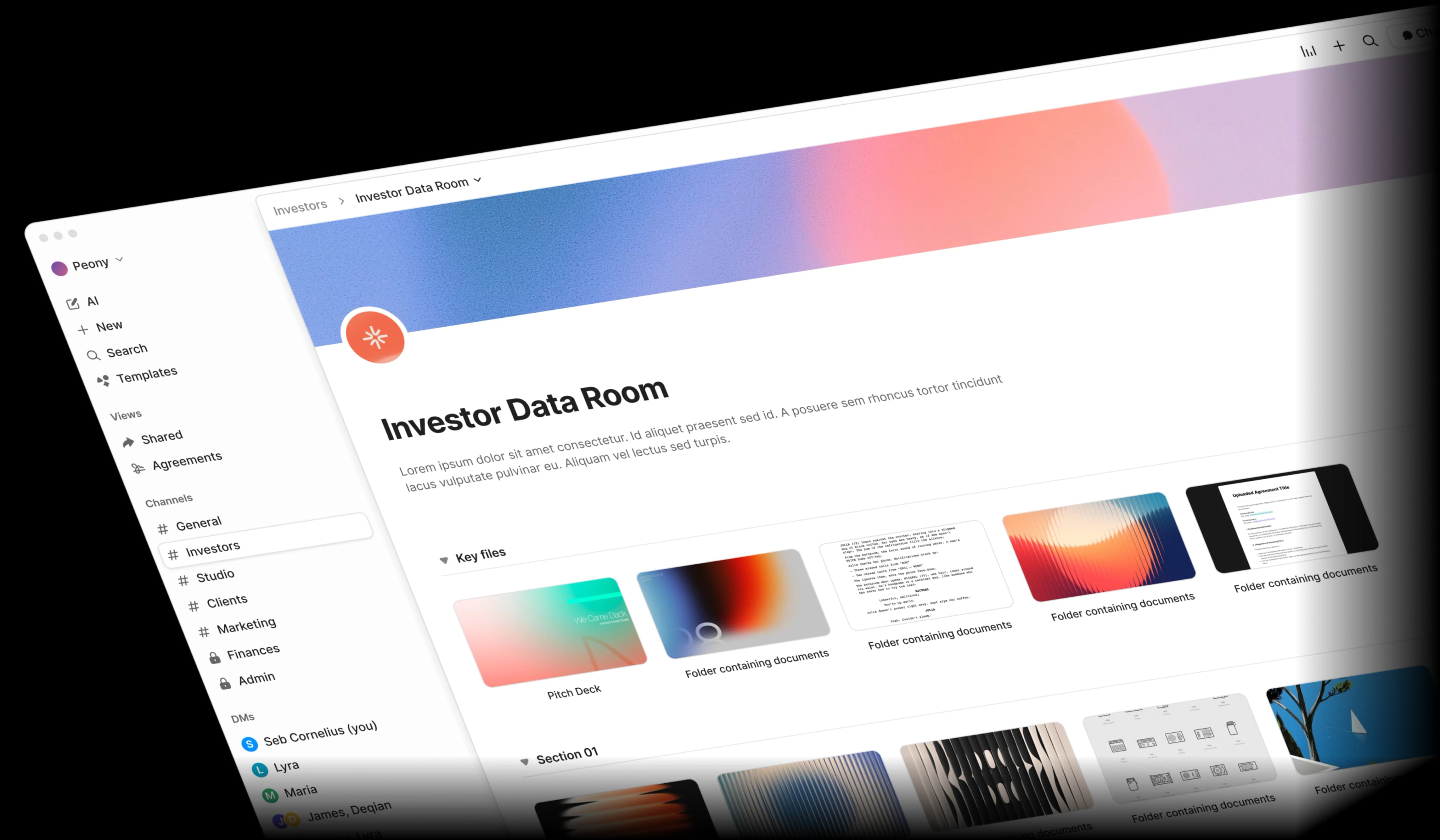
Organize confidential documents in secure data rooms
Google Drive uses folders with basic sharing permissions. Peony gives you branded virtual data rooms with granular access controls, NDA gating, and audit trails — purpose-built for fundraising, M&A, and due diligence.
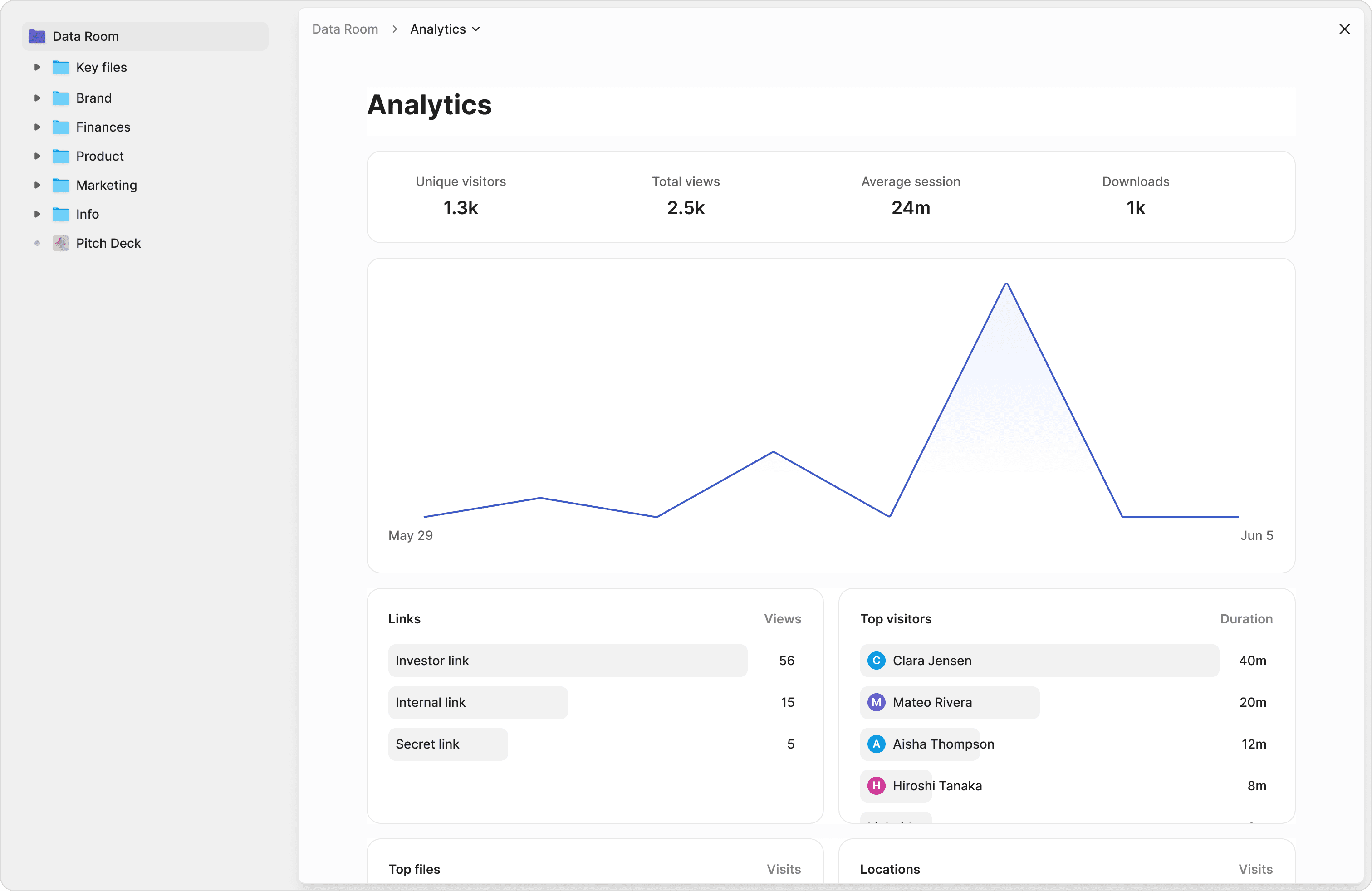
Know exactly what your recipients read
Google Drive has no document analytics beyond basic view counts. Peony tracks every page view, time spent, scroll depth, and visitor detail. See which sections of your pitch deck investors care about most.
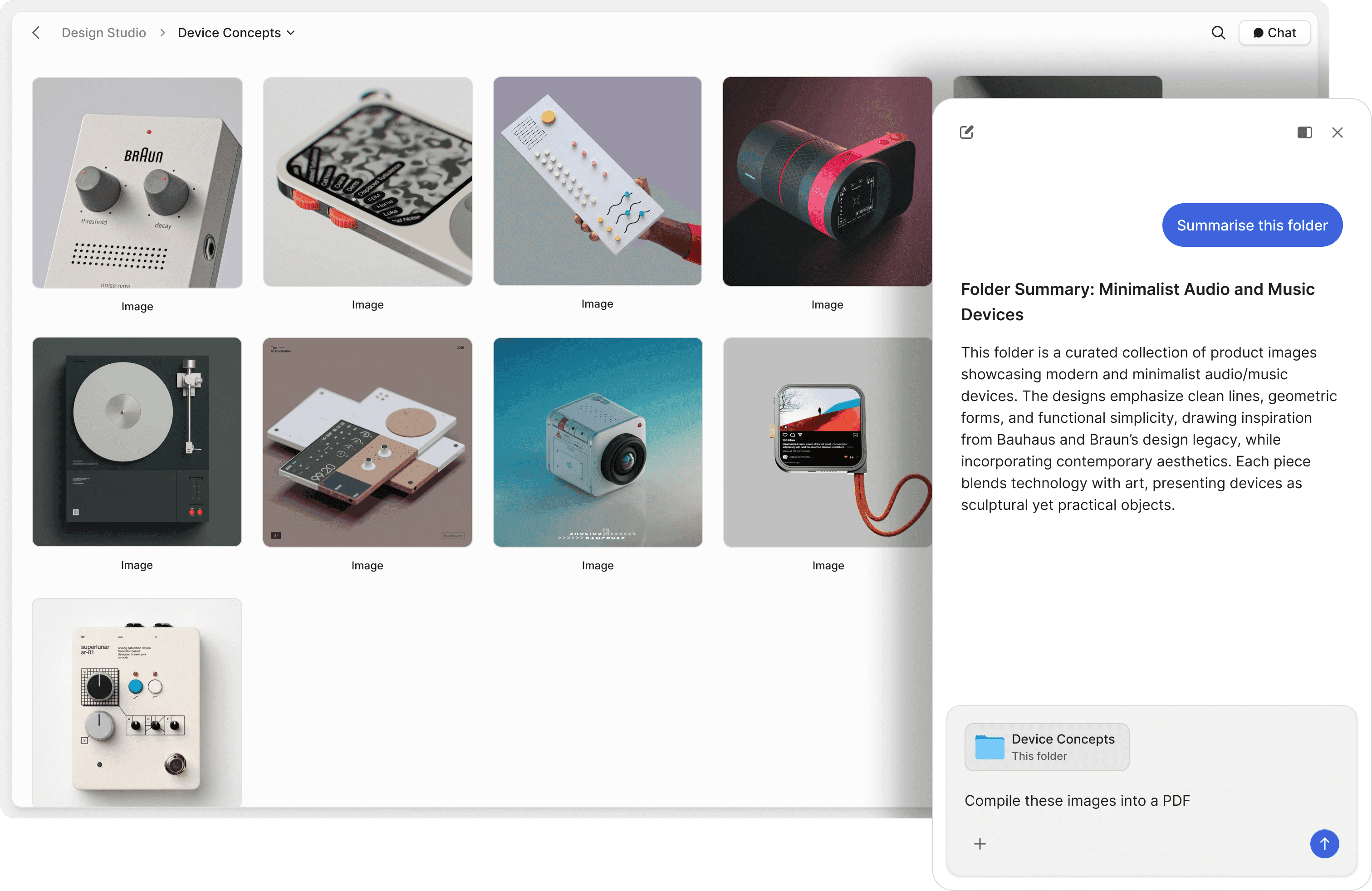
Let recipients chat with your documents
Google Drive files sit idle until someone reads them. Peony lets recipients ask questions and get instant, AI-powered answers from your documents 24/7 — reducing back-and-forth and accelerating deal timelines.
Protect documents beyond link sharing
Google Drive shares files via links with view, comment, or edit permissions — and nothing else. Peony secures the entire document lifecycle with screenshot protection, watermarks, password protection, 2FA, NDA gating, and link expiry.
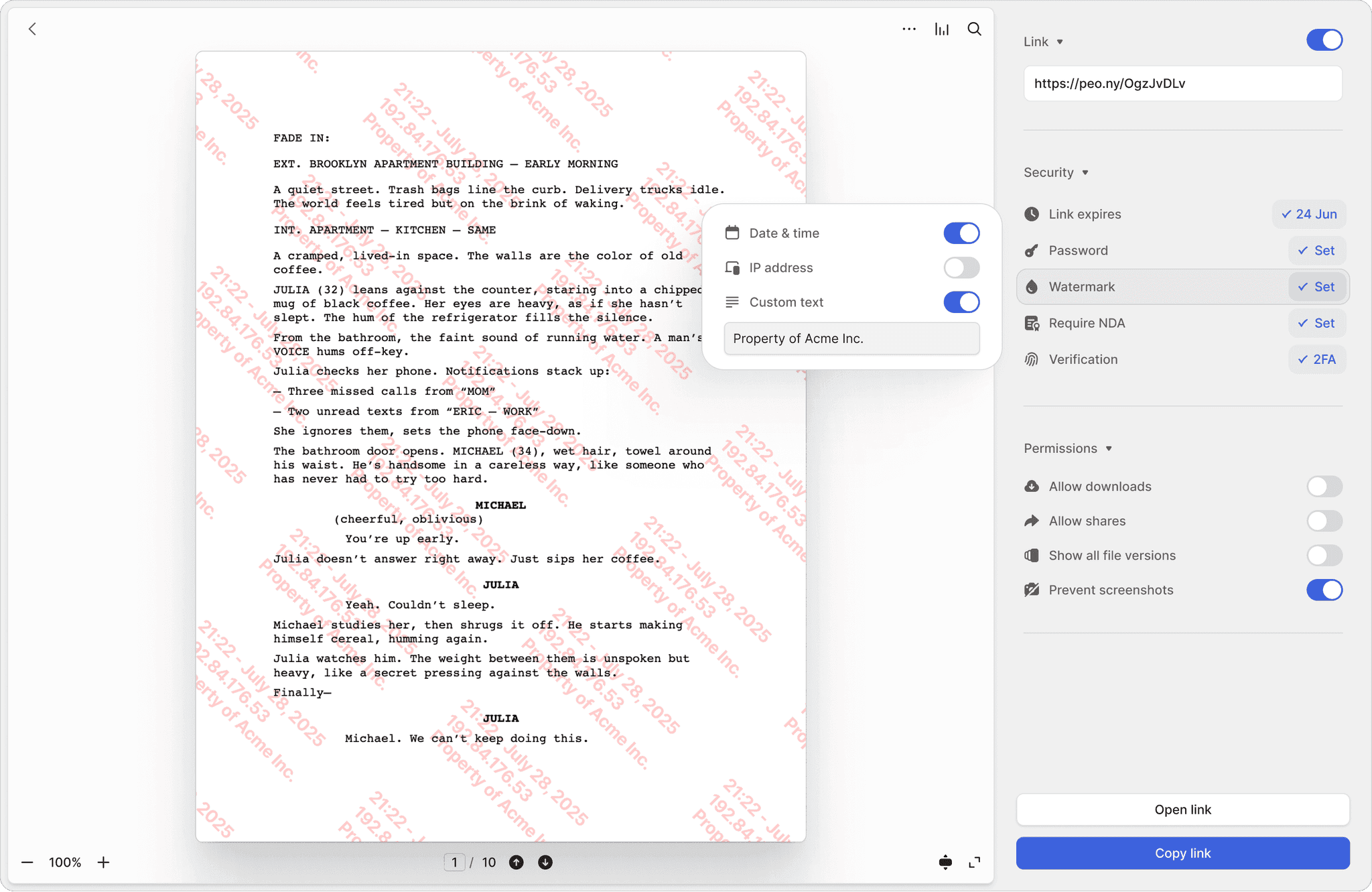
Screenshot protection
Block screen captures of sensitive documents. Google Drive has no equivalent — anyone with access can screenshot freely.
Dynamic watermarks
Every page stamped with the viewer's identity and timestamp. If a document leaks, you know exactly who shared it.
NDA-gated access
Require viewers to sign an NDA before accessing documents. Built-in e-signatures make it seamless — no third-party add-ons needed.
"Peony is a great example of a customer-obsessed company with a fantastic sense of design and UX. We moved on from Docsend in the first week — what we are really excited about is what all Peony does next."

Anish Bharadwaj
Founder & CEO, KiwiQ
Frequently asked questions
I'm sharing our term sheet and cap table with 8 investors — is Peony a better option than Google Drive for these confidential documents?
Yes — especially for founders sharing pitch decks, cap tables, and financials with VCs. Peony is purpose-built for confidential document sharing with page-by-page analytics, screenshot protection, dynamic watermarks, and NDA gating. Google Drive was designed for team collaboration on everyday files, not for controlling who sees sensitive fundraising materials or tracking how investors engage with them.
I sent my 40-page deck to 12 VCs through Google Drive and have no clue who opened it — can Peony track that?
Google Drive shows basic view counts but cannot tell you whether a VC read your revenue projections or skipped to the team slide. Peony provides page-by-page analytics with time-on-page, scroll depth, and visitor details for every document — so founders know exactly which investors showed real interest and who to follow up with first.
We're a 4-person team on Google Workspace — how does adding Peony compare cost-wise for running our investor data room?
Peony gives founding teams a complete data room with page-by-page analytics, screenshot protection, and AI document chat on every plan, including the free tier (2 GB storage). Pro at $20 per admin per month (200 GB) adds e-signatures and covers most fundraising workflows, and Business at $40 per admin per month (unlimited storage) adds custom branding. Google Workspace Business Starter is $7 per user per month but has zero data room features — meaning founders still need separate tools for document tracking, NDA gating, and e-signatures.
Our fundraising docs are all in a shared Google Drive folder we send to VCs — does that actually work as a data room?
No. VCs increasingly expect a proper data room — not a Google Drive folder with open sharing links. Google Drive has no NDA gating, no page-level analytics, no watermarks, and no audit trail of who viewed what. Peony provides full-featured virtual data rooms with organized folder structures, granular permissions, NDA gating, dynamic watermarks, and detailed viewer tracking — everything founders need to run a professional fundraising process.
A VC just told us to stop sending Google Drive links and use a proper data room — can Peony handle that for our Series A?
This is exactly what Peony is built for. Founders can set up a branded data room in under 5 minutes, upload their pitch deck and financials, enable NDA gating and screenshot protection, and send the VC a single secure link. Peony blocks screen captures, stamps pages with dynamic watermarks, and logs every page view — so the founding team controls the process. Peony's infrastructure is SOC 2-ready, GDPR, CCPA, and HIPAA compliant.
We're closing 3 SAFEs this month and currently use a Google Drive add-on for e-signatures — does Peony replace all of that?
Yes. Founders raising on a SAFE can share the document and collect signatures inside the same Peony data room — no third-party add-on required. Peony includes built-in e-signatures starting on the Pro plan ($20/admin/month), keeping the fundraising workflow in one place instead of bouncing between Google Drive, DocuSign, and a spreadsheet tracker.
I'm a solo technical founder with zero time to spare — how fast can I set up Peony compared to our current Google Drive setup?
Founders can go from sign-up to a live, investor-ready data room in under 5 minutes: upload your pitch deck and supporting documents, configure permissions and NDA gating, and share one link. Google Drive is quick for basic file storage but requires manual configuration for any access controls, and still lacks analytics, watermarks, and screenshot protection after all that effort.
We're a pre-seed team about to pitch 20 angels and 5 micro-VCs — is Peony better than Google Drive for our investor data room?
Yes. Pre-seed founders need to look buttoned-up to stand out with VCs, and a Google Drive folder signals the opposite. Peony gives early-stage teams organized folder structures, page-by-page analytics to track investor engagement, NDA gating to protect cap table details, dynamic watermarks, screenshot protection, and AI document chat — a professional data room that takes minutes to set up and helps founders control the fundraising narrative from day one.