
Dropbox syncs files.Peony protects and tracks every page.
Dropbox is great for storing and syncing files across devices. But when you need secure data rooms with page-by-page analytics, screenshot protection, NDA gating, and AI-powered document chat for fundraising and due diligence, you need Peony.Set up in under 5 minutes.
No credit card required

Side-by-side comparison
Dropbox is a cloud storage and file sync platform for personal and team use. Peony is a purpose-built virtual data room with analytics, security, and AI — designed for fundraising, M&A, and investor relations.
 Peony
PeonyWhy teams switch from Dropbox to Peony
Dropbox was built for file storage and sync across devices. When startups and dealmakers need to share confidential documents with investors, buyers, or partners, they need a purpose-built data room with real security, analytics, and AI intelligence.
Structured data rooms
Dropbox is flat file storage — folders without structure, branding, or viewer-level permissions. Peony organizes documents into branded data rooms with folder hierarchies and granular access controls — built for fundraising, M&A, and due diligence.
Page-by-page analytics
Dropbox has zero document engagement tracking — you never know if someone opened your pitch deck, let alone which slides they read. Peony shows you every page view, time per slide, and total engagement for each viewer.
Document security
Dropbox secures files in storage, but once someone opens a shared link they can screenshot, download, and forward your documents freely. Peony blocks screenshots, adds dynamic watermarks, and gates access behind NDAs.
AI document chat
Dropbox has no document intelligence for external recipients. Peony lets investors and partners ask questions about your data room and get instant AI-powered answers — around the clock. Close deals faster by removing information bottlenecks.
Pricing comparison
Dropbox offers generous cloud storage but zero data room features at any price. Peony gives you data rooms, page-by-page analytics, screenshot protection, and AI document chat — with analytics on every plan and full security features on the Business plan ($40/admin/mo).

Peony
Free
$0
2 GB storage, per-page analytics
Pro
$20/admin/mo
200 GB storage
Business
$40/admin/mo
Unlimited storage
Analytics on every plan. Pro adds e-signatures. Business adds data rooms, screenshot protection, watermarks, NDA gating, and AI chat.
Dropbox
Basic
Free
2 GB storage, file sync only
Plus
$12/mo
2 TB storage, file sync only
Business
$15/user/mo
9 TB storage, admin controls
No data rooms. No page-by-page analytics. No screenshot protection. No NDA gating. No AI document chat. No dynamic watermarks.
When to use each platform
Dropbox is ideal for personal file backup and team file sync. Peony is the better choice when you need to securely share documents with external parties like investors, buyers, and partners — with full analytics and deal-ready security.
Choose Dropbox when you need
Cloud storage and file sync across personal devices
Large file storage for photos, videos, and backups
Internal team collaboration on shared folders
Integration with the Dropbox ecosystem (Paper, Sign, Replay)
Choose Peony when you need
A secure data room for fundraising, M&A, or due diligence
Page-by-page analytics to see exactly which slides investors care about
Screenshot protection, dynamic watermarks, and NDA gating to prevent document leaks
AI document chat so investors get instant answers without waiting for your team
Built-in e-signatures for NDAs, term sheets, and closing documents
Branded, professional sharing experience for external stakeholders
What Peony gives you that Dropbox does not
Stop unauthorized screenshots of your deal documents
Dropbox secures files in storage, but once someone opens a shared link they can screenshot, download, and forward your documents freely. Peony blocks screen captures and stamps every page with the viewer's identity and timestamp — so if a document leaks, you know exactly who shared it.
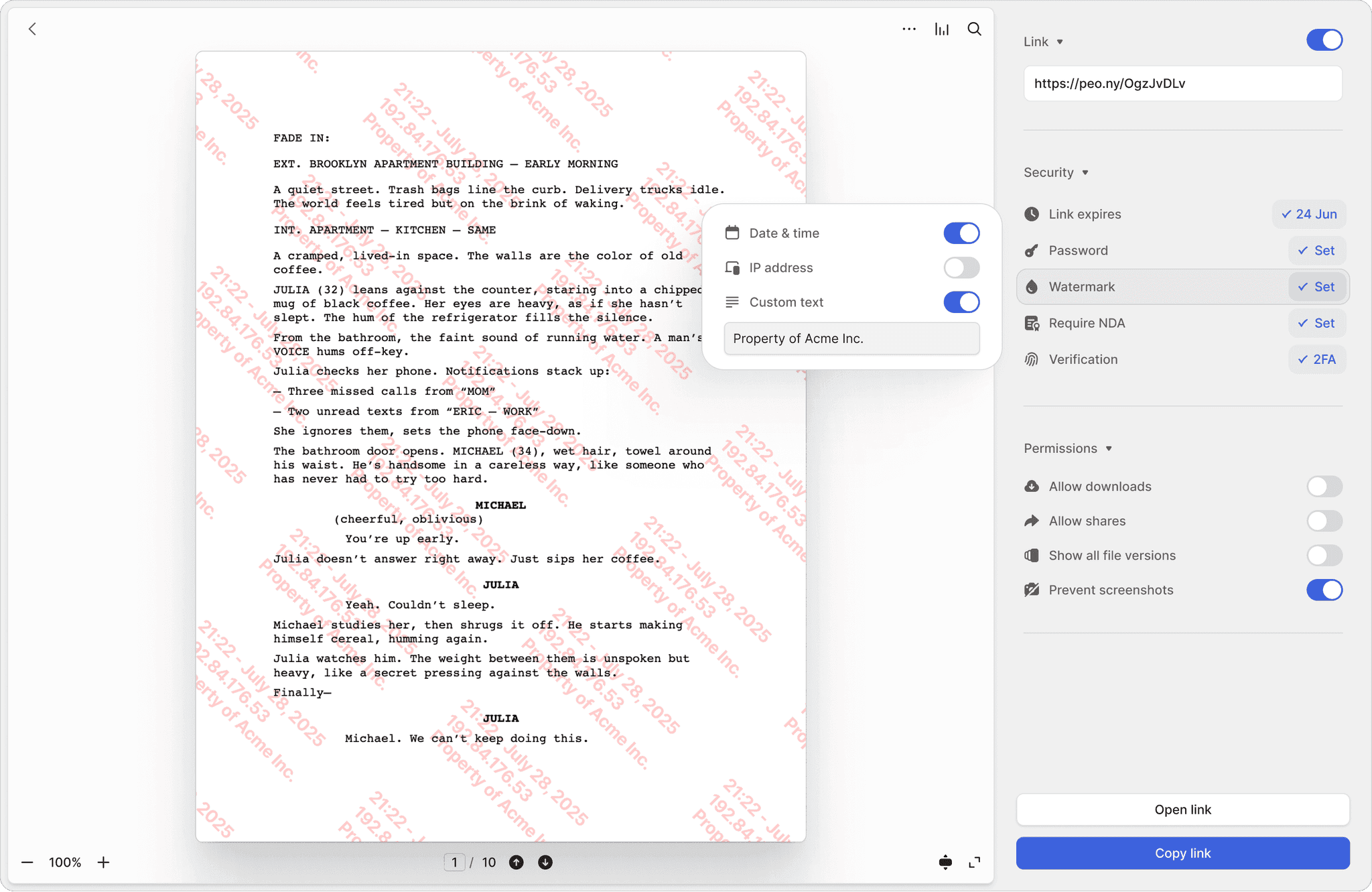
Screenshot protection
Block screen captures of sensitive documents. Dropbox has no screenshot blocking — once a file is shared, it can be captured and forwarded without restriction.
Dynamic watermarks
Every page stamped with the viewer's email and timestamp. Trace the source of any leak instantly — something Dropbox simply cannot do.
NDA-gated access
Require investors to sign an NDA before they see a single page. Built-in e-signatures make it seamless — no separate signing tool needed. Dropbox has no NDA gating at any tier.
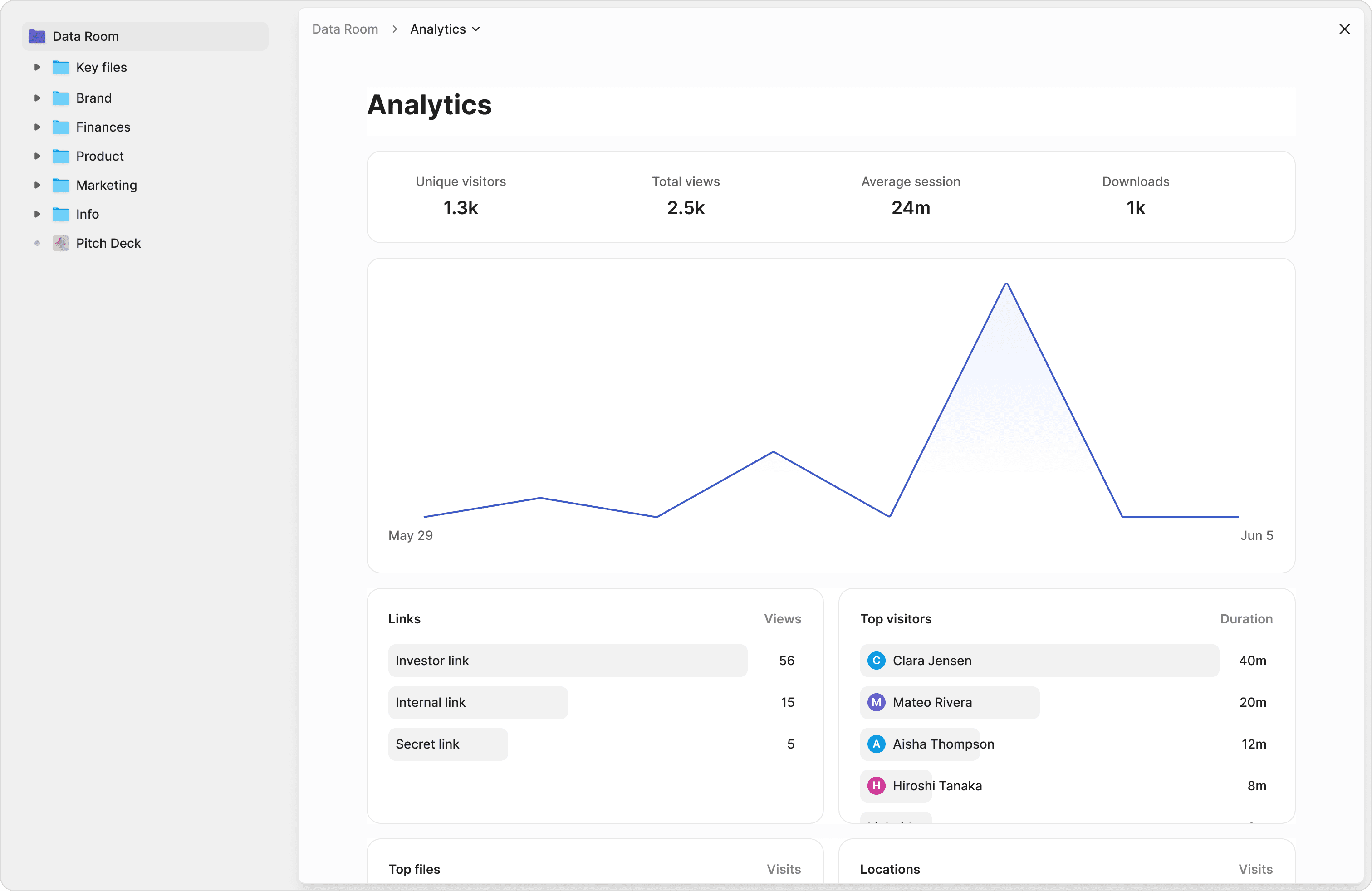
Know exactly which slides your investors care about
Dropbox tells you nothing about how people engage with your documents. Peony shows you which pages were read, how long each investor spent per slide, and their total viewing time across your entire data room. Prioritize follow-up calls based on real engagement data, not guesswork.
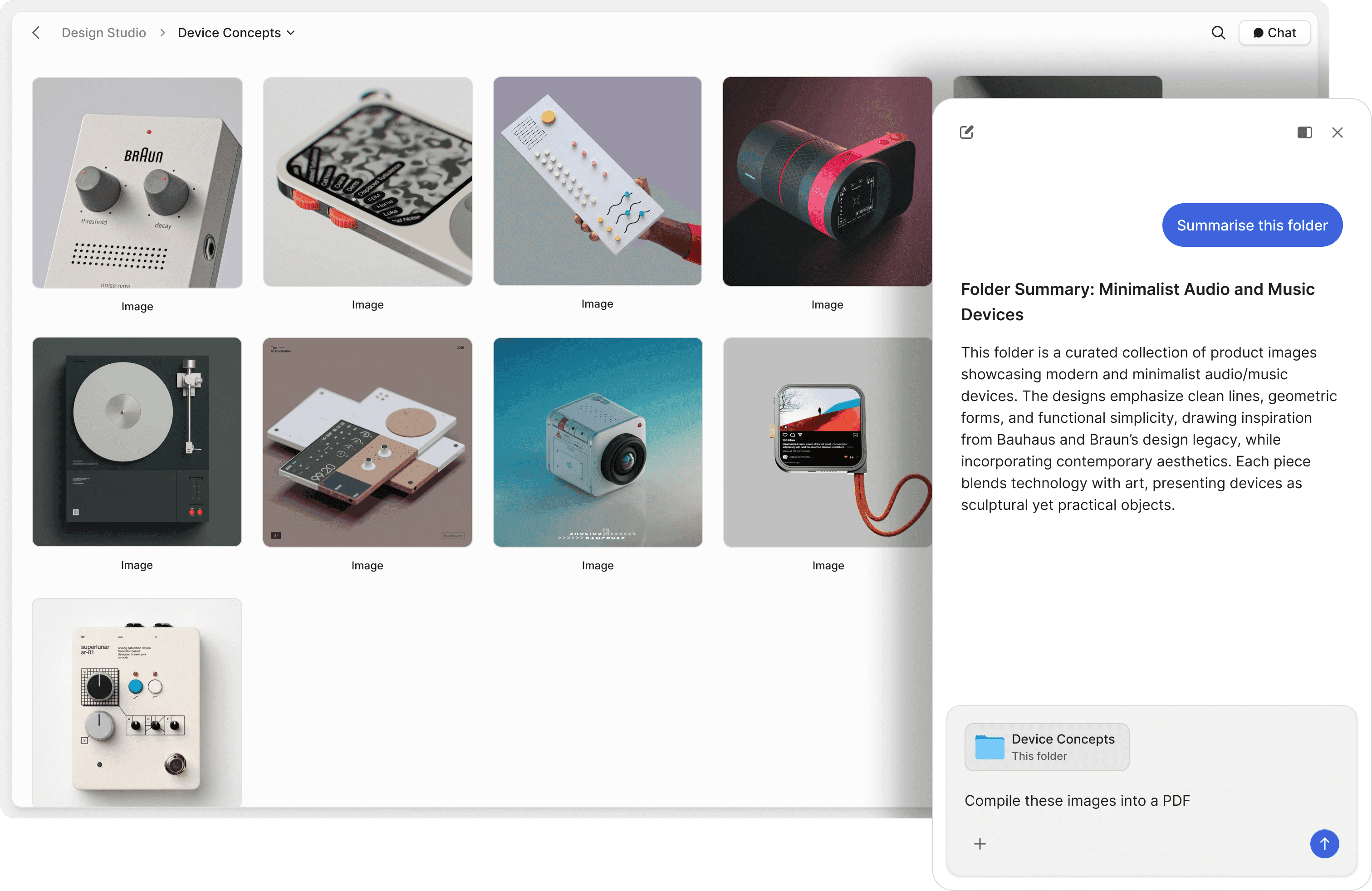
Let investors ask questions and get instant answers
Dropbox is a passive file storage system — viewers download files and read them on their own. Peony's AI document chat lets investors and partners ask questions about your data room and receive instant, accurate answers pulled directly from your documents — 24 hours a day, 7 days a week. Close deals faster by removing information bottlenecks.
"Peony is easily the best form factor for sharing client-facing material. It lets us stand out by embedding custom booking and website links into secure deck shares."


Robi Lin
Founder & CEO, Sepal AI (YC S24)
Frequently asked questions
My 4-person startup stores everything in Dropbox — why would I need a separate data room for our fundraise?
Dropbox keeps your team's files synced, but the moment a founder shares a pitch deck or financial model with investors, Dropbox falls short. Peony is a purpose-built data room that shows you exactly which VCs opened your deck, which pages they lingered on, and how long they spent — intel that helps founders prioritize follow-ups. Peony also adds screenshot protection, dynamic watermarks, NDA gating, controlled redaction, and AI document chat, none of which Dropbox offers at any tier.
We're a seed-stage team about to pitch 25 VCs — can we just use our existing Dropbox as a data room?
Founders who send pitch decks through Dropbox are flying blind — there is no way to see which investors actually read the materials. Peony gives seed-stage teams a branded, secure data room in under 5 minutes with page-by-page analytics, screenshot protection, NDA gating, and dynamic watermarks — everything VCs expect when reviewing early-stage opportunities, without the complexity of enterprise platforms.
I'm sharing our cap table and 3-year financial model with 10 investors — does Peony have better security than Dropbox for these documents?
Significantly. When founders share cap tables, financials, or term sheets, Peony blocks screen captures with screenshot protection, stamps every page with the viewer's identity through dynamic watermarks, and requires NDA signatures before anyone can access the room. Peony also includes password protection, two-factor authentication, link expiry controls, AES-256 encryption at rest, TLS 1.3 in transit, and SOC 2-ready, GDPR, CCPA, and HIPAA compliance on every plan. Dropbox focuses on file sync security but has none of these document-sharing safeguards.
We're a 5-person startup currently on Dropbox Plus — how does Peony pricing work if we switch for our investor data room?
Peony gives small teams full data room capabilities — page-by-page analytics, screenshot protection, AI document chat, and unlimited links — with a free tier (2 GB storage) to get started. The Pro plan at $20 per admin per month (200 GB) covers most startup and SMB needs, and Business at $40 per admin per month (unlimited storage) adds custom branding. No per-viewer, per-page, or per-link fees on any plan. Dropbox offers a free plan (2 GB), Plus at $12 per month, and Business at $15 per user per month, but none of those tiers include data room features.
I sent my deck to 15 VCs through Dropbox last week and have no idea who read it — can Peony show me that?
Dropbox shows basic file access logs — not much help when a founder needs to know whether a VC read the revenue slide or skipped straight to the team page. Peony provides page-by-page analytics showing exactly which pages each investor viewed, how long they spent per page, and their total engagement time. Founders use this to rank investor interest and decide who to follow up with first.
We're about to send our Series A data room to 20 VCs — does Peony let me require NDA signatures before they access anything?
Yes — and for a Series A with 20 VCs reviewing sensitive financials, NDA gating is essential. Peony requires every viewer to sign an NDA with built-in e-signatures before they see a single page, so founders maintain a clear audit trail of who agreed to confidentiality. No third-party e-signature tool needed. Dropbox has no NDA gating, meaning anyone with a shared link gets immediate access.
Our team has 200+ files organized in Dropbox folders — how hard is it to migrate everything to Peony?
Most small teams complete the switch in a single sitting. Peony is designed for 5-minute setup: upload your pitch deck and supporting documents from Dropbox, configure security settings like watermarks and NDA gating, and share one branded link with investors or buyers. There is no lengthy onboarding or IT involvement required.
We're a 30-person company exploring our first acquisition — is Peony better than Dropbox for running buy-side due diligence?
Absolutely. A growing SMB entering its first buy-side or sell-side process needs structured data rooms, granular access controls, and a full audit trail — none of which Dropbox provides. Peony gives small teams NDA gating, dynamic watermarks, page-by-page analytics, and AI document chat so potential buyers can get instant answers to their questions. Peony also generates AI-powered due diligence checklists tailored to your deal type, helping first-time acquirers avoid missing critical documents.