
E-signatures are table stakes.Get the full data room too.
DocuSign handles e-signatures well. But when you need analytics, security, AI document chat, and a complete data room alongside signing, you need Peony.Set up in under 5 minutes.
No credit card required

Peony vs DocuSign — at a glance
Price: Peony is $40/admin/mo on Business with e-signatures bundled (free plan available at $0). DocuSign starts at $10/user/mo for e-signatures only, scaling to $40/user/mo on Business Pro.
Features: Peony bundles data rooms, AI document chat, screenshot protection, dynamic watermarks, NDA gating, page-by-page analytics, and e-signatures. DocuSign is e-signatures only.
Setup: Peony is live in under 5 minutes self-serve with no credit card required. DocuSign requires per-user provisioning across separate plans for signatures, data rooms, and analytics.
How does Peony compare to DocuSign feature-by-feature?
Peony matches DocuSign on e-signatures and adds data rooms, AI document chat, screenshot protection, dynamic watermarks, NDA gating, and page-by-page analytics that DocuSign does not offer at any tier. The table below maps each feature against both platforms.
DocuSign is an e-signature tool. Peony is a complete virtual data room that includes e-signatures plus everything else you need to share, track, and protect documents.
| Feature |  Peony Peony |  DocuSign DocuSign |
|---|---|---|
| Starting price | Free ($0) | $10/mo per user |
| E-signatures | Pro plan+ | Core product |
| Data rooms | Business plan | Not available |
| Page-by-page analytics | Included | Not available |
| Screenshot protection | Business plan | Not available |
| Dynamic watermarks | Business plan | Not available |
| NDA gating | Business plan | Not available |
| AI document chat | Business plan | Not available |
| Link expiry controls | Included | Limited |
| Custom branding | Business plan | Enterprise only |
Why do teams switch from DocuSign to Peony?
Teams switch from DocuSign to Peony to consolidate e-signatures, data rooms, page-by-page analytics, AI document chat, and screenshot protection into a single $40/admin/mo platform instead of stacking three separate subscriptions. DocuSign covers signing well but stops there — no data rooms, no document-level analytics, no AI features at any tier.
DocuSign is a solid e-signature tool. But modern teams need more than just signing — they need a secure platform to share, track, and discuss documents.
Document analytics
DocuSign tells you when a document is signed. Peony tells you which pages were read, how long each viewer spent, and what they focused on — page by page.
Advanced security
Screenshot protection, dynamic watermarks, NDA gating, 2FA, and link expiry are all built into Peony. DocuSign focuses on signature security, not document security.
AI document chat
Peony lets recipients chat with your documents and get instant answers 24/7. DocuSign has no document intelligence or AI features for shared files.
Better value
Peony replaces DocuSign, your data room, and your document tracking tool — all in one platform with a free plan. Stop paying for three separate subscriptions.
How much does Peony cost vs DocuSign?
Peony costs $0 free, $20/admin/mo on Pro, or $40/admin/mo on Business — and Business bundles data rooms, AI chat, screenshot protection, and e-signatures together. DocuSign costs $10–$40/user/mo across Personal, Standard, and Business Pro and still only handles e-signatures.
Peony gives you e-signatures, data rooms, analytics, and AI document chat — all at a lower price than DocuSign alone.

Peony
Free
$0
2 GB storage
Pro
$20/admin/mo
200 GB storage
Business
$40/admin/mo
Unlimited storage
Analytics on all plans. E-signatures on Pro+. Data rooms, AI chat, and advanced security on Business.

DocuSign
Personal
$10/user/mo
E-signatures only
Standard
$25/user/mo
E-signatures only
Business Pro
$40/user/mo
E-signatures only
No data rooms, no page analytics, no screenshot protection, no AI features.
When should you choose Peony vs DocuSign?
Choose Peony when you need a secure data room, page-by-page analytics, screenshot protection, AI document chat, and e-signatures in one platform for $40/admin/mo. Choose DocuSign when you need thousands of envelopes per month, deep CRM integrations, or enterprise contract lifecycle management and nothing beyond signing.
DocuSign excels at high-volume e-signature workflows. Peony is the better choice when you need document sharing, security, and analytics alongside signing.
Choose DocuSign when you need
High-volume e-signature workflows (thousands of envelopes per month)
Deep CRM integrations (Salesforce, HubSpot) for automated signing
Enterprise contract lifecycle management (CLM)
Only e-signatures — no data room or analytics needed
Choose Peony when you need
A secure data room for fundraising, M&A, or due diligence
Page-by-page analytics to see what investors and partners actually read
Document security: screenshot protection, watermarks, NDA gating, link expiry
AI document chat so recipients get answers instantly
E-signatures and document sharing in a single platform
A free tier to get started without a credit card
What does Peony offer that DocuSign doesn't?
Peony adds full-featured data rooms, page-by-page analytics, screenshot protection, dynamic watermarks, NDA-gated access, and AI document chat on top of e-signatures — none of which DocuSign offers at any tier. The sections below break down the three biggest gaps.
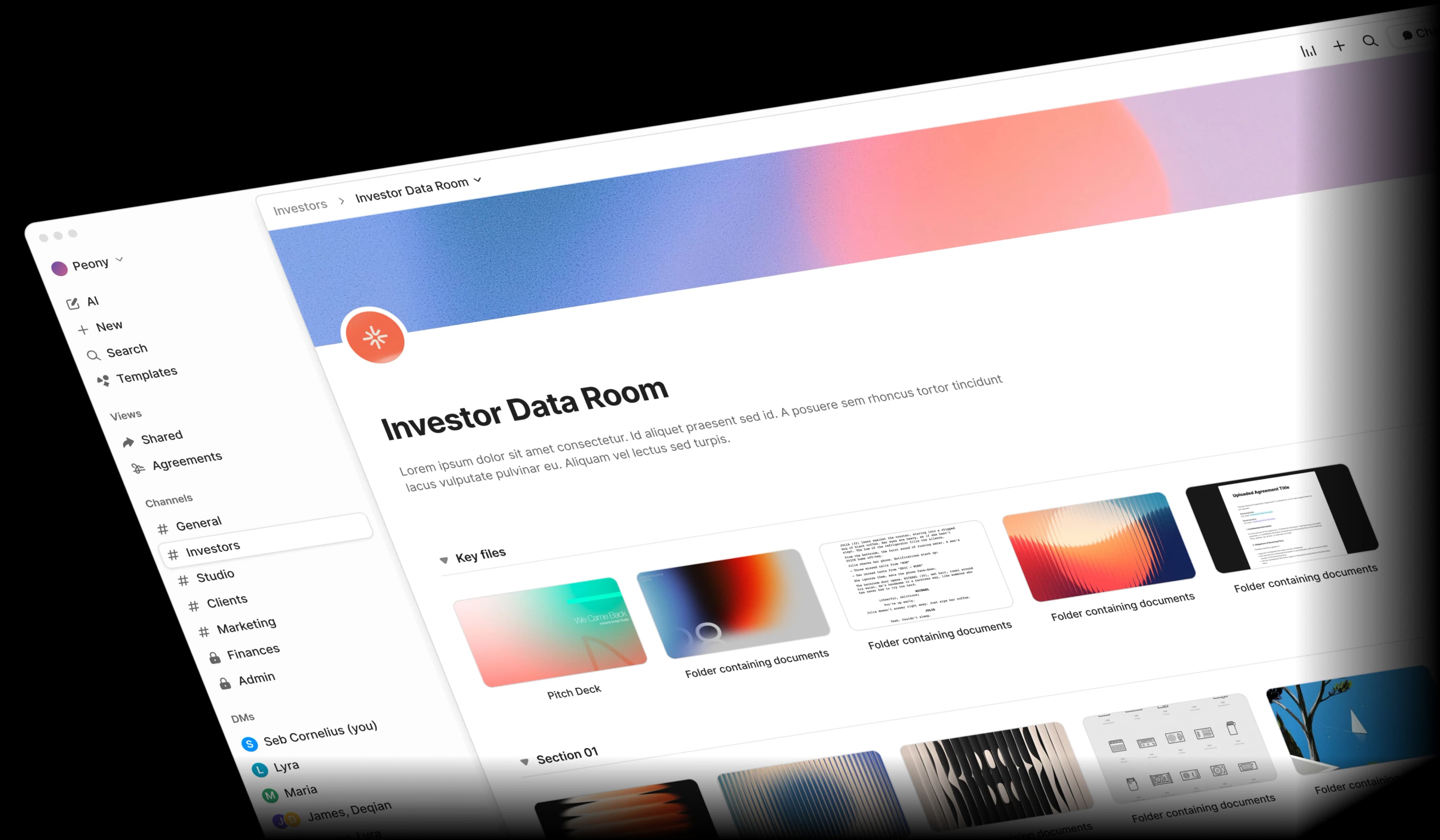
Share documents securely in organized data rooms
DocuSign sends individual documents for signing. Peony lets you organize all your documents into branded data rooms with granular access controls — perfect for fundraising, M&A, and due diligence.
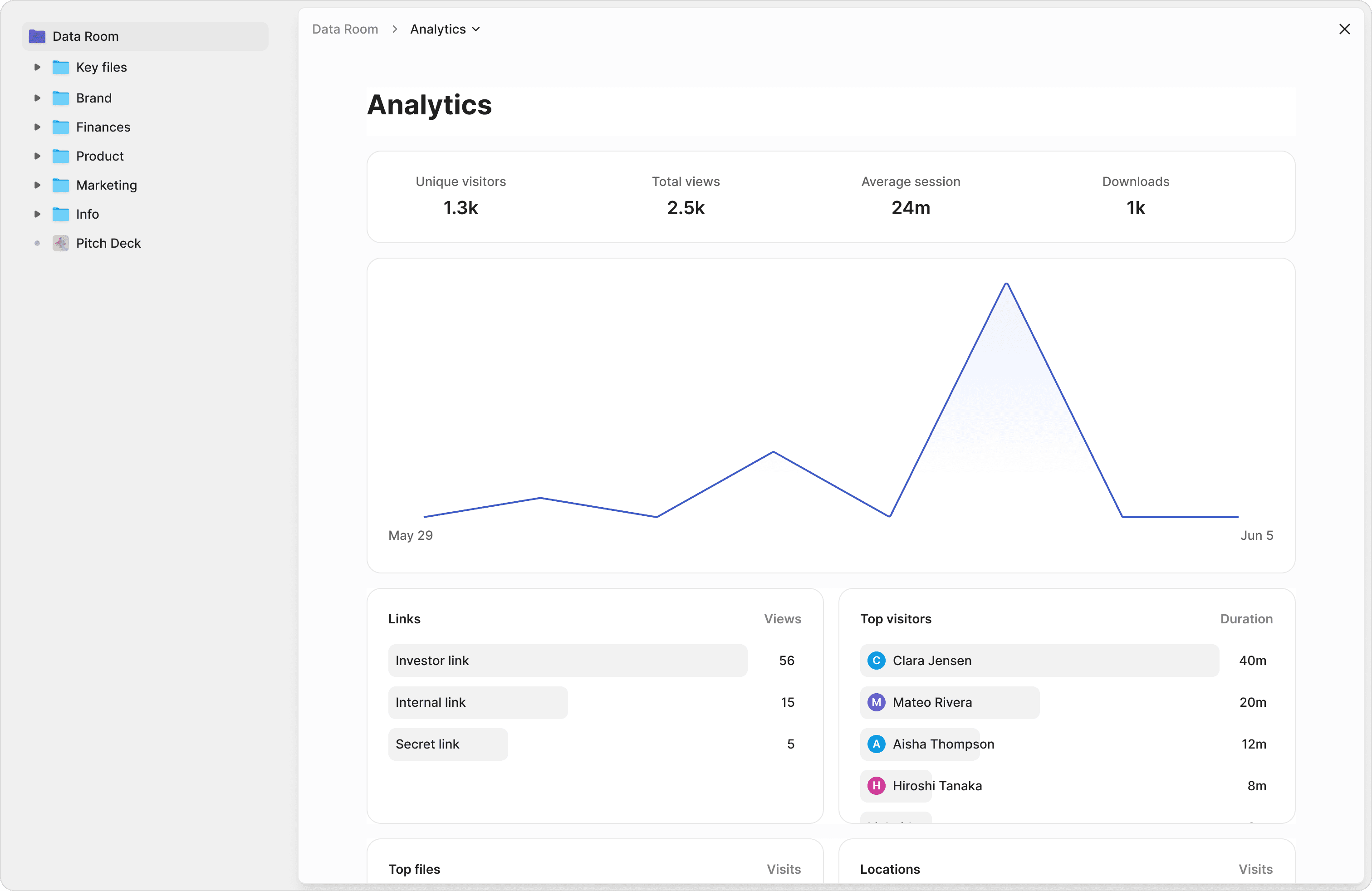
Know exactly what your recipients read
DocuSign tracks whether a document was signed. Peony tracks every page view, time spent, scroll depth, and visitor detail. See which sections of your pitch deck investors care about most.
Protect documents beyond just the signature
DocuSign secures the signing process. Peony secures the entire document lifecycle — from the moment you share a file to the moment access expires. Screenshot protection, watermarks, password protection, 2FA, and NDA gating are all included.
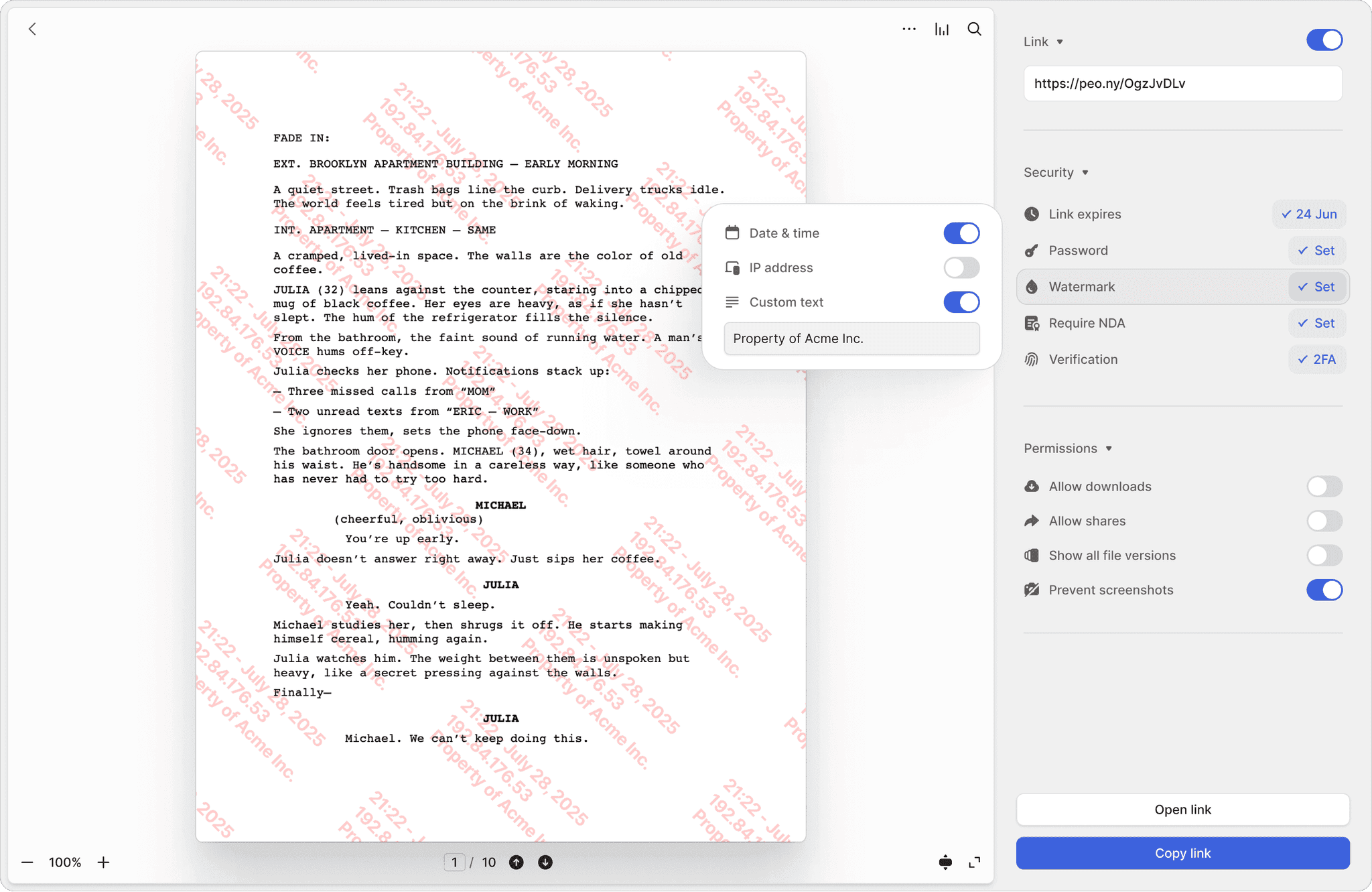
Screenshot protection
Block screen captures of sensitive documents. DocuSign has no equivalent — once a document is viewed, it can be screenshotted freely.
Dynamic watermarks
Every page stamped with the viewer's identity and timestamp. If a document leaks, you know exactly who shared it.
NDA-gated access
Require viewers to sign an NDA before accessing documents. Built-in e-signatures make it seamless — no separate tool needed.
"We'd been searching for a solution like Peony for ages, and it has completely transformed our workflows. What used to take hours every week is now effortless — Peony saves us so much time that we were finally able to move away from Dropbox Sign."
Akash Ghavalkar
Co-founder & COO, Third Space
Frequently asked questions
Our M&A team runs 6 deals a year and we're tired of paying for DocuSign plus a separate data room — is Peony a good alternative?
Yes. M&A and legal teams need more than e-signatures — they need secure data rooms, page-by-page analytics, screenshot protection, dynamic watermarks, NDA gating, and AI document chat. Peony includes built-in e-signatures plus all of these capabilities in one platform. DocuSign only handles e-signatures, so deal teams end up paying for a separate data room on top. Peony includes a free plan ($0).
I'm a partner at a 15-attorney firm evaluating costs — how does Peony pricing compare to DocuSign for our M&A practice?
Peony starts free ($0) with 2 GB of storage. The Pro plan ($20/admin/month, 200 GB) adds e-signatures and password protection. The Business plan ($40/admin/month, unlimited storage) adds data rooms, dynamic watermarks, screenshot protection, NDA gating, and AI document chat — everything a law firm or M&A advisor needs in one subscription. DocuSign starts at $10 per user per month for e-signatures only, with no data rooms, no analytics, and no AI features at any price.
We need e-signatures for 20+ NDAs, an LOI, and closing docs on a single deal — does Peony handle all of that like DocuSign?
Yes. Peony has built-in e-signatures that let deal teams collect NDA signatures, LOIs, purchase agreements, and closing documents without leaving the platform. Unlike DocuSign, Peony also provides data rooms, page-level analytics, screenshot protection, and AI document chat alongside signing — so counsel and bankers manage the entire transaction lifecycle in one place.
Our firm manages 3 active sell-side mandates right now — can Peony replace DocuSign for diligence and closing on all of them?
Yes. Peony combines e-signatures with secure data rooms, making it ideal for M&A due diligence, NDA execution, and closing binders. Instead of paying for DocuSign plus a separate data room provider, Peony gives deal teams both in a single platform with setup in under 5 minutes. Peony also includes Smart Q&A — a structured 4-step workflow where counterparties submit questions, AI drafts answers from your documents, your team reviews, and approved responses are published — which accelerates buyer diligence.
I'm a sell-side advisor preparing a 500-document data room for a $50M deal — does Peony have proper data rooms that DocuSign lacks?
Yes. Peony provides unlimited, fully structured data rooms with folder organization, granular permissions, and branded viewer experiences — exactly what sell-side advisors and corporate counsel need for M&A. DocuSign has no data room functionality and is designed purely for sending individual documents for signature.
Our deal involves highly sensitive IP that 4 bidder groups will review — what security features does Peony offer that DocuSign doesn't?
Peony includes screenshot protection, dynamic watermarks, NDA gating, password protection, two-factor authentication, link expiry controls, and controlled redaction that lets counsel black out privileged or sensitive information before sharing with counterparties. DocuSign focuses on signature security but does not protect documents from being screenshotted, forwarded, or accessed after a deal closes. Peony also encrypts data with AES-256 at rest and TLS 1.3 in transit, with SOC 2-ready, GDPR, CCPA, and HIPAA compliance on every plan.
My 2-person deal team is drowning in 100+ buyer diligence questions — does Peony have AI features that speed up our responses?
Yes. Peony includes AI document chat on Business plans, letting counterparties ask questions about your data room documents and get instant, accurate answers — reducing the back-and-forth that slows due diligence. Peony also provides auto-indexing that automatically classifies documents, applies OCR, and enables full-text search across your data room, so legal teams can locate specific clauses or exhibits in seconds. DocuSign has no AI document intelligence.
We have a deal signing in 3 weeks — how quickly can our law firm migrate from DocuSign to Peony?
Peony can be set up in under 5 minutes. Upload your transaction documents, create data rooms, configure NDA gating and security settings, and share links with counterparties — all self-serve. Most M&A teams and law firms use Peony alongside or as a replacement for DocuSign, consolidating e-signatures, data rooms, and document analytics into one platform.