
Why teams trust Peony with their most sensitive files
256-bit AES encryption
Every file is encrypted at rest and in transit. Your documents are protected by the same encryption standards used by banks and government agencies.
Granular access controls
Passwords, email verification, 2FA, approved-email lists, NDA gates, and link expiry — layer as many controls as your documents need.
Full audit trail
Every view, download, and access attempt is logged with timestamps, IP addresses, and device details. Complete visibility into who accessed what and when.
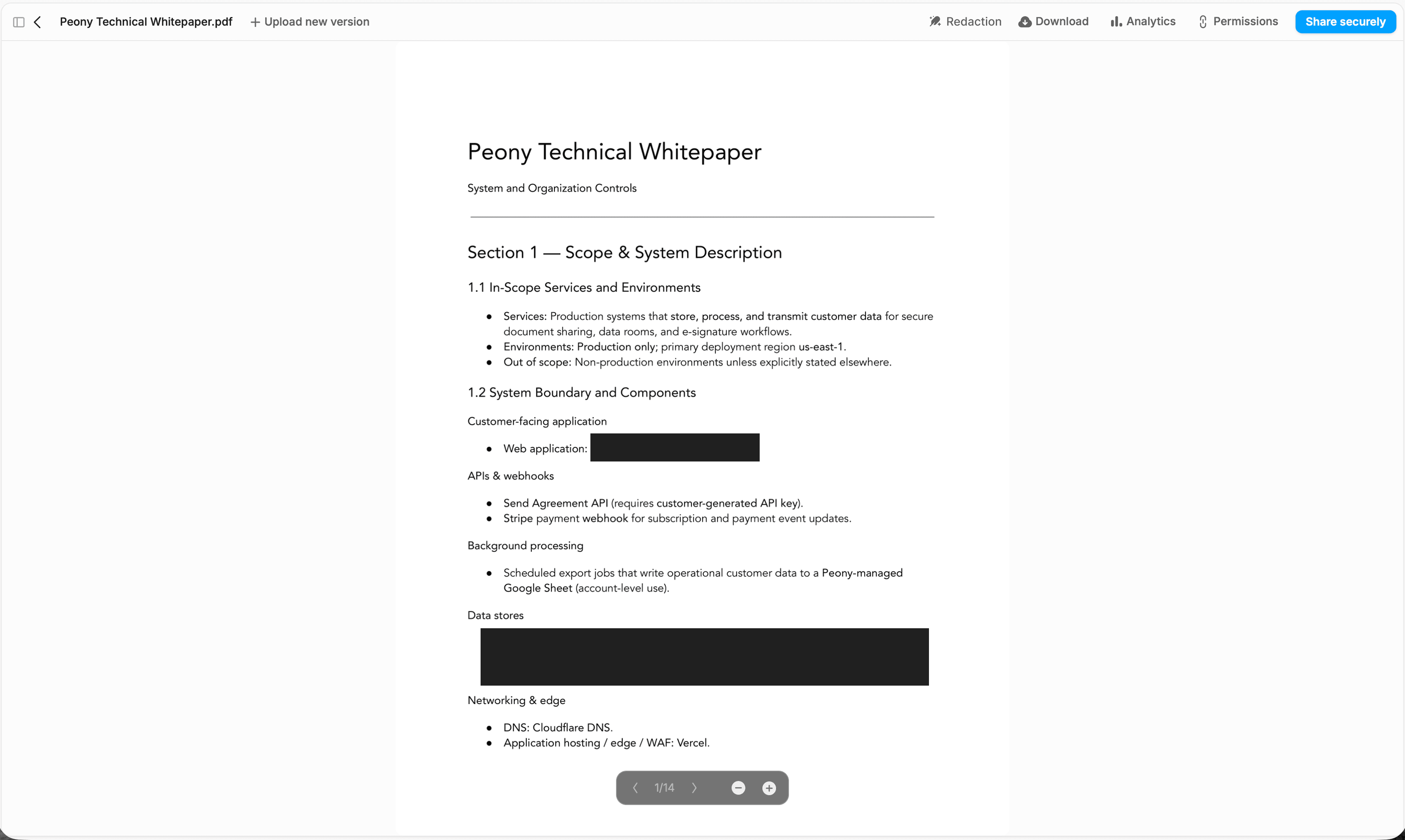
SOC 2-ready infrastructure
Peony's security architecture covers every layer — from API endpoints and data stores to networking and encryption at rest. Our Technical Whitepaper details the full scope and system boundary.
"Every now and then, you come across a product that has a massive positive impact on your business. Peony is one such product."
Panos Moutafis
Founder & CEO, Zenus
Frequently asked questions
I'm a FINRA-registered wealth manager with $50M+ AUM. How does Peony protect client documents I share with custodians and compliance reviewers?
Your client documents are encrypted with AES-256 at rest and TLS 1.3 in transit — the same standard used by banks and government agencies. On the Business plan ($40/admin/month), Peony adds dynamic watermarks that embed each reviewer's identity on every page of your client statements and portfolio reports, screenshot protection that blocks screen captures of sensitive holdings data, and approved-email lists so only your custodian's compliance team can access the link. Every view, download, and access attempt is logged with timestamps, IP addresses, and device details — giving your compliance officer an exportable audit trail for FINRA examinations. DocSend lacks screenshot protection and dynamic watermarks entirely. Ideals charges hundreds per user per month for comparable controls.
We're a mid-market bank going through SOC 2 compliance. Can Peony's infrastructure support our audit requirements?
Yes. Peony runs on SOC 2-ready infrastructure with AES-256 encryption at rest, TLS 1.3 in transit, two-factor authentication on every plan, and full audit trails logging every access event with timestamps, IP addresses, and device details. Your auditors can export complete access logs showing exactly who viewed which documents and when — the evidence trail SOC 2 Type II reviews require. On the Business plan ($40/admin/month), you also get approved-email lists, NDA gating, and screenshot protection to demonstrate layered access controls to your examiner. Peony maintains 99.96% uptime since August 2025 — exceeding the 99.9% SLAs offered by Datasite and Firmex.
I'm on a litigation team handling a $75M dispute with a protective order. How does Peony prevent unauthorized copying of produced documents?
On the Business plan ($40/admin/month), Peony enforces multiple leak-prevention layers designed for protective-order compliance. Screenshot protection blocks screen captures and recording tools on every page of your produced documents. Dynamic watermarks embed each reviewer's identity — so if a document surfaces outside the designated review group, the watermark traces it back to the exact viewer. You can restrict downloads on specific files, set link expiry dates aligned to your production schedule, and revoke access instantly if a party is disqualified. Every access attempt is logged with timestamps and IP addresses, giving your team a forensic audit trail that satisfies court-ordered document handling requirements. Ideals lacks screenshot protection, and DocSend has no dynamic watermarking or granular download controls.
We're a broker-dealer subject to FINRA Rule 4511 recordkeeping requirements. Does Peony's audit trail meet our retention obligations?
Peony logs every view, download, and access attempt with timestamps, IP addresses, and device details on every plan — including the Free tier. Your compliance team gets an exportable audit trail for every document in the data room, covering the who, what, when, and where that FINRA Rule 4511 and SEC Rule 17a-4 retention policies require. On the Business plan ($40/admin/month), you also get aggregate dashboard views, visitor location and device info, and multi-file analytics across your entire room — so your compliance officer can demonstrate complete document governance during a FINRA examination. DocSend provides basic link tracking but lacks the per-page granularity and exportable logs that broker-dealer compliance demands.
I'm a PE fund manager sharing quarterly reports with 40+ LPs across a $200M fund. How does Peony prevent LP report leaks?
On the Business plan ($40/admin/month), Peony combines three leak-prevention layers built for GP-to-LP workflows. Dynamic watermarks embed each LP's identity on every page of your quarterly reports and capital-call notices — so if a document surfaces externally, you trace it back to the exact viewer. Screenshot protection blocks screen captures and recording tools, preventing LPs or placement agents from copying your performance data. Approved-email lists ensure only your intended recipients can open the link, even if it is forwarded. Each of your 40+ LPs gets a separate personalized link with independent permissions and a full audit trail. Firmex charges premium rates for comparable leak tracking, and DocSend lacks screenshot protection and dynamic watermarks entirely.
We're an Am Law 200 firm running a $150M acquisition with 3 separate bidder groups. How do we prevent cross-contamination between buyer teams?
On the Business plan ($40/admin/month), each bidder group receives a separate link with its own NDA gate, approved-email list, password, and expiry date — so Bidder A never sees materials meant for Bidder B or C. Your team can set different permission levels per bidder and per document, restrict downloads on sensitive sections like customer contracts or IP schedules, and revoke access instantly if a party drops out. Dynamic watermarks embed each reviewer's identity on every page, and screenshot protection blocks screen captures across all three groups. Per-page analytics show exactly which sections each bidder's counsel reviewed and for how long, giving your deal team engagement intelligence across the entire auction. Datasite charges $25K+ per engagement for comparable controls. Peony delivers the same layered security at $40/admin/month.
I'm at a regional bank preparing for OCC and FDIC examinations. Can Peony serve as our secure document repository for examiner access?
Yes. Peony's SOC 2-ready infrastructure with AES-256 encryption, two-factor authentication on every plan, and full audit trails meets the security expectations OCC and FDIC examiners bring to document review. On the Business plan ($40/admin/month), you can create a dedicated data room for each examination cycle with approved-email lists restricting access to your examiners only, NDA gates if required by your legal team, and link expiry dates aligned to your exam timeline. Every examiner action is logged — views, downloads, time spent per page — giving your compliance team a complete record of the examination process. Peony maintains 99.96% uptime, exceeding the 99.9% SLAs offered by Datasite and Firmex, so your examiners have uninterrupted access throughout the review window.
We're running a $300M sell-side mandate and our client wants custom branding on the data room. Does that compromise any security features?
No — custom branding and enterprise security run on the same Business plan ($40/admin/month) with no trade-offs. Your client's logo, custom domain, and branded welcome message display to every bidder while AES-256 encryption, screenshot protection, dynamic watermarks, NDA gates, and approved-email lists stay fully active underneath. Each bidder group gets a separate branded link with independent permissions, and your team retains full audit trails with timestamps, IP addresses, and per-page analytics across every bidder. The branded experience signals institutional quality to your buyer groups without weakening any security layer. Datasite charges $25K+ per engagement and still requires a lengthy setup process for custom branding. Peony gives your $300M mandate both the polish and the protection from a single plan.
Related features
Two-Factor Authentication
Require email-based identity verification before anyone can view your shared documents.
Password Protection
Require a password before anyone can view your shared documents or data rooms.
Screenshot Protection
Block screen captures and recording tools to prevent unauthorized copies of your documents.