
ShareFile stores files.Peony protects your deals.
ShareFile is built for enterprise file sharing with complex admin and dated UI. Peony is a modern data room with screenshot protection, dynamic watermarks, NDA gating, and page-by-page analytics — purpose-built for fundraising, M&A, and due diligence.Set up in under 5 minutes. No credit card required.
No credit card required
Side-by-side comparison
ShareFile is an enterprise file sharing platform owned by Cloud Software Group (formerly Citrix). Peony is a complete virtual data room with analytics, security, and AI built in — designed for fundraising, M&A, and investor relations.
 Peony
PeonyWhy teams switch from ShareFile to Peony
ShareFile was built for enterprise file storage and compliance workflows. Modern deal teams need purpose-built data rooms with granular security, real-time analytics, and AI-powered document intelligence.
Modern data rooms
ShareFile is a general-purpose file sharing tool with a dated interface. Peony gives you purpose-built data rooms with folder hierarchies, granular permissions, and branded viewer experiences — designed for fundraising and M&A due diligence.
Screenshot protection
ShareFile has no screenshot protection. Anyone who opens your documents can capture and forward them. Peony blocks screen captures, adds dynamic watermarks, and gates access behind NDAs to keep your deal documents confidential.
AI document chat
Peony lets investors and partners ask questions about your documents and get instant AI-powered answers around the clock. ShareFile offers no document intelligence — viewers are left to read everything on their own.
Start free trial
ShareFile starts at $16 per user per month with a 5 user minimum. Peony lets you set up a data room, share documents, and track analytics at $0. When you scale, Pro ($20/admin/mo) gives you 200 GB with password protection and e-signatures. Business ($40/admin/mo) unlocks data rooms, watermarks, screenshot protection, and AI.
Pricing comparison
Peony gives you data rooms, page-by-page analytics, screenshot protection, and AI document chat — all at a lower price than ShareFile, which charges $55 per user per month for its VDR plan.

Peony
Free
$0
2 GB storage, per-page analytics
Pro
$20/admin/mo
200 GB storage
Business
$40/admin/mo
1 TB storage
Analytics on every plan. Pro adds e-signatures. Business adds data rooms, screenshot protection, watermarks, NDA gating, and AI chat.
ShareFile
Standard
$16/user/mo
5 user minimum, basic file sharing
Advanced
$25/user/mo
Workflow automation, client portals
Premium
$38/user/mo
Custom branding, advanced security
Virtual Data Room
$55/user/mo
Data room features, audit trails
No free tier. No screenshot protection. No AI features. No dynamic watermarks. No NDA gating.
When to use each platform
ShareFile works for enterprise file storage and compliance-driven document workflows. Peony is the better choice when you need purpose-built data rooms, advanced security, and AI intelligence for deal workflows.
Choose ShareFile when you need
Enterprise file storage with IT-managed user provisioning
Client portals for accounting or legal document collection
HIPAA-compliant file sharing for healthcare workflows
Workflow automation for repetitive document processes
Choose Peony when you need
A secure data room for fundraising, M&A, or due diligence
Page-by-page analytics to see exactly which slides investors care about
Screenshot protection, dynamic watermarks, and NDA gating to protect confidential deal documents
AI document chat so investors get instant answers without waiting for your team
Built-in e-signatures for NDAs, term sheets, and closing documents
A free tier to share your first data room without a credit card
What Peony gives you that ShareFile does not
Stop unauthorized screenshots of your deal documents
ShareFile has no screenshot protection. Anyone who opens your documents can capture every page and forward it. Peony blocks screen captures and stamps every page with the viewer's identity and timestamp — so if a document leaks, you know exactly who shared it.
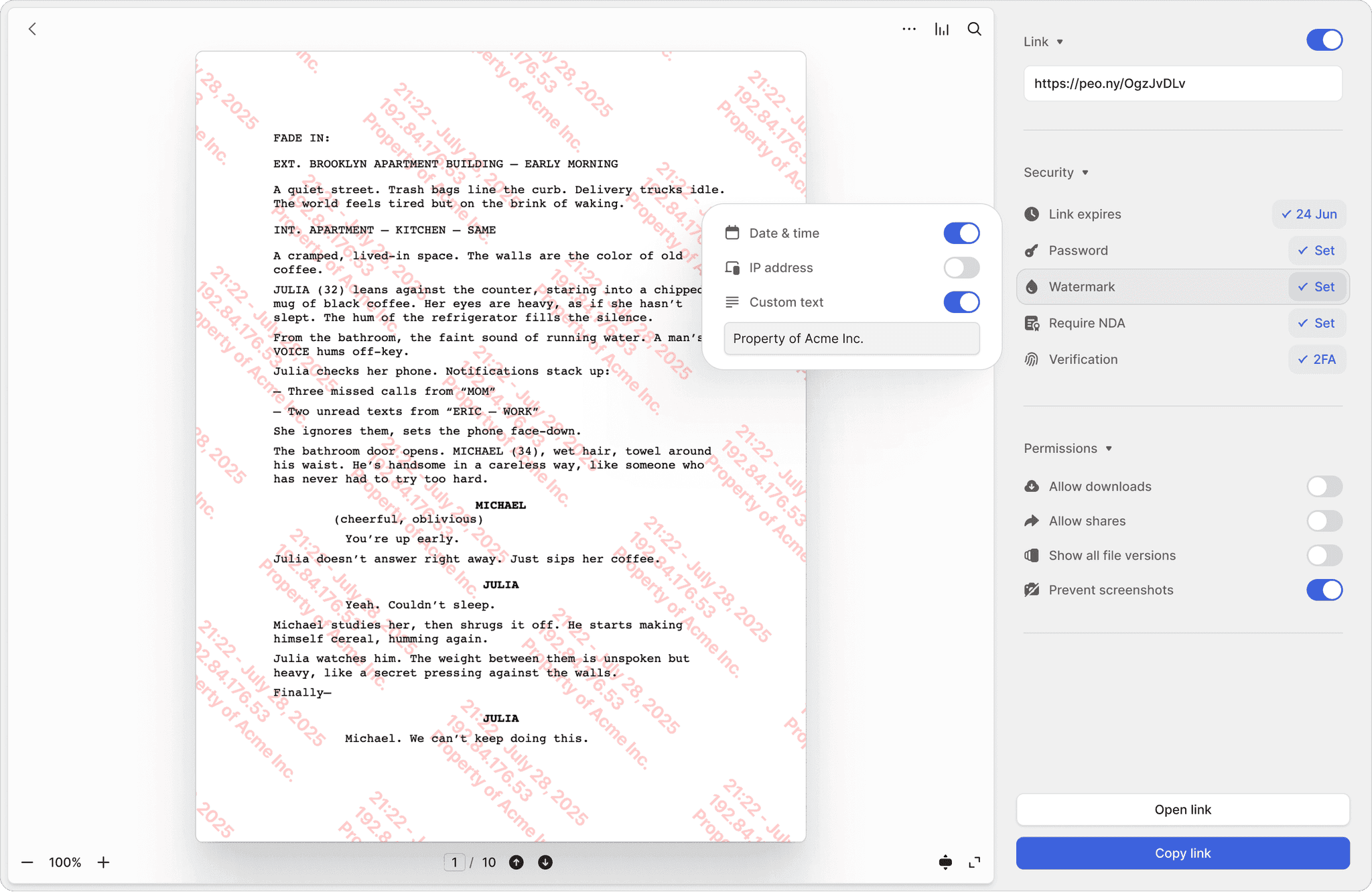
Screenshot protection
Block screen captures of sensitive documents. ShareFile has no equivalent — once a document is viewed, it can be screenshotted freely.
Dynamic watermarks
Every page stamped with the viewer's email and timestamp. Trace the source of any leak instantly — something ShareFile simply cannot do.
NDA-gated access
Require investors to sign an NDA before they see a single page. Built-in e-signatures make it seamless — no separate signing tool needed.
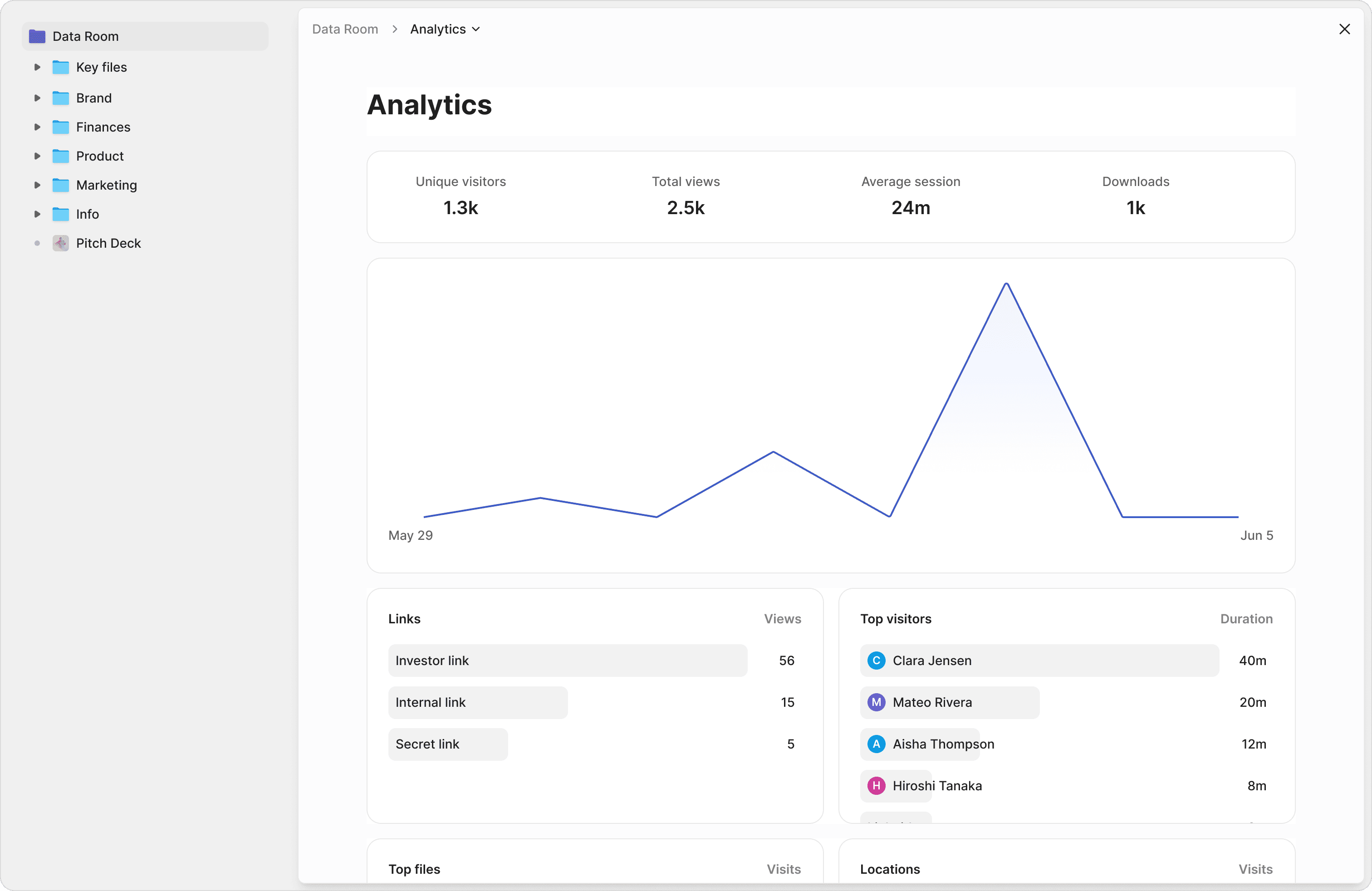
Know exactly which pages your investors care about
ShareFile tells you that a file was downloaded. Peony shows you which pages were read, how long each investor spent per page, and their total viewing time. Prioritize your follow-up calls based on real engagement data, not guesswork.
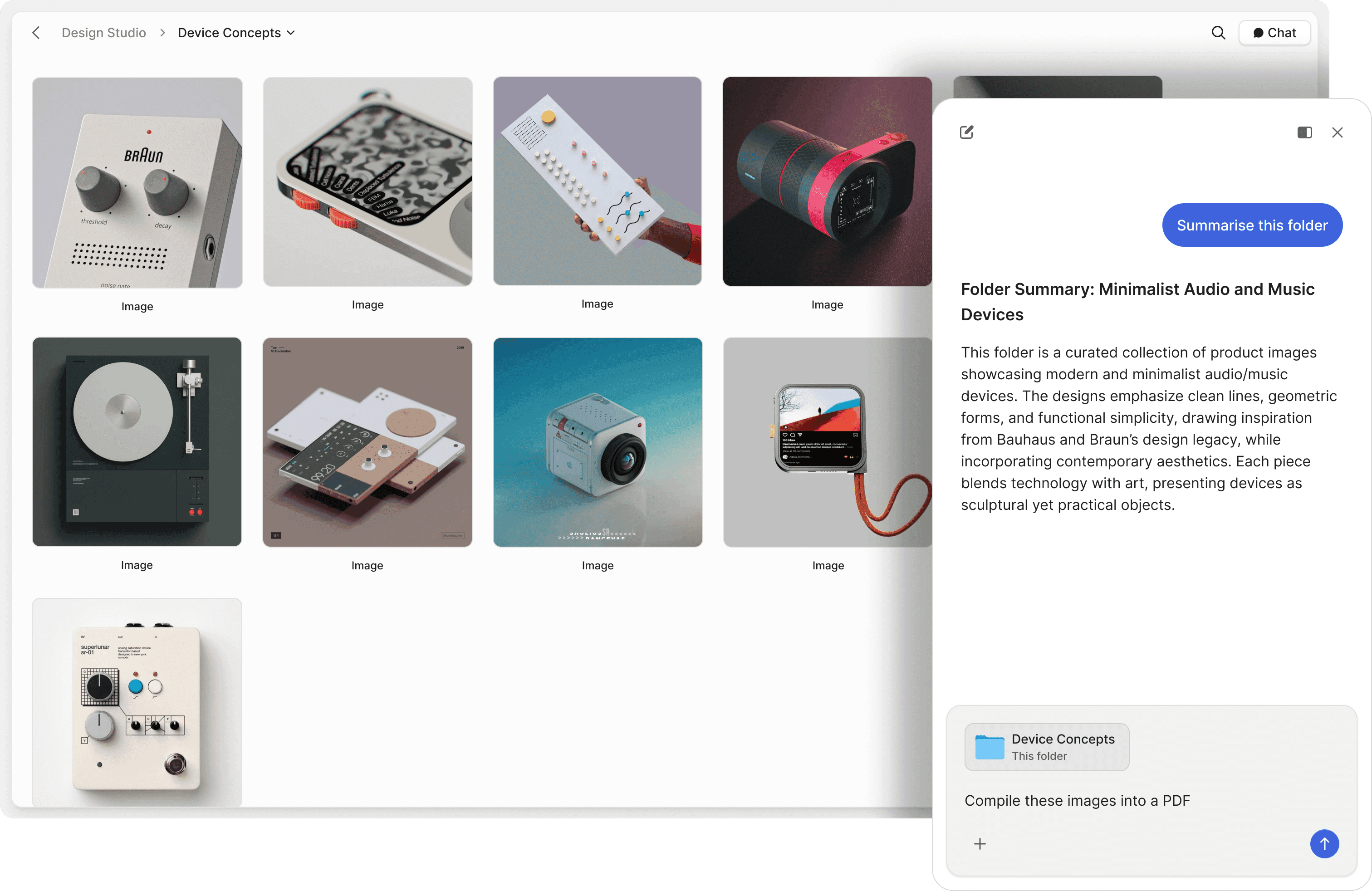
Let investors ask questions and get instant answers
ShareFile has no AI capabilities. Peony's AI document chat lets investors and partners ask questions about your data room and receive instant, accurate answers pulled directly from your documents — 24 hours a day, 7 days a week. Close deals faster by removing information bottlenecks.
"Every now and then, you come across a product that has a massive positive impact on your business. Peony is one such product."

Panos Moutafis
Founder & CEO, Zenus
Frequently asked questions
Is Peony a good ShareFile alternative for law firms sharing client documents?
Yes. Peony gives law firms a modern data room purpose-built for sharing privileged materials, closing documents, and due diligence files with outside counsel, opposing parties, and clients. Every plan includes page-by-page analytics so you know exactly which pages counsel reviewed and for how long. The Business plan ($40/admin/mo) adds screenshot protection, dynamic watermarks, NDA gating, and controlled redaction for blacking out privileged sections before producing documents. ShareFile is a general-purpose enterprise file sharing tool with a dated interface and complex admin starting at $16 per user per month — it was built for accounting firms, not legal workflows.
How does Peony pricing compare to ShareFile for a mid-size law firm?
Peony starts free ($0) with 2 GB of storage and per-page analytics — enough for a solo practitioner sharing closing documents. The Pro plan is $20 per admin per month (200 GB) and adds password protection and e-signatures for NDAs and engagement letters. Business is $40 per admin per month (1 TB) and includes data rooms, screenshot protection, dynamic watermarks, NDA gating, controlled redaction, and AI document chat — everything a mid-size firm needs for M&A closings, CRE transactions, and litigation document production. ShareFile starts at $16 per user per month (5 user minimum) for Standard, $25 for Advanced, $38 for Premium, and $55 for their VDR plan. A 10-attorney practice on ShareFile VDR pays $550/month; the same firm on Peony Business pays $40/month per admin with unlimited external viewers.
Does Peony have better security than ShareFile for sharing privileged legal documents?
Peony includes screenshot protection, dynamic watermarks, controlled redaction for blacking out privileged or confidential sections before production, and NDA gating on the Business plan ($40/admin/mo) — none of which ShareFile offers. For law firms sharing privileged materials with opposing counsel or co-counsel, this means every document is traceable to the individual viewer, screen captures are blocked, and sensitive figures can be redacted before sharing. Peony enforces AES-256 encryption at rest, TLS 1.3 in transit, and SOC 2-ready, GDPR, CCPA, and HIPAA compliance on every plan. Page-by-page analytics show exactly which pages each party reviewed and for how long — useful for confirming that counsel actually reviewed closing documents or that a CRE buyer examined environmental reports.
Can law firms and CRE teams use Peony for regulated document sharing like ShareFile?
Yes. Peony is built for regulated document sharing across law firms and CRE teams alike. Law firms use Peony to share closing binders, litigation exhibits, and privileged materials with outside counsel, clients, and opposing parties. CRE teams use Peony to distribute offering memorandums, environmental reports, lease abstracts, and title documents to prospective buyers during due diligence. Peony provides screenshot protection, dynamic watermarks, NDA gating, controlled redaction, and Smart Q&A — a 4-step workflow where counterparties submit questions, AI drafts answers from your documents, your team reviews, and approved responses are published — keeping counsel in control of every disclosure. ShareFile targets accounting, legal, and healthcare with basic compliance-focused file sharing but lacks these deal-specific capabilities.
Does Peony have AI features for legal document review that ShareFile lacks?
Yes. Peony includes AI document chat that lets opposing counsel, co-counsel, or CRE buyers ask questions about your data room documents and receive instant, cited answers pulled directly from the files — reducing the volume of email inquiries your attorneys field during due diligence or closing. Peony also provides auto-indexing that automatically classifies closing documents, lease agreements, and title files, applies OCR to scanned exhibits, and enables full-text search across your entire data room. ShareFile has no AI document intelligence capabilities. For law firms managing large document productions or CRE teams fielding repetitive buyer questions, Peony's AI works around the clock and keeps your team focused on substantive legal work.
How fast can a law firm set up Peony compared to ShareFile?
Peony is designed for self-serve setup — a law firm can create its first data room in under 5 minutes with a median setup time of 4 minutes 19 seconds. Upload your closing documents or diligence files, configure security settings like watermarks and NDA gating, and share a single link with counsel or clients. Peony even generates AI-powered due diligence checklists based on your deal type so associates know exactly which documents to include. ShareFile requires IT-managed admin setup, user provisioning, and configuration that can take days or weeks — time a law firm billing by the hour cannot afford to waste.
Does Peony support e-signatures for legal closings like ShareFile?
Yes. Peony has built-in e-signatures on the Pro plan ($20/admin/mo) for NDAs, engagement letters, closing documents, and CRE purchase agreements — no third-party integration needed. You can gate data room access behind an NDA that opposing counsel or buyers sign directly in the Peony viewer before accessing any privileged materials. This is standard practice for M&A closings and CRE due diligence where confidentiality is non-negotiable. ShareFile integrates with RightSignature for e-signatures but does not offer NDA-gated access to shared files.
Can a law firm migrate from ShareFile to Peony without disrupting client access?
Yes. Peony is designed for quick migration — your firm can set up its first data room in under 5 minutes. Upload your closing binders, client documents, or CRE diligence files, configure security settings like NDA gating and watermarks, and share a single link with counsel or clients. Most law firms complete their ShareFile-to-Peony migration in one session without disrupting active matters. Peony's modern interface requires no IT training for attorneys or support staff, unlike ShareFile's complex admin panel that typically needs dedicated IT support.