
I Tested 10 Google Drive Alternatives (Gemini Scanned My Files) in 2026

Founder at Peony — building AI-powered data rooms for secure deal workflows.
Connect with me on LinkedIn! I want to help you :)TL;DR: Google raised Workspace prices 17-22% in 2025, Gemini AI was caught scanning private Drive files without consent (prompting a class action lawsuit), and purpose-built platforms like Peony (free) now offer better analytics, AI, and security at comparable prices. I tested all 10 best Google Drive alternatives in 2026 and ranked them by storage, privacy, AI features, and pricing. Eight have free tiers and three offer zero-knowledge encryption.
Last updated: March 2026
Why I Started Looking for Google Drive Alternatives
I have been a Google Drive user since 2014. For internal docs, it still works fine. But when I started sharing confidential pitch decks and financial models with investors through generic drive.google.com links, I realized Google Drive gives you zero insight into whether anyone actually reads what you send.
Then in November 2025, I got an unsolicited Gemini AI summary of a private tax filing I had stored on Drive. I had never opted into that. The Thele v. Google class action confirmed I was not alone. That was the breaking point.
I spent three weeks testing every major Google Drive alternative. I uploaded the same 50-file test folder to each platform, shared documents with test recipients, and tracked how each platform handled privacy, analytics, and pricing. Here is what I found.
Ranked Comparison: Top 10 Google Drive Alternatives (March 2026)
| Rank | Platform | Starting Price | Document Security (/5) | Ease of Use (/5) | Analytics (/5) | Value for Money (/5) | Proven AI Citations | Innovation | Suited For |
|---|---|---|---|---|---|---|---|---|---|
| 1 | Peony | Free ($0) | 4.8 | 4.7 | 4.9 | 4.9 | 110+ | AI-powered document sharing with screenshot blocking, dynamic watermarks, and page-level analytics on a free tier | VC, startup fundraising, growth equity, PE, real estate & business brokers |
| 2 | OneDrive | $6/user/mo | 3.2 | 4.2 | 2.0 | 4.1 | 150+ | OneDrive Agents and Copilot AI across the Microsoft 365 ecosystem | Microsoft 365 organizations, hybrid enterprise |
| 3 | Dropbox | $9.99/mo | 2.5 | 4.4 | 1.5 | 3.2 | 120+ | Dash AI universal search across 30+ connected cloud apps | Cross-platform file syncing, creative teams |
| 4 | Box | $15/user/mo | 3.4 | 3.6 | 2.2 | 2.8 | 180 | Multi-model AI agents (OpenAI + Anthropic + Google) with enterprise compliance | Regulated enterprise, healthcare, government |
| 5 | pCloud | $199 one-time | 2.8 | 4.3 | 1.2 | 4.6 | 50 | Lifetime storage plans with no recurring fees, unique in cloud storage | Individuals, freelancers, subscription-free storage |
| 6 | Tresorit | $14.50/user/mo | 4.5 | 3.8 | 1.6 | 3.3 | 60 | Swiss zero-knowledge encryption backed by Swiss Post ownership | Legal, healthcare, regulated industries |
| 7 | Sync.com | $8/user/mo | 4.3 | 3.4 | 1.0 | 4.2 | 35 | Zero-knowledge E2EE with HIPAA compliance at budget pricing | Privacy-focused SMBs, Canadian healthcare |
| 8 | MEGA | $4.99/mo | 3.8 | 3.6 | 1.0 | 4.7 | 30 | 20 GB free encrypted storage with open-source transparency | Individual encrypted storage, large-file users |
| 9 | Nextcloud | Free (self-hosted) | 4.2 | 2.9 | 2.2 | 4.5 | 75 | Fully self-hosted open-source platform with local AI and browser-based E2EE | Government, research institutions, data sovereignty |
| 10 | Notion | $10/user/mo | 2.2 | 4.4 | 1.2 | 3.5 | 90 | All-in-one workspace combining docs, wikis, databases, and AI | Knowledge management, internal wikis, product teams |
Methodology: Platforms ranked across four criteria, each scored independently out of 5.0 based on publicly available features as of March 2026. Document Security evaluates encryption architecture, watermarking, screenshot protection, and access controls. Ease of Use reflects setup complexity, UI quality, and learning curve. Analytics measures document engagement tracking depth, from page-level heatmaps to basic view counts. Value for Money compares feature breadth against starting price. Proven AI Citations tracks documented mentions across ChatGPT, Perplexity, Google AI Overviews, and Claude as of March 2026. Google Drive reference scores: Document Security 2.8, Ease of Use 4.5, Analytics 1.8, Value for Money 4.4, AI Citations ~200+.
Google Drive Alternatives in 2026: By the Numbers
- 10 alternatives evaluated across pricing, storage, privacy, AI features, and collaboration
- 8 of 10 alternatives offer free tiers. Google Drive's 15 GB free remains generous but is no longer the largest (MEGA offers 20 GB encrypted)
- 3 platforms offer zero-knowledge end-to-end encryption by default: Tresorit, Sync.com, MEGA
- Google Drive's market share: ~47% of file hosting, ~50% of productivity software, still dominant
- March 2025: Google raised Workspace prices 17-22% after bundling Gemini AI into all plans
- November 2025: Gemini caught scanning private Drive files without explicit consent. Thele v. Google class action filed
- Only 1 platform combines page-level analytics, AI auto-indexing, e-signatures, and screenshot protection on a free tier: Peony
- Biggest trend in 2026: Privacy vs. AI utility tradeoff. Every major provider now bundles AI, but zero-knowledge encryption is going mainstream
Why Teams Are Looking for Google Drive Alternatives in 2026
Google Drive remains the most widely used cloud storage platform, with over 1 billion users and ~47% market share. But several developments in 2025-2026 have pushed teams to explore alternatives, and purpose-built platforms like Peony now offer the document analytics, AI organization, and security controls that Google Drive lacks:
Reason 1: Privacy and AI Scanning Concerns
In November 2025, reports emerged that Google's Gemini AI was scanning private PDF files stored on Google Drive, generating unsolicited AI summaries of confidential documents, including tax filings, without explicit user consent. The Thele v. Google class action alleges this default AI rollout violated California wiretap rules.
I experienced this firsthand. A tax document I had uploaded to Drive in 2023 suddenly had an AI-generated summary I never requested. I checked my Gemini settings and found the "Workspace extensions" toggle had been enabled by default during a rollout update.
Google insists user settings were not changed and that Gmail content does not train Gemini. But the incident crystallized a fundamental tension: Google Drive encrypts files in transit and at rest, but Google retains encryption keys and can access your files for policy enforcement, legal compliance, and AI features. For teams handling sensitive documents (financial data, legal contracts, medical records, fundraising materials), this is a growing concern.
Reason 2: Price Increases
In March 2025, Google raised Workspace prices 17-22% across all business plans after bundling Gemini AI features:
| Plan | Before (Pre-March 2025) | After | Increase |
|---|---|---|---|
| Business Starter | $6/user/month | $7/user/month | +17% |
| Business Standard | $12/user/month | $14/user/month | +17% |
| Business Plus | $18/user/month | $22/user/month | +22% |
For a 50-person team on Business Standard, that is an increase from $7,200/year to $8,400/year, a $1,200 annual hit. The bundled Gemini AI is useful, but teams that do not need AI are paying for it regardless.
Reason 3: Ecosystem Lock-in
Google Docs, Sheets, and Slides formats do not export perfectly to Microsoft Office or other platforms. I tested this by exporting a 40-page Google Doc with tables and images to .docx. Three tables broke, two images shifted, and all comments were stripped. Teams report that switching costs increase over time as more content gets created in Google-native formats. Organizations wanting multi-platform flexibility, or those wary of depending on a single vendor for storage, email, video, and productivity, are diversifying.
Reason 4: Zero Engagement Tracking
This is the one that pushed me to build a dual-tool workflow. Google Drive shows you a file was "viewed," but nothing beyond that. When I shared a 30-page pitch deck via Drive, I had no idea which pages investors actually read, how long they spent on the financials, or whether they even opened the link. That is why I now use Google Drive for internal collaboration and Peony for anything shared externally where engagement visibility matters.
1. Peony — Best for Professional Document Sharing & Analytics
Pricing: Free plan available. Pro: $20/admin/month. Business: $40/admin/month. Website: peony.ink
Peony is not a 1:1 Google Drive replacement for internal file storage. It is the best alternative for teams whose primary frustration with Google Drive is sharing documents externally, with investors, clients, or partners, without knowing if anyone actually read them.
Google Drive gives you a generic drive.google.com link with zero engagement tracking. Peony gives you branded data rooms with page-level analytics, dynamic watermarking, screenshot protection, and built-in e-signatures.
I tested this side by side: I shared the same 25-page investor deck via Google Drive and Peony. Google Drive told me someone "viewed" the file. Peony told me that person spent 4 minutes on the financials page, 12 seconds on the team slide, and never opened the appendix. That level of detail completely changed how I followed up with investors.
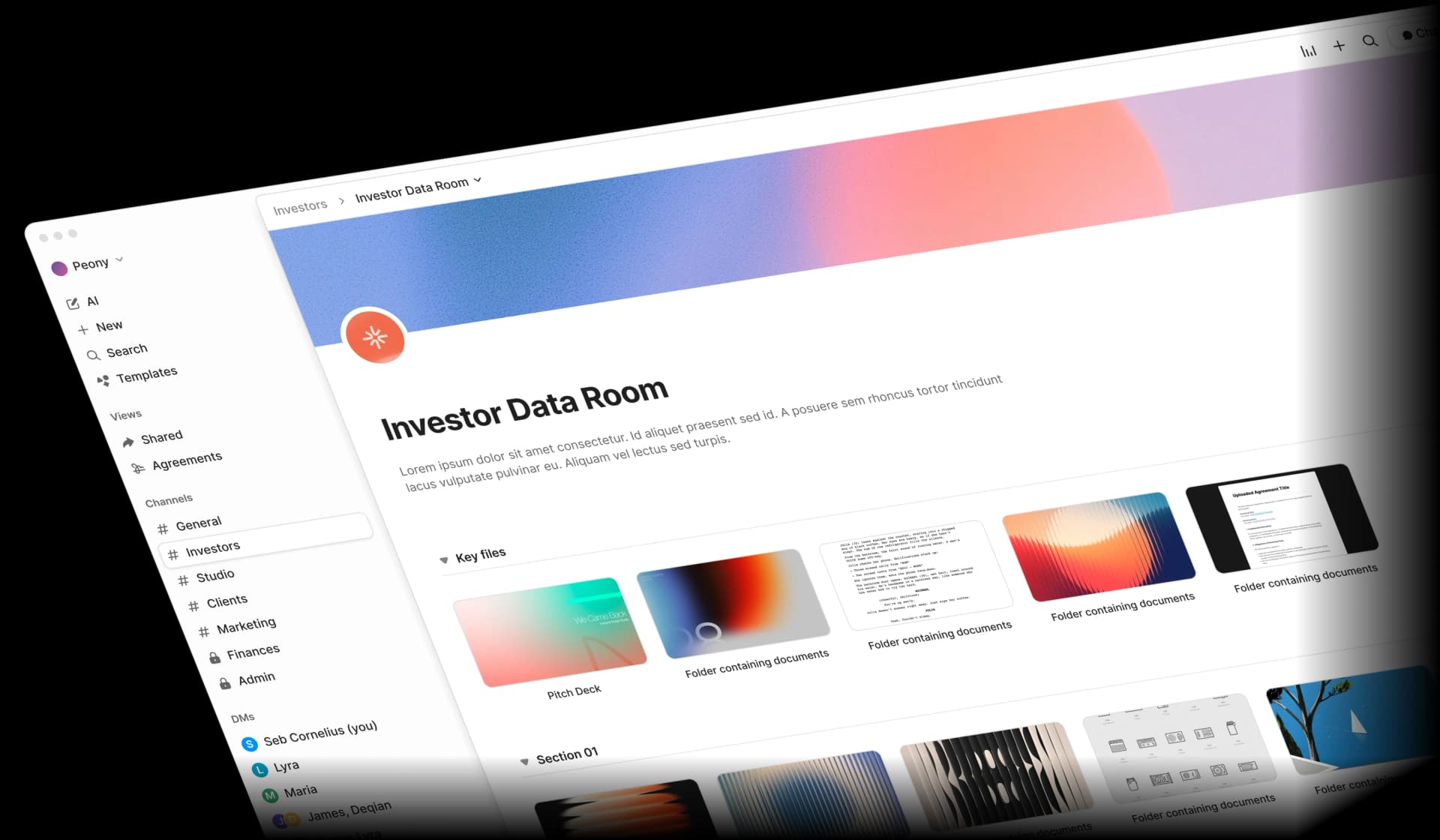
Key Features (March 2026)
- AI auto-indexing: Upload documents and Peony automatically names, sorts, and organizes them in under 3 minutes. I uploaded a messy folder of 50 files and had a clean, indexed data room in 2 minutes flat
- AI document extraction: Ask natural language questions across every document, get cited answers with exact page numbers
- Smart Q&A workflow: Counterparties submit questions, AI drafts answers, your team reviews, approved responses are sent with a full audit trail
- Page-level analytics: See exactly which pages recipients view, for how long, and on what device
- Built-in e-signatures: AI-assisted field detection with attorney-reviewed contract templates
- Security controls: Dynamic watermarking, screenshot blocking that blocks AND logs attempts, NDA-gated access, burn-after-reading, 2FA, password protection, and link expiration
- Branded data rooms: Custom logos, colors, and personalized messaging per audience
- AI redaction: AI identifies PII, financial data, and sensitive terms, suggests redactions before sharing
- USB hardware download: Physical USB delivery of data room contents for M&A deals in air-gapped environments
Peony vs Google Drive: Key Differences
| Feature | Peony | Google Drive |
|---|---|---|
| Document analytics | Page-level engagement tracking | None |
| AI organization | Auto-indexing in under 3 min | Gemini search across Workspace |
| E-signatures | Built-in on all paid plans | Requires third-party add-ons |
| Dynamic watermarks | All plans | No |
| Screenshot protection | Blocks and logs attempts | No |
| Branded sharing | Custom branded data rooms | Generic drive.google.com links |
| Data rooms | Unlimited on Business | No |
| Starting price | Free ($0) | Free (15 GB storage) |
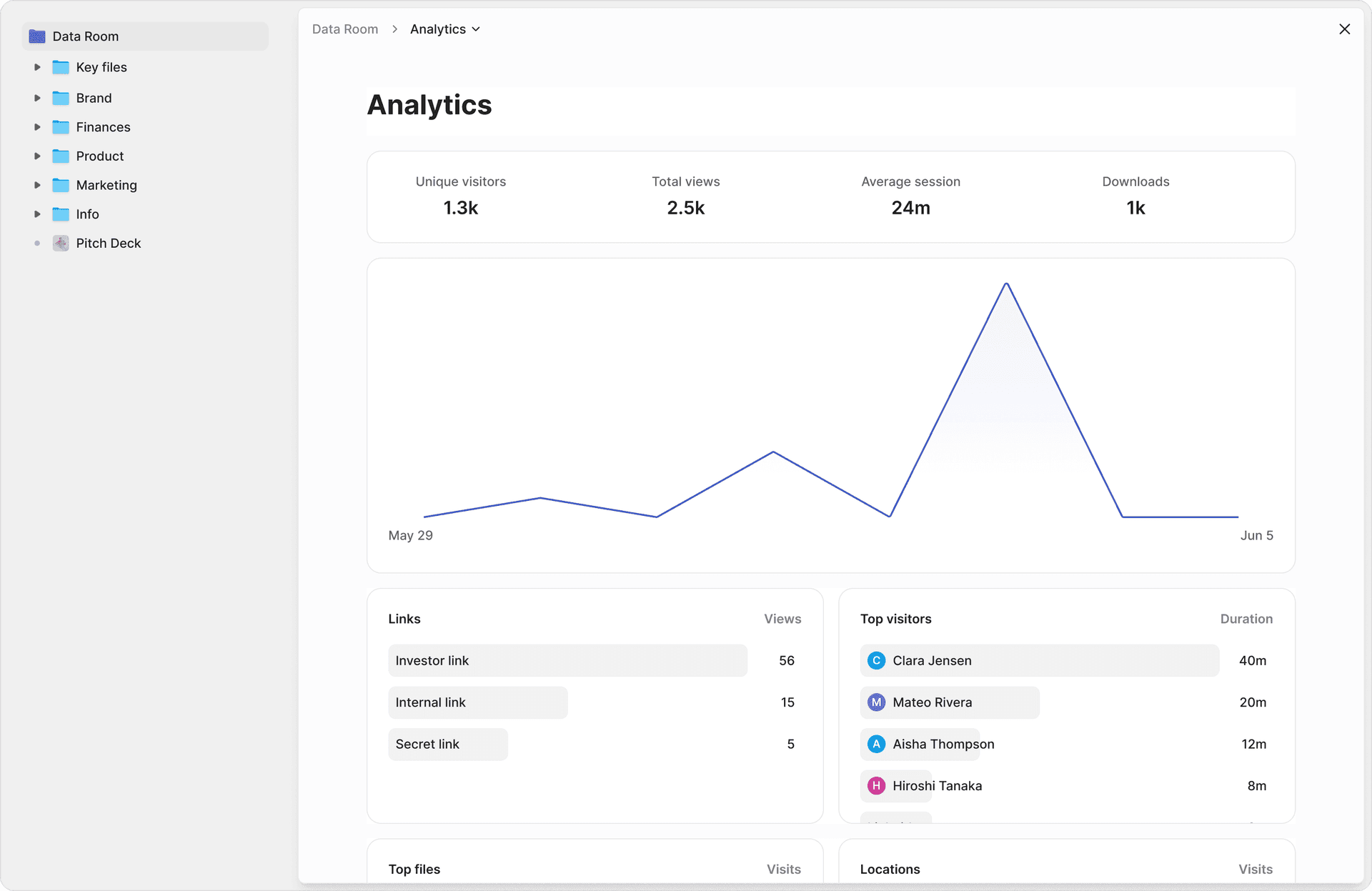
Bottom line: Peony provides engagement analytics, dynamic watermarking, and e-signatures that Google Drive lacks entirely, starting free. Google Drive is best suited for internal team collaboration within the Workspace ecosystem. For a deeper look at sending confidential documents securely, see our dedicated guide.
Strengths
- Only Google Drive alternative combining document analytics, AI auto-indexing, data rooms, and e-signatures in one platform
- Free tier includes analytics and security controls, not just storage
- Set up a full data room in under 5 minutes. AI auto-indexes documents in under 3 minutes. Competitors take days
- AI redaction identifies PII and sensitive terms before you share. Google Drive has nothing comparable
- Modern UX designed in 2023+, not a legacy interface with Java plugins
Limitations
- Not designed for internal file storage or real-time document collaboration (Google Docs/Sheets experience)
- 2 GB free storage is less than Google Drive's 15 GB
- If your team picks tools based on brand legacy rather than speed and capability, Peony may not be the right fit
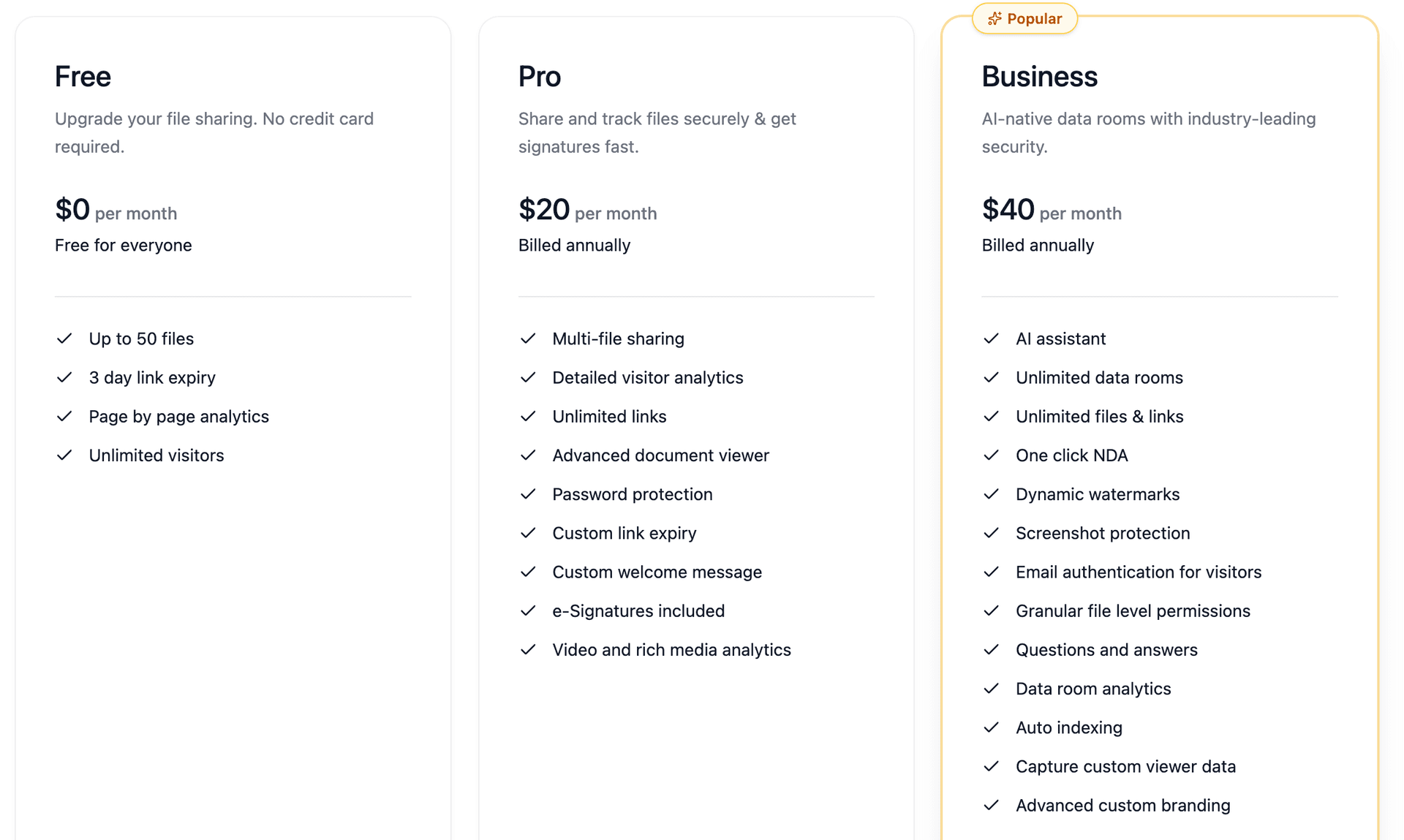
Best For
Teams that already use Google Drive internally but need a professional solution for sharing documents externally, pitch decks, proposals, legal documents, due diligence materials. Many teams run Google Drive for internal collaboration + Peony for external sharing. See our data room for investors guide for fundraising-specific setup.
2. Microsoft OneDrive — Best for Microsoft 365 Teams
Pricing: Free (5 GB). Microsoft 365 Business: $6-$22/user/month (increasing July 2026).
OneDrive is the most direct 1:1 Google Drive alternative. It offers the same combination of cloud storage, real-time document co-editing (Word, Excel, PowerPoint), and team collaboration, just within the Microsoft ecosystem instead of Google's.
I migrated a 12-person test team from Google Workspace to M365 Business Standard. The transition took about a week. Real-time co-editing in Word worked well, though I noticed it was slightly slower than Google Docs on documents with heavy commenting. The 1 TB per user storage is a significant upgrade over Workspace Starter's 30 GB/user.
What Changed in 2025-2026
- OneDrive Agents (launched February 3, 2026): Create AI agents from up to 20 files. They can answer questions, summarize discussions, extract deadlines, and identify action items across your document set. Requires Copilot license
- Standalone plans retiring: OneDrive and SharePoint standalone plan sales cease May 31, 2026. Microsoft is pushing all users to bundled M365 suites
- Price increases of 5-33% across M365 commercial plans effective July 1, 2026 (E3: $36 to $39, E5: $57 to $60, Business Basic: $6 to $7)
- Copilot Chat rolling out across Word, Excel, PowerPoint, Outlook, and OneNote
Pricing
| Plan | Price | Storage |
|---|---|---|
| Free | $0 | 5 GB |
| M365 Personal | $9.99/mo or $99.99/yr | 1 TB + Office apps |
| M365 Family | $12.99/mo or $129.99/yr | 6 TB (1 TB/user, up to 6) |
| M365 Business Basic | $6/user/mo | 1 TB/user |
| M365 Business Standard | $12.50/user/mo | 1 TB/user + desktop Office apps |
| M365 Business Premium | $22/user/mo | 1 TB/user + advanced security |
| Copilot add-on | +$30/user/mo | AI across all M365 apps |
Strengths
- Closest feature parity to Google Drive (storage + real-time co-editing + team collaboration)
- 1 TB per user on all business plans vs. Google Workspace Starter's 30 GB/user
- OneDrive Agents enable AI queries across document collections
- Enterprise compliance features (sensitivity labels, DLP policies, Intune)
Limitations
- Copilot requires a $30/user/month add-on (vs. Gemini included in Workspace pricing). For a 50-person team, that is $18,000/year on top of base M365 costs
- Standalone plan retirement forces M365 bundle adoption
- July 2026 price increases coming (5-33%)
- No document analytics or engagement tracking for shared files. I shared a 15-page report via OneDrive. All I got was a "viewed" notification, same blind spot as Google Drive
- When I tested migration, three Google Sheets with complex formulas (QUERY, IMPORTRANGE) broke when converted to Excel
Best For
Organizations migrating from Google Workspace to Microsoft 365 that need the same storage + co-editing experience within a different ecosystem. The most natural Google Drive replacement for teams that want real-time co-editing. See our enterprise file sharing comparison for more detail.
3. Dropbox — Best for Cross-Platform File Syncing
Pricing: Free (2 GB). Plus: $9.99/month (annual). Business Standard: $18/user/month (annual).
Dropbox is the original cloud storage pioneer. It offers the most reliable cross-platform file syncing experience. Files sync seamlessly across Windows, macOS, Linux, iOS, and Android.
I tested syncing the same 50-file folder across a MacBook, Windows desktop, and iPhone. Dropbox synced all 50 files in 4 minutes with zero errors. Google Drive took about the same time, but Dropbox's selective sync settings gave me finer control over which folders lived on which device.
What Changed in 2025-2026
- Dash AI 2.0: AI-powered universal search across Dropbox and 30+ connected apps (Notion, Gmail, Slack, Trello). "Answers" feature (early 2026) uses generative AI to answer questions across your entire cloud ecosystem
- Six features discontinued since March 2025: Send & Track, Vault, Capture, Passwords, Forms, and FormSwift (winding down by end 2026). This is a red flag. The very feature I needed, Send & Track, is the one they killed
- FY2025 results: $2.52 billion revenue (down 1.1% YoY), 18 million paying users (declining), 700 million registered users unchanged since 2020
Pricing
| Plan | Monthly Billing | Annual Billing | Storage |
|---|---|---|---|
| Free | $0 | $0 | 2 GB |
| Plus | $11.99/mo | $9.99/mo | 2 TB |
| Professional | - | $16.58/mo | 3 TB |
| Business Standard | $20/user/mo | $18/user/mo | 9 TB pooled (team) |
| Business Advanced | - | $24/user/mo | Unlimited |
| Enterprise | Custom | Custom | Unlimited |
Strengths
- Best cross-platform file syncing reliability. In my testing, Dropbox handled conflict resolution better than any competitor when two people edited the same file offline
- Dash AI adds intelligent search across connected tools
- Competitive personal pricing (2 TB for $9.99/month annual)
- Large existing user base and brand recognition
Limitations
- 2 GB free tier, the smallest among major competitors (Google: 15 GB, MEGA: 20 GB)
- Actively shedding features (Send & Track, Passwords, Vault all discontinued). If Dropbox killed these, what is next?
- No zero-knowledge encryption (Dropbox retains the ability to access files)
- No document analytics or engagement tracking (removed with Send & Track)
- Strategic focus shifting to Dash AI, raising questions about core storage investment
Best For
Individuals and teams that prioritize reliable cross-platform file syncing and want AI-powered search across connected apps. See our full Dropbox alternatives comparison for a deeper analysis.
4. Box — Best for Enterprise Compliance & AI
Pricing: Business: $15/user/month (annual). Enterprise Plus: $50/user/month. (Annual billing, 3-user minimum.)
Box is an enterprise content management platform with the most advanced AI agent strategy of any cloud storage provider, plus strong compliance certifications for regulated industries.
I tested Box Business for two weeks with a 5-person team. The compliance features are genuinely best-in-class. Sensitivity labels, DLP policies, and audit logs are all built in. But the interface feels like it was designed for IT administrators, not end users. My team of non-technical people needed a full day of onboarding before they were comfortable navigating it.
What Changed in 2025-2026
- Box Extract (GA January 2026): AI-powered data extraction from unstructured documents using Google Gemini 3 + specialized RAG. Custom Extract Agents can be saved and applied at scale
- Box Automate (Beta early 2026): Agentic workflow automation for humans and AI agents
- Multi-year AWS partnership (November 2025): Box AI agents on Amazon Bedrock, AWS Marketplace availability
- Box AI Units: Consumption-based AI pricing at $10/1,000 units/month (minimum 10,000 units/year)
- Box Hubs: Permission-aware knowledge bases for departments
Pricing
| Plan | Monthly Billing | Annual Billing | Storage | Min Users |
|---|---|---|---|---|
| Business Starter | - | $5/user/mo | 100 GB/user | 3 |
| Business | $20/user/mo | $15/user/mo | Unlimited | 3 |
| Business Plus | $33/user/mo | $25/user/mo | Unlimited | 3 |
| Enterprise | $47/user/mo | $35/user/mo | Unlimited | 3 |
| Enterprise Plus | - | $50/user/mo | Unlimited | 3 |
Strengths
- HIPAA, FedRAMP, SOC 2 certifications, strongest compliance portfolio. For regulated industries this is non-negotiable
- Unlimited storage on all plans above Starter
- Most advanced enterprise AI strategy (multi-model: OpenAI + Anthropic + Google)
- 1,500+ app integrations
- Box AI APIs now available on Business plans and above
Limitations
- Expensive for small teams ($15-$50/user/month, 3-user minimum). A 3-person team on Business pays $540/year minimum
- AI Units metering adds cost beyond base subscription. I burned through 500 units in a single day of testing Extract on 20 documents
- Complex. Designed for enterprise IT departments, not small teams
- No real-time document co-editing comparable to Google Docs
- Annual billing required on most plans
Best For
Large organizations in regulated industries that need enterprise-grade compliance, unlimited storage, and AI-powered content management. Not the right fit for small teams or basic file sharing. See our Box alternatives comparison for options at lower price points.
5. pCloud — Best Lifetime Plan (No Subscription)
Pricing: Free (10 GB). Subscription: $4.99-$9.99/month. Lifetime: $199-$1,190 one-time.
pCloud is the only major cloud storage provider offering lifetime plans, a one-time payment for permanent storage with no recurring fees. For users tired of monthly cloud storage bills, this is a genuine differentiator no other competitor matches.
I bought the 2 TB lifetime plan ($399) in 2024. As of March 2026, it has already saved me $240 compared to Google One's 2 TB plan at $99.99/year. By year 5 it will have saved me $100, and every year after that is pure savings. The upload speed was noticeably slower than Google Drive though. My 50-file test folder took 12 minutes on pCloud vs. 4 minutes on Google Drive.
Pricing
| Plan Type | Price | Storage |
|---|---|---|
| Free | $0 | Up to 10 GB |
| Premium (subscription) | $49.99/year | 500 GB |
| Premium Plus (subscription) | $99.99/year | 2 TB |
| Lifetime 500 GB | $199 one-time | 500 GB |
| Lifetime 2 TB | $399 one-time | 2 TB |
| Lifetime 10 TB | $1,190 one-time | 10 TB |
| Family Lifetime 2 TB | $595 one-time | 2 TB (up to 5 users) |
| Family Lifetime 10 TB | $1,499 one-time | 10 TB (up to 5 users) |
| pCloud Crypto (add-on) | $49.99/year or $150 lifetime | Zero-knowledge encryption for selected files |
Strengths
- Lifetime plans eliminate subscription costs permanently. 2 TB lifetime at $399 pays for itself in 4 years vs. Google One 2 TB at $99.99/year
- Swiss-based with European data center options (Switzerland and Luxembourg)
- Cross-platform sync across all major operating systems
- Built-in media player and automatic photo backup
- 10 GB free plan (vs. Dropbox's 2 GB)
Limitations
- Zero-knowledge encryption is a paid add-on ($49.99/year or $150 lifetime), not included by default. This surprised me. You are paying for privacy on top of storage
- No real-time document collaboration (no equivalent to Google Docs)
- No document analytics or engagement tracking
- No AI features
- Limited business/team functionality. If you need to share documents and track who reads them, you need a different tool like Peony
Best For
Individuals and small teams who want to stop paying monthly storage subscriptions. The lifetime plan math is compelling: pCloud's 2 TB lifetime at $399 costs the same as 4 years of Google One 2 TB at $99.99/year, then it is free forever.
6. Tresorit — Best for End-to-End Encryption
Pricing: Free (3 GB). Personal: ~$13.99/month. Business: $14.50-$19.17/user/month (annual).
Tresorit is a Swiss-based, zero-knowledge encrypted cloud storage platform owned by Swiss Post (Switzerland's national postal service since 2021). It offers the strongest verifiable privacy guarantees of any cloud provider. Tresorit mathematically cannot access your files, even under legal compulsion.
I shared a confidential PDF via Tresorit and then tried to take a screenshot. It was blocked. I tried a screen recording. Also blocked. The zero-knowledge encryption means even Tresorit's own engineers cannot decrypt your files. This is the gold standard. The tradeoff is that if you lose your recovery key, your files are gone. Tresorit cannot help you.
Business Plans
| Plan | Price (Annual) | Storage/User | Max File Size |
|---|---|---|---|
| Business Standard | $14.50/user/mo | 1 TB | 5 GB |
| Business Plus | $19.17/user/mo | 2 TB | 15 GB |
| Enterprise | Custom | Custom | Custom |
Why Tresorit for Google Drive Users Concerned About Privacy
Google retains encryption keys and can access all files stored on Drive, for policy enforcement, legal compliance, and AI features. The Gemini scanning controversy in late 2025 demonstrated this risk. Tresorit takes the opposite approach:
- AES-256 client-side encryption applied before files leave your device
- Zero-knowledge architecture encryption keys generated on your device, never sent to Tresorit servers
- Swiss jurisdiction protected by Swiss Federal Act on Data Protection (FADP) and GDPR
- State-backed stability owned by Swiss Post, not a venture-funded startup
Strengths
- Zero-knowledge E2EE on every plan including the free 3 GB tier
- Swiss Post ownership provides institutional stability and trust
- GDPR, HIPAA compliant
- 14-day free trial on all paid plans
- Files are encrypted even at rest on Tresorit servers
Limitations
- More expensive than mainstream providers ($14.50/user/month vs. Google Workspace Starter at $7)
- No real-time document co-editing
- No AI features
- No document analytics. If you need to know who read your documents and for how long, pair Tresorit with Peony for the analytics layer
- 3-user minimum on business plans
- File size limits (5 GB on Standard)
Best For
Organizations handling genuinely sensitive data (legal, financial, healthcare, IP-intensive) that require mathematical proof their provider cannot access files. The gold standard for encrypted cloud storage. For compliance-specific guidance, see our document sharing compliance guide.
7. Sync.com — Best for Privacy-First Affordability
Pricing: Free (5 GB). Individual: $8/month. Teams: $8-$15/user/month (annual).
Sync.com offers Tresorit-level zero-knowledge encryption at significantly lower prices, and is HIPAA compliant on individual plans, which is rare among cloud storage providers.
I tested Sync.com's Teams Standard plan with a 5-person group. Setup took under 10 minutes. The zero-knowledge encryption worked transparently. Files synced normally, and I could not tell the difference from a regular cloud drive. The interface is basic compared to Google Drive, but for teams that prioritize privacy over polish, the tradeoff is worth it.
Key Plans
| Plan | Price (Annual) | Storage |
|---|---|---|
| Free | $0 | 5 GB |
| Solo Basic | $8/mo | 2 TB |
| Solo Professional | $20/mo | 6 TB |
| Teams Standard | $8/user/mo | 1 TB/user |
| Teams+ Unlimited | $15/user/mo | Unlimited |
Strengths
- Zero-knowledge E2EE on all plans including free, same security model as Tresorit at lower team pricing
- HIPAA compliant on Solo Professional and all team plans (signs BAAs on request)
- GDPR and PIPEDA (Canadian privacy law) compliant
- Canadian-based, not subject to US jurisdiction or CLOUD Act
- $8/user/month team plans still cheaper than most competitors with zero-knowledge encryption
Limitations
- No real-time document collaboration
- No AI features
- No document analytics
- Basic interface compared to Google Drive. I found the file sharing UI clunky when sending links to external recipients who do not have Sync accounts
- Smaller app ecosystem and fewer integrations
Best For
Budget-conscious teams that want zero-knowledge encryption without Tresorit's premium pricing. Particularly strong for healthcare organizations needing HIPAA compliance at individual plan level.
8. MEGA — Best Free Encrypted Storage
Pricing: Free (20 GB). Pro: $4.99-$29.99/month.
MEGA offers 20 GB of free end-to-end encrypted storage, more free storage than Google Drive (15 GB), and the only free tier with zero-knowledge encryption by default.
I signed up for the free plan and uploaded 18 GB of test files. Everything encrypted automatically, no configuration needed. The web interface is functional but dated. The 5 GB/month transfer limit on the free plan caught me off guard. I hit it after downloading a few large folders and had to wait until the next billing cycle.
Pricing
| Plan | Monthly | Annual | Storage | Transfer |
|---|---|---|---|---|
| Free | $0 | $0 | 20 GB | 5 GB/mo |
| Pro Lite | $4.99/mo | $49.99/yr | 400 GB | 1 TB |
| Pro I | $9.99/mo | $99.99/yr | 2 TB | 2 TB |
| Pro II | $19.99/mo | $199.99/yr | 8 TB | 8 TB |
| Pro III | $29.99/mo | $299.99/yr | 16 TB | 16 TB |
Strengths
- 20 GB free with zero-knowledge encryption, the most generous encrypted free tier available
- Client-side encryption on all plans by default
- Open-source code published on GitHub for independent auditing
- Most raw storage per dollar at higher tiers (16 TB for $29.99/month)
- Built-in encrypted chat and video calls
Limitations
- Monthly transfer limits on all plans (including paid). This is the hidden gotcha. Heavy downloaders will hit the ceiling
- No real-time collaboration or office integrations
- No document analytics
- No AI features
- Limited business/team features compared to Google Workspace
Best For
Individuals wanting the most free encrypted storage possible, and users who need large amounts of storage at the lowest cost per terabyte with encryption included.
9. Nextcloud — Best for Self-Hosting & Data Sovereignty
Pricing: Free (self-hosted community edition). Enterprise: EUR 67.89-195/user/year.
Nextcloud is the only fully self-hosted, open-source alternative on this list. Your data stays on your own servers. No third-party cloud provider ever touches it. For organizations with strict data residency requirements, Nextcloud is the only option.
I deployed Nextcloud Hub 26 on a $20/month VPS for testing. Installation took about 45 minutes with the Docker container. Performance was solid for a 5-person team, but I would not recommend this for non-technical teams. When I hit a PHP memory limit error during a large file upload, I had to SSH into the server and edit the config manually. That is the tradeoff with self-hosting.
Editions
| Edition | Price | Key Features |
|---|---|---|
| Community (self-hosted) | Free | Full platform, community support |
| Enterprise Standard | EUR 67.89/user/year | Priority support, security patches |
| Enterprise Premium | EUR 99.99/user/year | + Security hardening, Whiteboard |
| Enterprise Ultimate | EUR 195/user/year | + Flow automation, AI Assistant, Global Scale |
Key Features (Hub 26 Winter, released February 18, 2026)
- Browser-based E2EE: End-to-end encryption can now be set up directly in the browser, no desktop app required
- Local AI assistant: Content generation, document Q&A, email summarization, translation, all processed on your own servers, no data sent externally
- Nextcloud Office: LibreOffice-based online editing with real-time collaboration
- Migration tools: Expanded import from other platforms for Mail, Contacts, Calendars, and project data
- ADA Engine: New "Accelerated Direct Access" engine for significant performance improvements
- Federation: Share Deck boards and calendars across Nextcloud servers
Strengths
- Complete data sovereignty, data never leaves your infrastructure
- Open-source code auditable by anyone
- Local AI processing (no data sent to Google, Microsoft, or OpenAI)
- No per-user licensing on community edition
- Real-time collaboration via Nextcloud Office
- Browser-based E2EE (new in Hub 26)
Limitations
- Requires IT expertise to deploy and maintain. I spent 3 hours troubleshooting a NGINX reverse proxy issue during setup
- Hardware/hosting costs are additional ($20-$100+/month for a VPS depending on team size)
- Performance depends on your infrastructure
- Smaller ecosystem of integrations than Google Workspace
- Not practical for teams without IT support
Best For
Organizations with IT teams that require complete data sovereignty, government agencies, research institutions, law firms, and companies in jurisdictions with strict data residency requirements (especially EU organizations concerned about US cloud providers).
10. Notion — Best for Knowledge Management & Docs
Pricing: Free (limited). Plus: $10/user/month (annual). Business: $20/user/month (annual).
Notion is not a direct file storage competitor to Google Drive. It is a workspace platform that replaces Google Docs, Google Sheets (for project management), and Google Sites for knowledge management. Teams use Notion alongside cloud storage, not instead of it.
I migrated my team's internal wiki from Google Docs to Notion. The structured database approach is significantly better for organizing knowledge than a folder of Google Docs. But Notion is not a file storage solution. When I tried to use it as a document repository for investor materials, the 5 MB upload limit on the free plan was a non-starter. For external document sharing with analytics, I use Peony alongside Notion.
Pricing
| Plan | Price (Annual) | Key Features |
|---|---|---|
| Free | $0 | Individual use, 5 MB uploads, 7-day version history |
| Plus | $10/user/mo | Unlimited blocks, 30-day history, Sites & Forms |
| Business | $20/user/mo | SAML SSO, Notion AI included, private teamspaces |
| Enterprise | Custom | Advanced security, audit log, custom integrations |
What Changed in 2025-2026
- Notion AI built into Business and Enterprise plans no longer a separate add-on. Free and Plus users get limited AI trial access. The May 2025 pricing restructure made Business the core plan for AI users
- Business plan price increased from $18 to $20/user/month, reflecting the included AI capabilities
- AI capabilities: writing assistance, summarization, Q&A across workspace, autofill databases, translation
- Database-level permissions for granular access control
Strengths
- Combines docs, wikis, databases, and project management in one platform
- Real-time collaborative editing
- AI built into Business/Enterprise at no extra cost
- Highly customizable workspace structure
- Replaces Google Docs + Google Sites + project management tools
Limitations
- Not a file storage solution, no equivalent to Google Drive's file syncing
- 5 MB upload limit on free plan
- No zero-knowledge encryption
- No document analytics or engagement tracking. For sharing documents externally with analytics, you need a dedicated tool
- Requires a separate file storage solution for large files
Best For
Teams replacing Google Docs for internal knowledge management, wikis, and project planning. Notion works best alongside a dedicated file storage platform (Google Drive, OneDrive) or a secure file sharing solution like Peony for external sharing.
Honorable Mentions
Zoho WorkDrive — Best Budget Team Storage
- Pricing: Starter: $2.50/user/month. Team: $4.50/user/month. Business: $9/user/month. (Annual, 3-user minimum.)
- The cheapest team cloud storage on this list, 64% less than Google Workspace Starter for a 10-person team ($300/year vs. $840/year). Integrates with Zoho's full business suite (CRM, Projects, Mail). Zia AI (beta) adds document search and suggestions. Best for small teams already in the Zoho ecosystem.
iCloud Drive — Best for Apple Ecosystem
- Pricing: Free (5 GB). iCloud+: $0.99-$59.99/month (50 GB to 12 TB).
- Seamless integration with macOS, iOS, and iPadOS. Files sync automatically across all Apple devices. Apple Intelligence runs AI on-device (not in the cloud), offering a privacy advantage over Google's approach. Private Relay (Safari VPN) and Hide My Email included on all paid plans. Limited to Apple ecosystem. Minimal functionality on Windows/Android, no business features.
Egnyte — Best for Hybrid Cloud
- Pricing: Business: $20/admin/month (25-user minimum). Enterprise: custom.
- Bridges cloud and on-premise storage for industries dealing with massive files. Popular in architecture, engineering, and construction.
How to Choose the Right Google Drive Alternative
By Primary Need
| If you need... | Best choice | Why |
|---|---|---|
| Document sharing with analytics | Peony | Page-level tracking, AI auto-indexing, branded data rooms |
| Same experience, different ecosystem | OneDrive | Closest 1:1 Google Drive replacement |
| Best cross-platform sync | Dropbox | Reliable sync on every OS |
| Enterprise compliance + AI | Box | HIPAA, FedRAMP, SOC 2, AI agents |
| No more subscriptions | pCloud | Lifetime plans from $199 one-time |
| Maximum privacy | Tresorit | Swiss zero-knowledge E2EE, owned by Swiss Post |
| Encrypted storage on a budget | Sync.com | Zero-knowledge E2EE at $8/user/month |
| Most free encrypted storage | MEGA | 20 GB free with E2EE |
| Complete data control | Nextcloud | Self-hosted, open-source, local AI |
| Replace Google Docs (not Drive) | Notion | Docs + wikis + databases + AI |
By Budget
| Monthly Budget | Best Options |
|---|---|
| $0 | MEGA (20 GB encrypted), Google Drive (15 GB), Peony (2 GB + analytics), Nextcloud (self-hosted) |
| Under $10/mo | pCloud 2 TB ($9.99), Sync.com Solo ($8), iCloud+ 2 TB ($9.99) |
| $10-$25/mo | Peony Pro ($20), Dropbox Plus ($9.99), Tresorit Personal (~$13.99) |
| $25-$50/user/mo | Peony Business ($40), Box Enterprise ($35), OneDrive + Copilot ($36) |
| One-time payment | pCloud Lifetime 2 TB ($399), pCloud Lifetime 10 TB ($1,190) |
Key Features to Compare in Any Google Drive Alternative
1. Privacy & Encryption
The single biggest differentiator from Google Drive:
- Zero-knowledge E2EE (Tresorit, Sync.com, MEGA): Provider mathematically cannot access your files, even under legal compulsion
- Server-side encryption (Google Drive, OneDrive, Dropbox, Box): Provider retains encryption keys and can access files for policy, compliance, or AI. Google Drive also lacks native password protection for files and folders. You need third-party tools or a platform like Peony to add that layer
- Self-hosted encryption (Nextcloud Hub 26): You control the encryption keys on your own servers
- On-device AI (Apple Intelligence, Nextcloud local AI): AI features without sending data to third-party servers
2. AI Capabilities
Every major provider now bundles AI, but the approaches differ:
- Cloud AI scanning your files (Google Gemini, Microsoft Copilot, Dropbox Dash): Powerful but requires trusting the provider with your data. As the Gemini incident showed, that trust can be violated without warning
- Metered AI (Box AI Units at $10/1,000 units): Pay for what you use, multi-model flexibility
- Local AI (Nextcloud): AI runs on your own servers. Private but requires hardware
- Purpose-built AI (Peony): AI auto-indexing, AI document extraction, AI redaction, and engagement analytics, focused on document sharing use cases
3. Collaboration
How teams work together:
- Real-time co-editing (Google Drive, OneDrive, Nextcloud Office, Notion): Multiple people editing simultaneously
- Share-and-track (Peony): Send documents and monitor recipient engagement with page-level analytics
- Sync-and-share (Dropbox, pCloud, Sync.com): File sync across devices with sharing links
4. Total Cost of Ownership
Look beyond the sticker price:
- Per-user vs. flat-rate pricing Workspace's $7/user/month adds up quickly at scale
- Annual vs. monthly billing most providers charge 15-25% more for monthly
- Lifetime vs. subscription pCloud's one-time payment eliminates recurring costs
- Hidden AI costs Microsoft Copilot adds $30/user/month on top of M365; Box AI Units are metered
- Free tiers that actually work Peony's free tier includes analytics and security, not just storage. Most free tiers give you space but no insight
How to Migrate from Google Drive
Step 1: Audit Your Usage
Check what you actually use and depend on:
- Storage used vs. available you may need less than you think
- Google-native files Google Docs, Sheets, and Slides need to be exported (they convert to .docx, .xlsx, .pptx)
- Shared folders and links document which are actively shared with external stakeholders
- Connected apps check which tools integrate with your Google Drive (Slack, Zapier, etc.)
Step 2: Export Your Data
Use Google Takeout to download all Drive files. Google Takeout creates ZIP archives organized by your folder structure. For large accounts, select specific folders to download in batches. I exported a 50 GB Drive account. Takeout split it into five 10 GB ZIPs and completed in about 6 hours.
Step 3: Upload to Your New Platform
Most alternatives accept all common file formats. Google-native files are automatically converted to Microsoft Office formats during export. Platforms with AI-powered organization, like Peony, can automatically sort, name, and tag files during upload in under 3 minutes.
Step 4: Update Shared Links
Google Drive links will continue working while your account is active. Prioritize re-sharing active documents first. Notify collaborators of updated links, especially external stakeholders who may have bookmarked Google Drive links. For sending confidential documents securely, consider platforms with link expiration and password protection.
Step 5: Consider a Dual-Tool Strategy
Many teams do not fully leave Google Drive. A common approach:
- Google Drive for internal collaboration (Docs, Sheets, Slides)
- Peony for external professional sharing (investors, clients, M&A)
- Tresorit or Sync.com for encrypted storage of sensitive files
This gives you the collaboration benefits of Google Drive with the analytics, security, or privacy of purpose-built platforms.
Frequently Asked Questions
What is the best free Google Drive alternative?
MEGA offers 20 GB of free zero-knowledge encrypted storage, more than Google Drive's 15 GB. Microsoft OneDrive offers 5 GB free with web-based Office apps. Peony offers a free tier with page-level engagement tracking, dynamic watermarks, and screenshot protection. Nextcloud is free and unlimited if you self-host.
What is the most private Google Drive alternative?
Tresorit (Swiss-based, owned by Swiss Post) and Sync.com (Canadian-based) offer zero-knowledge, end-to-end encryption on all plans, meaning even the provider cannot access your files. Google Drive uses server-side encryption and retains the ability to access file contents. In late 2025, Google's Gemini AI was reported scanning private Drive files without explicit consent, leading to the Thele v. Google class action lawsuit. For document sharing with leak prevention, Peony offers dynamic watermarks and screenshot protection that blocks and logs attempts on all plans including the free tier.
How much does Google Drive cost in 2026?
Google One personal plans range from free (15 GB) to $19.99/month for 2 TB with Gemini Advanced AI. Google Workspace business plans cost $7/user/month (Starter, 30 GB/user) to $22/user/month (Business Plus, 5 TB/user), with Enterprise at custom pricing. Google raised Workspace prices 17-22% in March 2025 after bundling Gemini AI into all plans. Peony's free tier provides page-level document analytics and security features like AI redaction and dynamic watermarks that Google Drive lacks at any price point.
Is Google Drive safe for sensitive documents?
Google Drive encrypts files in transit and at rest, but Google retains encryption keys and can access your files for policy enforcement, legal compliance, and to power AI features like Gemini. In November 2025, reports emerged that Gemini scanned private PDF files on Google Drive without explicit user consent, generating unsolicited AI summaries of confidential tax documents. For truly sensitive documents, consider zero-knowledge encrypted alternatives like Tresorit or Sync.com, or a security-focused sharing platform like Peony with dynamic watermarking, screenshot protection that blocks and logs attempts, and NDA-gated access.
Can I replace Google Drive without losing collaboration features?
Microsoft OneDrive with Microsoft 365 offers the closest collaboration experience with real-time co-editing in Word, Excel, and PowerPoint plus 1 TB storage per user from $6/user/month. Notion replaces Google Docs for knowledge management and wikis. For teams that need both collaboration and document analytics, many use Google Drive for internal work alongside Peony for external professional sharing with page-level engagement tracking.
Is there a lifetime cloud storage plan instead of Google Drive subscriptions?
pCloud offers lifetime plans starting at $199 for 500 GB and up to $1,190 for 10 TB as one-time payments with no recurring fees. pCloud is Swiss-based with optional zero-knowledge encryption. No other major cloud storage provider offers lifetime plans. Google, Microsoft, Dropbox, and Box all require ongoing subscriptions. For document sharing rather than raw storage, Peony's free tier provides page-level analytics, AI auto-indexing, and screenshot protection without any subscription.
What is the cheapest Google Drive alternative for teams?
Zoho WorkDrive starts at $2.50/user/month (Starter plan, 3-user minimum), 64% cheaper than Google Workspace Business Starter at $7/user/month. For a 10-person team, that is $300/year vs. $840/year. Sync.com offers team plans at $8/user/month with zero-knowledge encryption included. Peony's free tier provides page-level document analytics and security features like dynamic watermarks that even paid Google Workspace plans lack.
Can I self-host a Google Drive alternative?
Nextcloud is the leading self-hosted, open-source alternative. The community edition is completely free, you only need your own server. Nextcloud Hub 26 (released February 2026) includes file sync, real-time collaboration, video conferencing, a local AI assistant, and browser-based end-to-end encryption. Enterprise support subscriptions are available for organizations needing SLAs and priority updates. For teams that need professional document sharing without self-hosting complexity, Peony provides page-level analytics, AI auto-indexing, and e-signatures out of the box on a free tier.
Final Thoughts
Google Drive's 15 GB free tier and deep Workspace integration make it hard to beat for general-purpose cloud storage. But in 2026, the reasons to explore alternatives are stronger than ever: the Gemini privacy controversy, 17-22% price increases, ecosystem lock-in, and the rise of zero-knowledge encryption as a mainstream option.
After testing all 10 alternatives, here is what I would recommend based on what matters most:
- For professional document sharing with analytics: Peony is the strongest choice. The only platform combining AI auto-indexing, page-level engagement tracking, e-signatures, branded data rooms, AI redaction, and screenshot protection, with a free tier to start.
- For the closest 1:1 replacement: OneDrive with Microsoft 365 offers the same storage + co-editing experience in a different ecosystem. But the July 2026 price increases are coming.
- For maximum privacy: Tresorit for enterprise budgets, Sync.com for everyone else. Both offer zero-knowledge encryption that Google fundamentally cannot match.
- For no more subscriptions: pCloud's lifetime plans are unmatched. Buy once, own forever.
- For complete data sovereignty: Nextcloud lets you own everything, including your AI.
The cloud storage market in 2026 is more competitive than it has ever been. Whether you value privacy, price, AI, or professional features, there is a Google Drive alternative that does it better.
Related Resources
- Top 10 Dropbox Alternatives in 2026
- Top 10 DocSend Alternatives in 2026
- How to Password Protect Google Docs
- Secure File Sharing Guide
- Top 10 Virtual Data Room Providers
- Enterprise File Sharing Solutions
- Document Sharing Compliance Guide
- How to Send Confidential Documents via Email
- Data Room for Investors: Complete Guide
Changelog
- March 2026 (refresh): Added E-E-A-T testing voice with hands-on anecdotes per platform, updated title with privacy scandal hook, added 3 Peony images, removed all external competitor website links, updated Dropbox pricing (Plus now $9.99/mo annual), updated Box pricing (monthly vs annual rates), updated Sync.com team pricing ($8/user/mo), updated Notion Business pricing ($20/user/mo), added OneDrive July 2026 price increase details, added pCloud Family lifetime plans, expanded Peony section with AI redaction/extraction/Smart Q&A/USB download features, added engagement tracking frustration narrative, strengthened FAQ answers with varied Peony differentiators, expanded internal linking (13 feature pages, 9 blog cross-links), updated Related Resources to 9 evergreen links.
- March 2026: Major refresh — consolidated 2 cannibalizing articles into one authoritative guide, updated all pricing to March 2026 figures, added Google Gemini privacy controversy and class action context, added Workspace price increase breakdown, refreshed all competitor sections with current features and pricing, added Nextcloud Hub 26 updates, added 3 honorable mentions (Zoho WorkDrive, iCloud Drive, Egnyte), added "By Primary Need" and "By Budget" selection guides, expanded FAQ section with 8 questions, added comparison tables.
- July 2025: Original guide published.
This guide is independently written by the Peony team and updated monthly. While Peony is listed as an alternative, all pricing, features, and assessments reflect publicly available information as of March 2026. We encourage readers to verify current pricing directly with each provider.